
Magento 2 ERP integration is the automated, two-way exchange of orders, inventory, pricing, and customer data between a Magento 2 store and an enterprise resource planning (ERP) system. Orders travel from Magento to the ERP, while stock levels, prices, and shipment statuses travel back. When the connection is reliable, overselling, re-keying, and reconciliation delays largely disappear. Teams delivering Adobe Commerce development services often find that sync quality, more than storefront design, sets the ceiling for operational scale.
Quick answer: The ERP is usually the system of record for stock, finance, and fulfillment. Magento is the system of engagement for shoppers. Integration keeps both in agreement.
What Is Magento 2 ERP Integration?
Magento 2 ERP integration connects the storefront to back-office software such as SAP, Microsoft Dynamics 365, NetSuite, Oracle ERP, or Odoo. The connection typically runs through the Magento REST API, message queues, event-driven extensions, or a middleware layer.
A well-designed ecommerce backend gives each data type one owner. Without that rule, two systems edit the same field and conflicts follow. Specialists in ecommerce API integration services usually start with ownership decisions before writing any code.
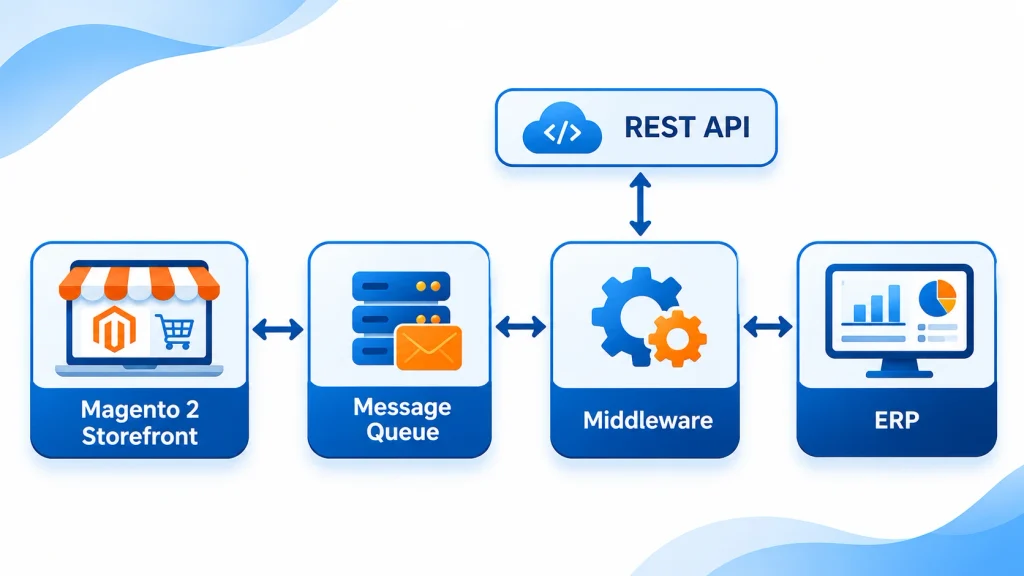
Quick answer: Magento 2 ERP integration replaces manual exports and re-entry with automated, monitored data flows between the store and the ERP.
Which Data Should Sync Between Magento 2 and an ERP?
Ownership and direction should be documented before development starts. The pattern below is common, though not a fixed rule.
- New orders: Created in Magento, fulfilled through the ERP. Direction: Magento to ERP. Cadence: event-driven, after payment.
- Shipments and tracking: Owned by the ERP or warehouse system. Direction: ERP to Magento. Cadence: event-driven.
- Stock quantities: Owned by the ERP or warehouse system. Direction: ERP to Magento. Cadence: near real time or every few minutes.
- Prices and tier discounts: Owned by the ERP or a product information system. Direction: ERP to Magento. Cadence: on change, plus scheduled reconciliation.
- Customer and company accounts: The ERP holds credit and terms, while Magento holds storefront login. Direction: both ways. Cadence: on change.
- Product content: Owned by a PIM or Magento. Direction: PIM to Magento. Cadence: scheduled or on change.
Quick answer: Orders flow out of Magento. Stock, prices, and shipment statuses flow in from the ERP. Customer data usually moves both ways under a shared ID.
Core Data Flows in Magento 2 ERP Integration
Four flows cover most projects.
Order Synchronization Between Magento 2 and the ERP
Orders move to the ERP after payment is authorized or captured. Each payload needs line items, taxes, discounts, shipping method, both addresses, and a unique order reference. The ERP then returns confirmed, picked, shipped, invoiced, or canceled statuses.
Shipment updates can be written back through the Magento REST API. Adobe Commerce provides a shipment-creation endpoint that accepts the shipped items, quantities, a notification flag, and tracking details such as carrier code, title, and tracking number. Middleware typically calls that endpoint when the ERP reports a shipment.
Field mapping deserves early attention. A starting point:
- Order increment ID maps to an external order or customer PO reference in the ERP and should stay the unique key.
- Item SKU maps to the ERP item number, so SKUs must match the item master.
- Tax and discount amounts map to order line tax and discount fields, with tax codes mapped explicitly.
- Shipping method maps to a carrier and service code through a translation list.
- Billing and shipping addresses map to bill-to and ship-to records, with formats normalized before sending.
Practical recommendation: Send orders through a queue rather than a synchronous call at checkout. If the ERP is slow or offline, queued orders wait and retry, and checkout stays fast.
Inventory Synchronization with Multi-Source Inventory
Inventory is the most time-sensitive flow. Multi-Source Inventory (MSI) lets Magento track quantities per source, such as individual warehouses, and calculate salable quantity per stock. The ERP or warehouse system typically pushes quantity changes to the source items endpoint of the REST API, sending the SKU, the source code, the quantity, and the stock status.
Reservations matter here. Magento records reservations when orders are placed and compensates them when shipments are created, so salable quantity reflects pending demand. The ERP should update source quantities after shipments in a way that does not double-count those reservations. Testing the behavior in staging is essential.
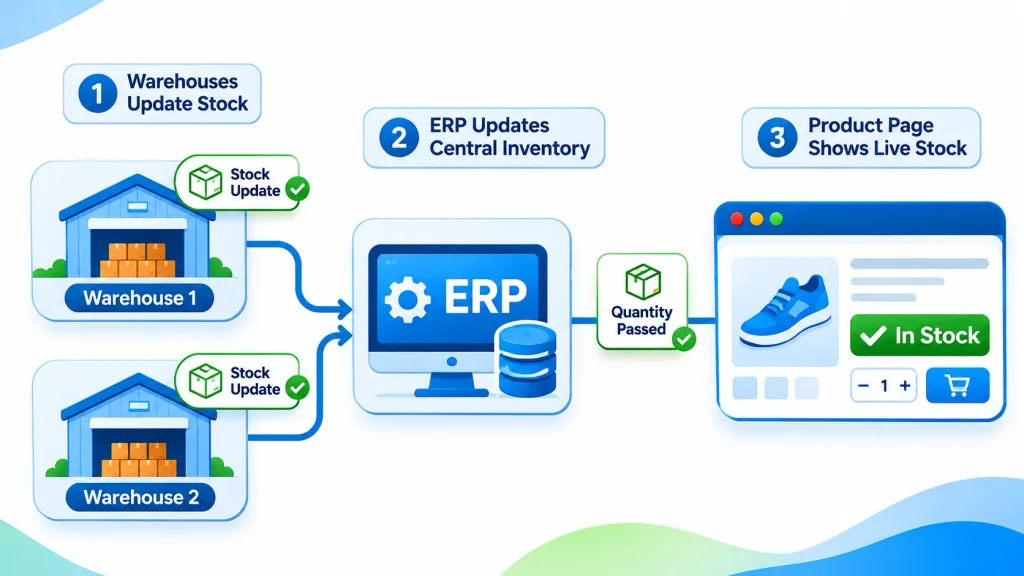
Quick answer: Push small, frequent quantity updates per source through the API. Avoid relying only on one large nightly import for fast-moving products.
Customer Data Synchronization
Customer records need a shared identifier, commonly an ERP customer ID stored in a Magento custom attribute. Sync typically covers company accounts, addresses, tax exemption status, payment terms, credit limits, and customer group assignment. B2B merchants gain the most, since negotiated pricing and credit rules often originate in the ERP. Adobe Commerce also offers B2B company features that can mirror ERP account structures.
Pricing, Catalog, and Product Data Synchronization
Prices and product master data often start in the ERP or a product information system. The Magento REST API includes a base price endpoint that accepts a price, a store scope, and a SKU, which suits scheduled or change-triggered price updates.
ERP product descriptions tend to be short and technical. Many teams add AI product data enrichment between the ERP and the storefront to draft readable descriptions, standardize attributes, and flag missing metadata. Human review should remain in the loop for accuracy. Clean markup based on Schema.org Product and Google’s Product structured data guidance helps search engines and AI assistants interpret each item.
Magento 2 ERP Integration Architecture: Point-to-Point, Middleware, or iPaaS
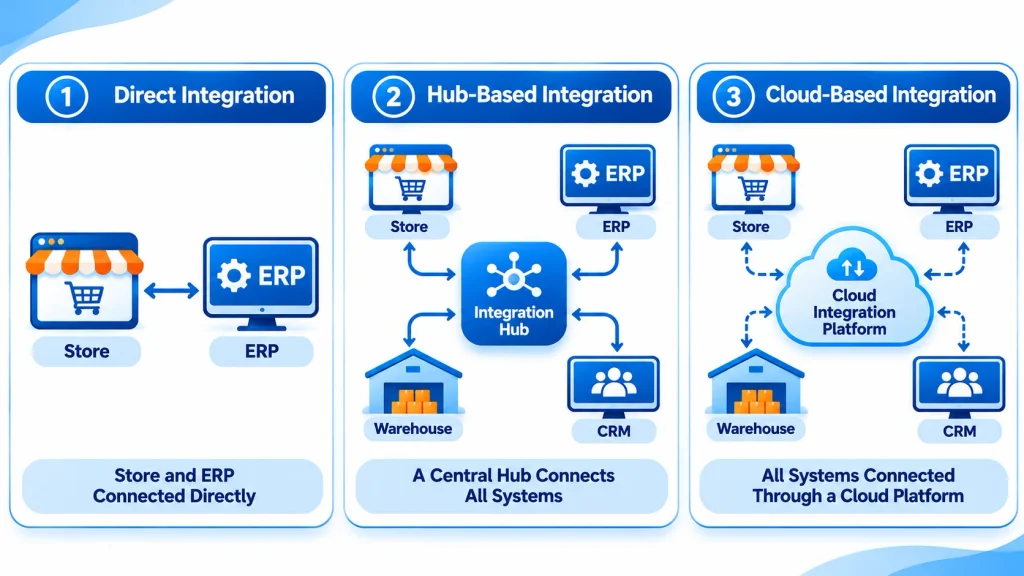
Three patterns dominate real projects.
Point-to-point connector. Best suited to one ERP and simple flows. Setup is fast and initial cost is low, but maintenance grows as more systems join the stack.
Middleware or service bus. Best suited to several systems, such as an ERP, warehouse system, CRM, and marketplaces. Routing, transformation, and error handling are centralized, at the cost of more infrastructure to run and monitor.
iPaaS platform. Best suited to teams wanting prebuilt mappings and visual workflows. Setup is shorter, though subscription cost and customization limits deserve review. Examples include Boomi, Celigo, and Workato.
The Enterprise Integration Patterns catalog remains a respected reference for message routing and transformation design. A common rule of thumb is that middleware or iPaaS becomes attractive once three or more systems exchange data, because direct connections multiply failure points. Teams offering magento enterprise development for large catalogs often prefer middleware for centralized monitoring.
Quick answer: Use a connector for simple setups, middleware for complex multi-system landscapes, and iPaaS when prebuilt mappings and speed matter most.
How Magento 2 Connects to an ERP: REST, GraphQL, Queues, and Events
Each interface has a different job.
- REST API: The main choice for backend integrations. Endpoints cover orders, shipments, products, prices, inventory sources, and customers. Asynchronous bulk endpoints also exist for large batches, and those requests are processed through the message queue.
- GraphQL: Designed mainly for storefront and headless experiences, such as catalog, cart, and customer queries. GraphQL does not replace REST for every administrative operation.
- Message queues: Magento supports queued processing through RabbitMQ (AMQP), with consumers that run through cron or the command line. Queues decouple checkout from slower downstream systems. The Adobe message queue documentation and the RabbitMQ project describe configuration in detail.
- Events: Adobe I/O Events for Adobe Commerce can publish events, such as order changes, to external applications, including those built with App Builder. Version and edition support should be confirmed in the Adobe Commerce Events documentation.
Quick answer: REST handles most ERP writes and reads, GraphQL serves storefront data, queues absorb load, and events push changes outward without constant polling.
Example Scenario: Two-Warehouse B2B Distributor
The following is an illustrative scenario, not a client case study.
A distributor sells industrial parts from two warehouses through Magento and manages finance in an ERP. A reasonable design could look like the following:
- A buyer places an order. Magento authorizes payment and queues the order message.
- Middleware validates the SKU list, converts tax and shipping codes, and creates the sales order in the ERP.
- The ERP allocates stock from the nearest warehouse and returns a confirmation reference stored on the Magento order.
- The warehouse ships, and the ERP sends a shipment event. Middleware creates the shipment in Magento with tracking details.
- Updated quantities for both warehouses are pushed to the matching Magento sources.
- A nightly reconciliation job compares ERP and Magento quantities and reports mismatches instead of silently overwriting them.
Step 6 is a design choice worth copying. Reconciliation should report differences first, so data issues are investigated rather than hidden.
Step-by-Step Plan for Magento 2 ERP Integration
- Map the data. List each entity, its owner system, direction, and frequency.
- Audit data quality. Clean duplicate SKUs, inconsistent units of measure, and incomplete addresses before syncing.
- Choose the architecture. Match the pattern to system count, volume, and budget.
- Define field mappings. Document tax codes, payment methods, carriers, and attribute correspondence.
- Build and test in staging. Use realistic volumes and edge cases such as partial shipments, returns, split payments, and cancellations.
- Set monitoring and alerts. Failed messages and sync delays should notify the team immediately.
- Launch in phases. Start with inventory and orders, then add customers and pricing.
Timelines vary widely with ERP complexity, data quality, number of connected systems, and customization, so any fixed duration should be treated with caution until scope is defined.
Technical Best Practices for Reliable Sync
- Use asynchronous queues so slow ERP responses do not block checkout.
- Design idempotent operations. An idempotent request can repeat without creating duplicate orders or double-deducting stock.
- Apply retry logic with backoff so temporary failures resolve automatically.
- Log every transaction with order IDs so troubleshooting takes minutes instead of hours.
- Batch and throttle large pushes and schedule heavy imports off-peak.
- Use token-based or OAuth authentication over HTTPS with restricted API roles.
Poorly written sync jobs can overload cron and the database. Sound Magento 2 performance optimization includes tuning indexers, running imports through queues, and caching aggressively. Adobe’s performance best practices apply directly to integration workloads. Effective ecommerce performance optimization also means measuring each new sync job’s effect on page speed before launch, using metrics such as those in Google’s Core Web Vitals guide and the Interaction to Next Paint documentation.
Quick answer: Queues, idempotency, retries, logging, throttling, and secure authentication are the core pillars of stable ERP sync.
Security and Data Governance for ERP Connections
ERP connections carry financial records, customer identities, and pricing agreements. The OWASP API Security Project documents common API weaknesses, including broken authorization and excessive data exposure. Integration accounts should hold only the permissions required, and credentials should rotate on a schedule.
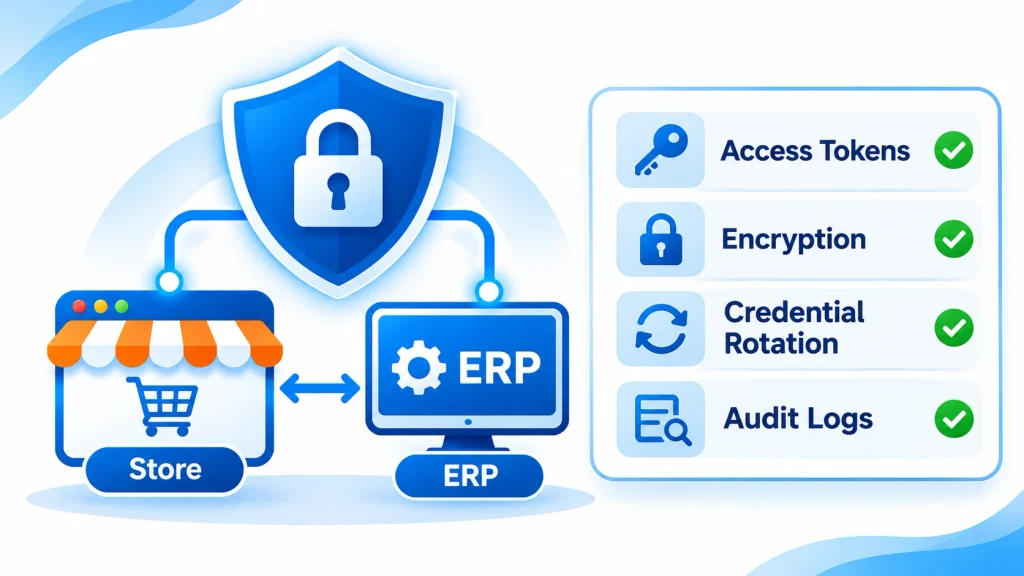
Personal data moving between systems should follow applicable privacy regulations. The NIST Cybersecurity Framework offers a practical structure for identifying, protecting, and monitoring sensitive data flows. Audit trails showing who changed a price or credit limit, and when, simplify compliance reviews.
Quick answer: Limit API permissions, encrypt traffic, rotate credentials, and keep audit logs for records moving between Magento and the ERP.
Measuring Sync Health After Launch
- Order sync latency: time from payment capture to ERP confirmation
- Inventory accuracy rate: share of SKUs where storefront and warehouse quantities match
- Failed message count: queue errors per day and time to resolve
- Oversell incidents: orders canceled because stock was unavailable
- Backlog depth: messages waiting in the queue during peak traffic
Weekly review exposes slow degradation before customers notice.
ERP Platform Notes: SAP, Dynamics 365, NetSuite, Oracle ERP, and Odoo
Each ERP exposes data differently, so connector effort varies. Exact options depend on product edition and version, so vendor documentation should be checked before scoping.
- SAP (such as S/4HANA or Business One): Commonly uses OData APIs, IDocs, and the Service Layer for Business One. Often paired with middleware because of complex data models.
- Microsoft Dynamics 365 (such as Business Central): Commonly uses OData-based APIs and data entities. A strong fit with Microsoft integration tooling.
- NetSuite: Commonly uses SuiteTalk REST and SOAP web services and RESTlets. Governance limits on API usage should be planned for.
- Oracle ERP (Oracle Fusion Cloud ERP): Commonly uses REST APIs and file-based import services. Bulk data often moves through scheduled import jobs.
- Odoo: Commonly uses external XML-RPC and JSON-RPC APIs. Flexible and customizable, so mapping discipline matters.
Quick answer: All five ERPs can connect to Magento 2 through APIs, connectors, or middleware. The best choice depends on volume, customization, and available skills.
Magento 2 ERP Integration on Adobe Commerce Cloud
The Magento 2 vs Adobe Commerce Cloud decision changes how integration is hosted and extended.
- Hosting: Open Source is provisioned and managed by the merchant or agency. Adobe Commerce Cloud runs on Adobe-managed cloud infrastructure.
- Queue broker: Open Source needs RabbitMQ installed and operated separately. On Cloud, RabbitMQ is available as a service within the platform.
- Environments: Open Source environments are configured manually. Cloud provides integration, staging, and production environments.
- B2B features: Not included in Open Source. Available with Adobe Commerce.
- Extensibility: Open Source relies on custom modules, with events available in supported versions. Cloud adds App Builder and I/O Events to custom modules.
Teams running Magento 2 Commerce Cloud environments can use Adobe’s App Builder and I/O Events model to run ERP logic outside the core codebase, which keeps upgrades cleaner. Buyers comparing providers should confirm real experience with Cloud deployment pipelines and not only storefront theming.
Quick answer: Adobe Commerce Cloud reduces infrastructure work and adds B2B and extensibility options. Open Source offers flexibility with more self-managed operations.
Headless Storefronts and ERP Integration
In a headless vs traditional commerce comparison, the headless model separates the frontend from Magento, using PWA Studio, Next.js, or similar frameworks. A traditional storefront reads ERP-driven data through Magento rendering, relies on full-page and block caching, and costs less to develop. A headless storefront reads the same data through APIs or GraphQL, needs API-level caching and cache invalidation, and demands more development effort, but offers stronger multi-channel reach.
Because a headless frontend consumes APIs, stock and price lookups must be fast and cacheable. A sound headless ecommerce architecture places an API gateway or GraphQL layer between the storefront, Magento, and the ERP, so shoppers never reach the ERP directly. The Adobe Commerce GraphQL reference documents common storefront queries. Projects labeled headless ecommerce development should reserve time for caching strategy and webhook-driven invalidation. Related options are covered on the headless commerce service page.
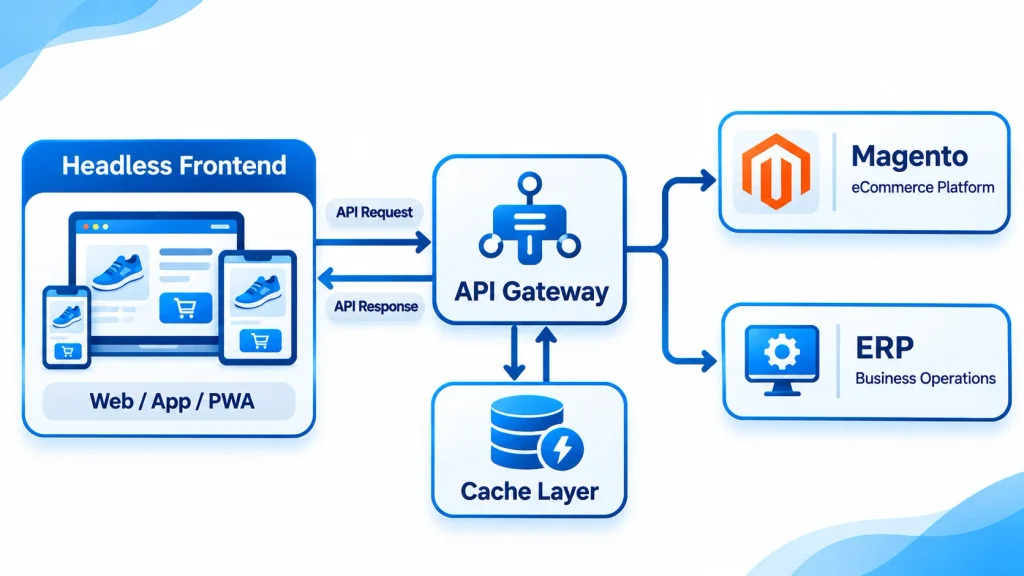
Quick answer: Headless storefronts need cached, API-first access to ERP-driven stock and price data, usually through a gateway or GraphQL layer.
Common Magento 2 ERP Integration Mistakes
- Unclear data ownership. Two systems editing one field create endless conflicts.
- Skipping edge-case testing. Returns, backorders, and partial refunds break naive mappings.
- Relying only on nightly batches. Stock accuracy suffers during busy periods.
- Ignoring error visibility. Silent failures can run for days.
- Overloading cron. Heavy imports at peak hours slow the site.
- Overlooking currency and tax rules. Mismatched settings cause invoice errors.
- Neglecting catalog quality. Thin ERP descriptions weaken search visibility.
Choosing the Right Platform and Partner in 2026
Selecting the right ecommerce platform 2026 involves more than feature lists. Integration depth, ERP compatibility, hosting model, total cost of ownership, and available talent all carry weight. Magento and Adobe Commerce suit complex catalogs, B2B workflows, and deep customization, while hosted platforms such as Shopify Plus or BigCommerce may fit simpler operations.
A dependable partner for Magento ecommerce development should show documented integration methodology, references, and clear post-launch support terms. Technical teams can evaluate scope with the Adobe Commerce REST API documentation before development begins. Performance-focused work is described on the Magento 2 performance optimization page.
Quick answer: Choose based on ERP compatibility, integration experience, hosting model, and long-term maintenance capacity.
Frequently Asked Questions About Magento 2 ERP Integration
What is Magento 2 ERP integration?
Magento 2 ERP integration is the automated exchange of orders, inventory, prices, and customer data between a Magento 2 store and an ERP, removing manual data entry.
How does Magento 2 sync orders with an ERP?
Magento sends each paid order to the ERP, often through a queue or middleware. The ERP returns confirmations, statuses, and tracking numbers, which Magento records on the order.
How long does Magento 2 ERP integration take?
No universal timeline exists. Duration depends on ERP complexity, data quality, number of connected systems, and customization. A scoped discovery phase produces a reliable estimate.
Which ERP systems work with Magento 2?
SAP, Microsoft Dynamics 365, NetSuite, Oracle ERP, Odoo, Acumatica, Sage, and others connect through APIs, connectors, or middleware.
Should Magento 2 inventory sync in real time?
Near-real-time sync suits fast-moving products. Batches every few minutes may be enough for slow-moving catalogs.
Can ERP integration prevent overselling?
Yes, when inventory updates are frequent, reservations are reconciled correctly, and order feedback is reliable.
Does ERP integration slow down Magento?
A poorly built integration can. Queue-based processing, batching, and off-peak scheduling protect storefront speed.
Is middleware required for Magento 2 ERP integration?
No. Middleware becomes valuable when three or more systems exchange data or transformation rules grow complex.
Should Magento 2 ERP integration use REST or GraphQL?
REST is the usual choice for backend ERP operations. GraphQL is mainly for storefront and headless data queries.
How does ERP integration work with a headless storefront?
The frontend reads data through APIs or GraphQL while the ERP syncs with Magento in the background. A caching layer keeps stock and price lookups fast.
What data should the ERP own?
Finance records, stock quantities, and fulfillment status usually belong to the ERP. Marketing content, reviews, and storefront behavior belong to Magento.
Is Adobe Commerce better than Magento Open Source for ERP projects?
Adobe Commerce adds B2B features, Cloud infrastructure, and extensibility tools suited to enterprise needs. Open Source can still work well with sound engineering.
Conclusion
Magento 2 ERP integration succeeds when data ownership is clear, flows are asynchronous and monitored, and the architecture matches business scale. Accurate stock, faster order processing, and consistent customer records improve shopper experience and reduce operational workload. Starting with a data map, testing edge cases, and launching in phases keeps risk low. Clear question-and-answer sections and trustworthy references also help search engines and AI assistants understand and cite the page. Google’s guidance on helpful, people-first content and the SEO Starter Guide are useful companions.