

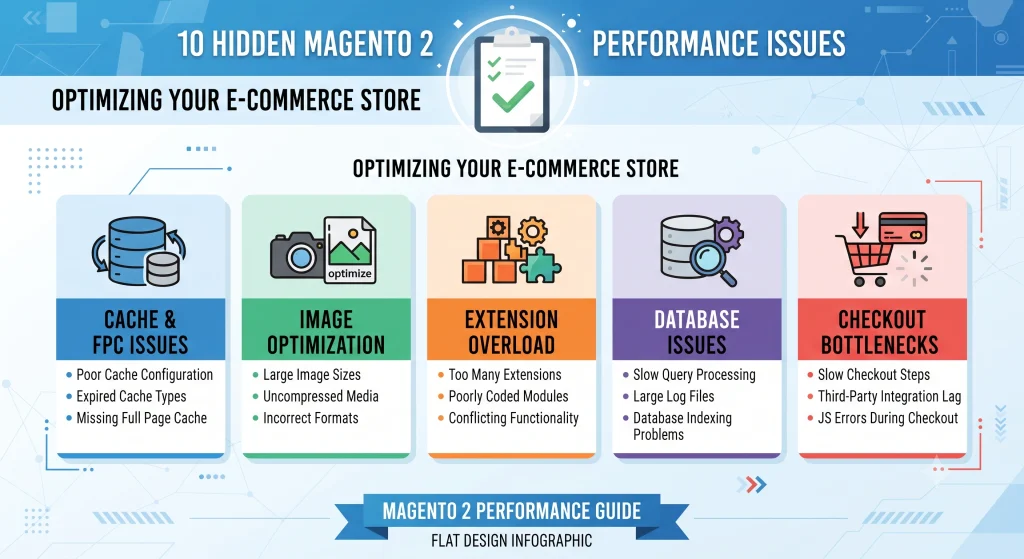
Slow storefronts quietly drain revenue long before a crash or an outage ever happens. Magento 2 performance optimization is often treated as a one-time technical checklist, yet the platform’s flexibility hides several issues that surface only under real traffic, real catalog size, and real checkout volume. A store can pass every synthetic speed test and still lose orders because of problems that never show up in a basic audit.
The sections below cover ten of the most overlooked performance issues on Magento 2 storefronts, why each one matters for conversion and search visibility, and practical fixes that development teams can apply without a full replatform.
Why Magento 2 Performance Optimization Matters for Revenue
Page speed is a ranking factor and a conversion factor at the same time. Studies from Google and multiple retail benchmarking firms consistently show that each additional second of load time reduces conversion rates and increases bounce, a pattern documented in Google’s page experience guidelines and reinforced by broader research on web performance benchmarks. On a platform as feature rich as Magento 2, slowdowns rarely come from one obvious cause they accumulate from indexing delays, bloated extensions, unoptimized media, and configuration defaults left untouched since installation.
Below is the breakdown of the ten issues that most commonly cost sales, along with the fixes that resolve them.
1. Full Page Cache Left Partially Configured
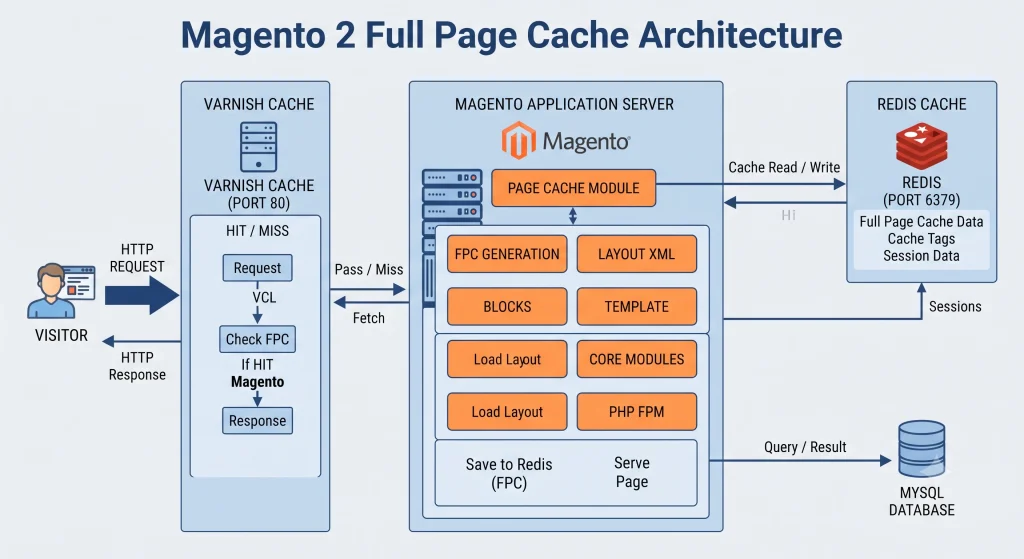
Magento ships with Full Page Cache (FPC), but many installations run it with default settings or skip Varnish entirely, relying instead on the built-in file cache. That default is noticeably slower under concurrent traffic.
Why It Happens
Development teams frequently leave Varnish configuration for a later sprint that never arrives, so the storefront runs on the slower built-in cache indefinitely.
How to Fix It
- Varnish should sit in front of the storefront for HTML caching, following setup patterns from Magento’s cache configuration documentation.
- Cache warming should run after every deployment and reindex, a workflow detailed in the cache warming and deployment guide.
- Cache tags need auditing so product and category pages invalidate correctly instead of purging the entire cache on every save.
2. Uncompressed and Unoptimized Product Images
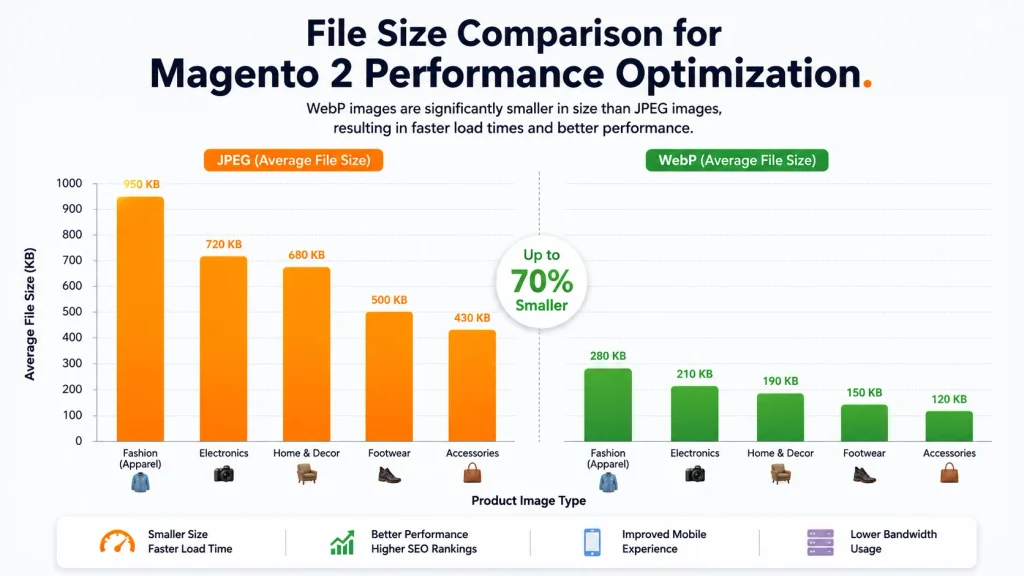
Catalog and gallery images are frequently uploaded at full camera resolution and served without compression, next-gen formats, or lazy loading. A single product listing page with dozens of thumbnails can add several megabytes of unnecessary payload.
Why It Happens
Merchandising teams often upload supplier-provided images directly, without a resizing or compression step built into the workflow.
How to Fix It
- WebP or AVIF formats reduce file size significantly versus JPEG, as outlined in Cloudflare’s CDN and image delivery overview.
- Lazy loading below the fold prevents unnecessary image requests on first paint, covered further in the lazy loading implementation guide.
- A CDN with automatic image resizing avoids serving desktop-sized images to mobile devices.
3. Bloated or Conflicting Third-Party Extensions
Extension marketplaces make it easy to add features, but each module adds JavaScript, CSS, database queries, and observer events. Conflicting extensions frequently duplicate functionality or trigger redundant indexing.
Why It Happens
Extensions accumulate over years of feature requests, with few stores ever removing modules once a project or campaign that required them has ended.
How to Fix It
- A quarterly extension audit should flag unused or duplicate modules, following a checklist similar to the extension audit template.
- Code profiling tools such as Blackfire reveal which modules add the heaviest server-side load.
- Deferred or asynchronous loading should be applied to non-critical third-party scripts.
4. Inefficient Database Indexing Schedules
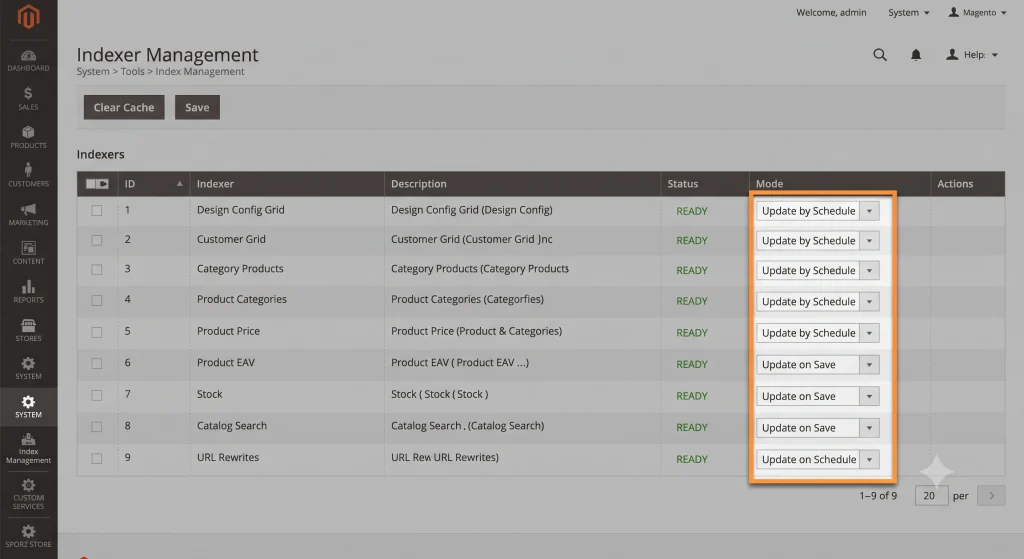
Magento relies on indexers to keep catalog, pricing, and inventory data query-ready. Many stores leave indexers set to “Update on Save,” which recalculates data on every single change and locks resources during peak hours.
Why It Happens
“Update on Save” is the simplest setting to leave active during development, and it often stays untouched after the store moves to production.
How to Fix It
- Indexers should run on a schedule using cron rather than in real time for high-traffic catalogs, a topic explored in depth in the database indexing strategies guide.
- Composite indexes on frequently filtered columns speed up custom queries, per general guidance in the MySQL indexing documentation.
- MySQL query logs should be reviewed monthly to catch slow queries before they compound.
5. Unoptimized JavaScript and CSS Bundling
Legacy bundling in Magento 2 can produce oversized JavaScript files that block rendering. Even with newer minification tools enabled, unused Knockout.js templates and requireJS modules often ship on pages that never use them.
Why It Happens
Default RequireJS configuration loads a broad set of modules across every page type rather than scoping modules to the pages that actually use them.
How to Fix It
- Critical CSS should be inlined for above-the-fold content.
- RequireJS configuration should be trimmed to exclude unused modules per page type, following the approach in the JavaScript bundling and RequireJS optimization guide.
- Deferred JavaScript execution keeps checkout and product pages interactive sooner.
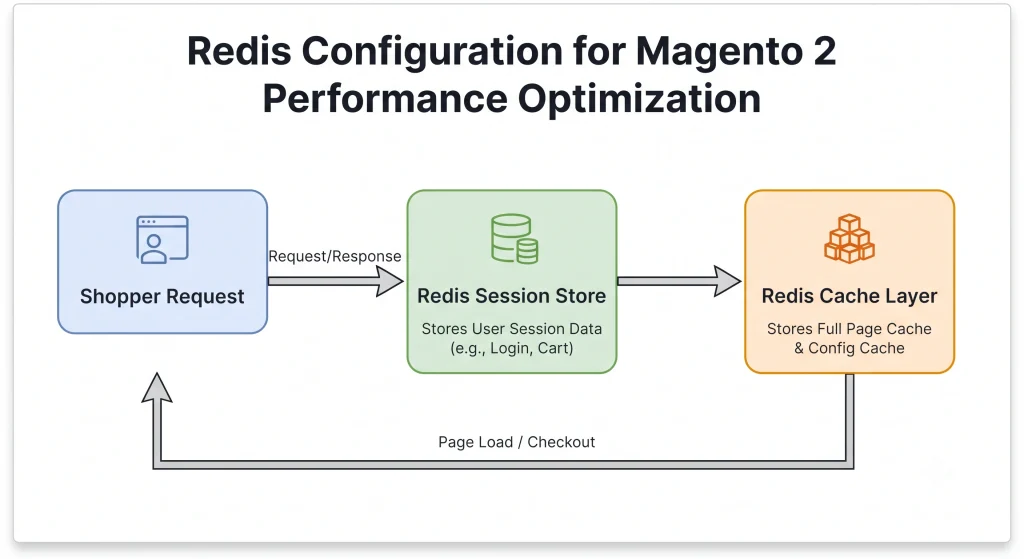
6. Magento 2 Performance Optimization: Redis and Session Storage Misconfiguration
Sessions and cache stored in the database rather than Redis create write contention as concurrent shoppers increase. This becomes especially visible during flash sales or seasonal spikes.
Why It Happens
Database-backed sessions work fine on small catalogs during early testing, so the switch to Redis is frequently deferred until traffic exposes the bottleneck.
How to Fix It
- Redis should handle both cache and session storage in production environments, per the official Redis documentation.
- Persistence settings need tuning so Redis does not become a memory bottleneck.
- Session lifetime settings should match actual shopping behavior instead of default values.
7. Third-Party Tag Managers and Tracking Scripts
Marketing, analytics, and personalization scripts loaded synchronously in the page head are a frequent, invisible drag on load time. Tag manager containers can balloon with unused tags left active long after a campaign ends.
Why It Happens
Marketing and engineering teams rarely coordinate on script cleanup, so old tracking pixels stay live well past the campaigns that required them.
How to Fix It
- A tag audit every quarter removes stale tracking scripts.
- Google Tag Manager containers should load asynchronously, never render-blocking.
- Server-side tagging reduces the number of third-party requests firing from the browser.
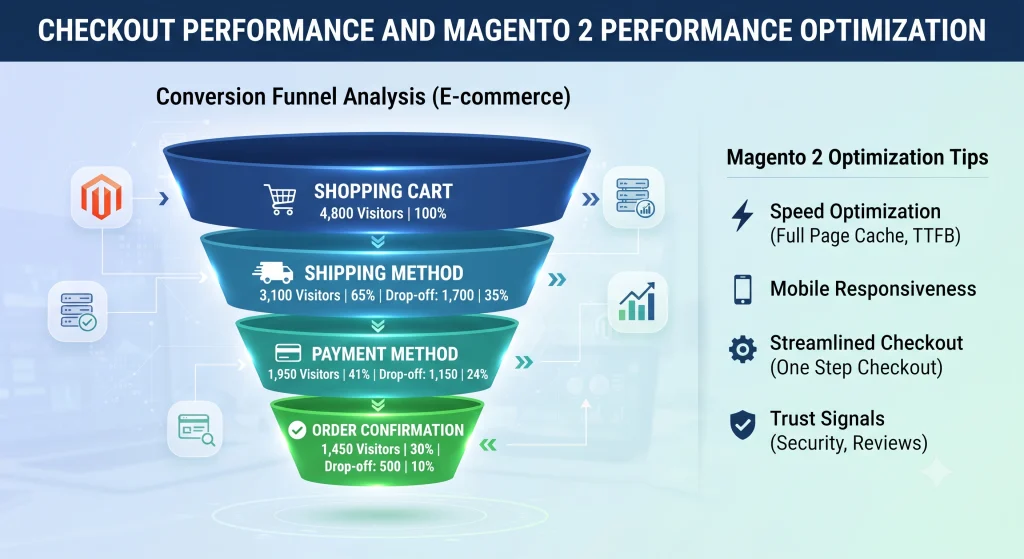
8. Magento 2 Performance Optimization: Checkout Page Overload
Checkout is often the least-tested page for performance because most audits focus on the homepage or category pages. Extra payment methods, shipping calculators, and address validation widgets can each add API calls that stack up during a single checkout flow.
Why It Happens
Payment and shipping integrations are typically added incrementally over time, with no single point where their combined performance impact gets measured together.
How to Fix It
- Payment and shipping integrations should be profiled individually for response time, using methods described in the checkout page speed optimization guide.
- Guest checkout flows need testing separately from logged-in flows, since saved data changes query patterns.
- Field-level validation should happen client-side before hitting server endpoints.
9. Missing or Misconfigured CDN Rules
A CDN without properly configured cache rules for static assets, or one that excludes dynamic storefront content from edge caching, leaves origin servers handling more requests than necessary.
Why It Happens
Default CDN configurations often cache only image files, leaving CSS, JavaScript, and font assets to hit the origin server repeatedly.
How to Fix It
- Static assets such as CSS, JavaScript, and fonts should carry long cache lifetimes with versioned filenames, following the setup in the CDN configuration for e-commerce guide.
- Edge-side includes (ESI) allow dynamic blocks like cart counts to stay fresh without breaking full-page caching.
- Geographic distribution of CDN nodes matters for stores with international shoppers.
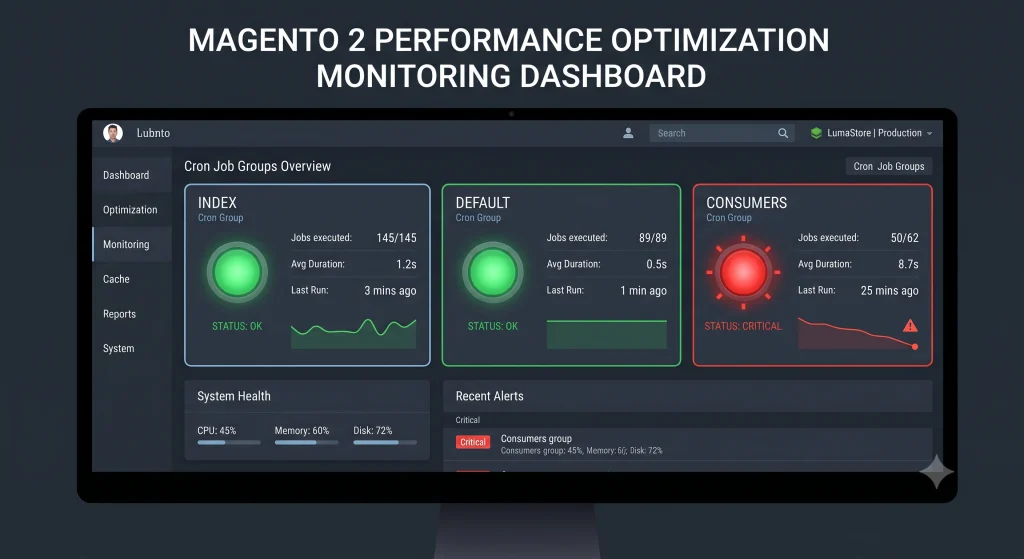
10. Magento 2 Performance Optimization: Unmonitored Cron Job Failures
Magento depends heavily on cron for indexing, email queues, and scheduled price updates. A silently failing cron job does not crash the store, but it does mean stale prices, delayed order confirmations, and outdated search indexes all of which quietly erode trust and sales.
Why It Happens
Cron failures rarely produce a visible error on the storefront itself, so they go unnoticed until a merchandising or customer service team flags a data mismatch.
How to Fix It
- Cron logs should feed into an external monitoring or alerting tool, as described in the cron job monitoring guide.
- Multiple cron groups (index, default, consumers) need separate health checks.
- Message queue consumers require the same monitoring as cron itself, since Magento 2 relies on both.
Magento 2 Performance Optimization Across Different Commerce Platforms
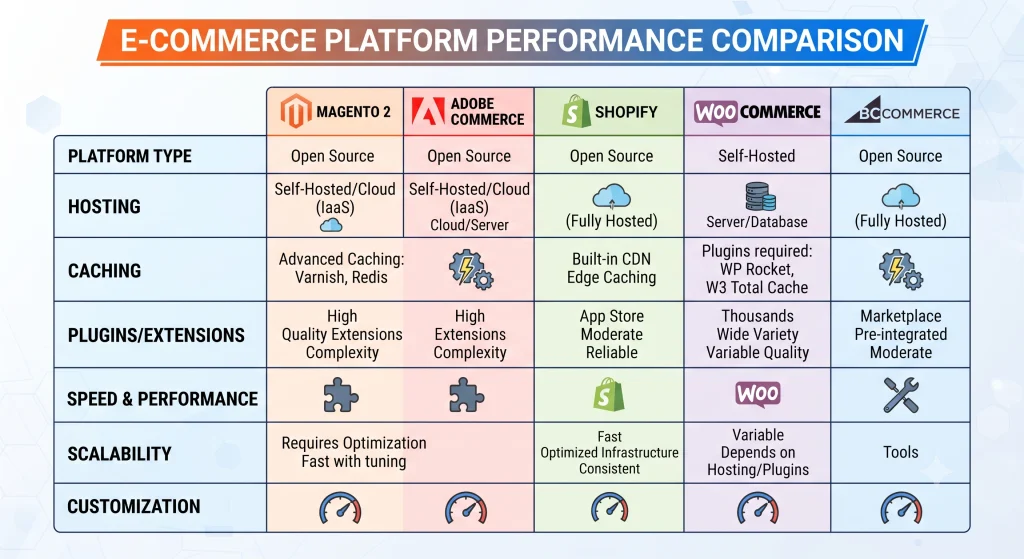
Performance challenges are not unique to Magento. Shopify and Shopify Plus manage much of the infrastructure layer automatically, trading some flexibility for built-in speed. WooCommerce, running on WordPress, depends heavily on hosting quality and plugin discipline, since a single poorly coded plugin can slow an entire storefront. BigCommerce sits closer to Shopify with a managed hosting model, while Adobe Commerce (the enterprise tier built on the same core as Magento 2) adds enterprise-grade caching and cloud infrastructure but still requires the same indexing and cache discipline described above.
Headless commerce setups where a Magento 2 or Adobe Commerce backend serves data to a decoupled frontend built in React, Vue, or Next.js remove much of the theme-layer bloat but shift the performance conversation toward API response times, GraphQL query efficiency, and edge caching at the frontend layer. Teams building headless storefronts still need the backend indexing, Redis, and database tuning described earlier, since a fast frontend cannot compensate for a slow API. The Adobe Commerce web API getting-started documentation covers the API layer relevant to headless implementations.
For teams comparing platforms before building or migrating a commerce website, the deciding factor is rarely which platform is fastest in isolation it is which platform matches the catalog size, customization needs, and internal engineering capacity available to maintain performance over time.
Frequently Asked Questions About Magento 2 Performance Optimization
What is the fastest way to start Magento 2 performance optimization?
A full-page cache audit paired with Redis configuration typically delivers the fastest measurable improvement, since both affect every page load across the storefront.
Does upgrading hosting alone fix Magento 2 performance issues?
Better hosting reduces some bottlenecks but does not resolve configuration issues like unscheduled indexing, unoptimized images, or bloated extensions — those require code-level and configuration-level fixes regardless of server power.
How often should a Magento 2 store be audited for performance?
Quarterly audits catch extension bloat, stale tracking scripts, and cron failures before they compound; a deeper technical audit is recommended after any major extension installation or catalog expansion.
Can headless Magento 2 storefronts skip backend performance work?
No. A decoupled frontend can load quickly, but slow API responses from an unoptimized backend still delay data on the page, so indexing, caching, and database tuning remain necessary.
Is Magento 2 performance optimization different for B2B stores?
B2B catalogs often carry larger product counts, custom pricing tiers, and complex quote workflows, which makes indexing schedules and database query optimization even more critical than on standard B2C storefronts.
Conclusion
Most Magento 2 slowdowns are not caused by a single dramatic failure but by a series of small, unmonitored defaults left unchanged since launch. Addressing full page cache configuration, image delivery, indexing schedules, checkout performance, and cron reliability covers the majority of hidden issues that quietly cost sales. Regular audits, real monitoring, and platform-appropriate benchmarking keep a storefront fast as catalog size and traffic grow the core outcome that consistent Magento 2 performance optimization is meant to deliver.