

Black Friday exposes every weakness in an online store. A black friday technical readiness checklist turns that risk into a structured plan covering speed, infrastructure, integrations, security, and monitoring before the first discount goes live. Black Friday 2026 falls on November 27, so the window for testing, fixes, and a code freeze is shrinking fast.
Traffic can multiply within minutes during peak sales. A slow product page, a failing payment call, or an overloaded database can erase months of marketing effort in a single afternoon. The sections below break readiness into clear, testable stages for Magento, Adobe Commerce, Shopify, WooCommerce, BigCommerce, and headless builds.
Quick Answer: What Does Black Friday Technical Readiness Mean?
Black Friday technical readiness is the process of verifying that an eCommerce site can handle peak traffic without slowdowns, errors, or security gaps. It combines load testing, performance tuning, API and payment validation, infrastructure scaling, security review, and live monitoring with a rollback plan.
A store counts as ready when every critical path (browse, search, add to cart, checkout, payment, confirmation email) has been tested at several times normal traffic and meets defined thresholds.
Why a Black Friday Technical Readiness Checklist Matters
Shoppers on sale days arrive with high intent and low patience. As a result, a slow page sends buyers to a competitor one tab away. Moreover, paid campaigns amplify the damage, because ad spend continues while a broken checkout converts nothing.
A written checklist also removes guesswork. With one shared document, developers, merchandisers, marketers, and hosting teams can work from clear owners and deadlines instead of memory during a high-pressure week.
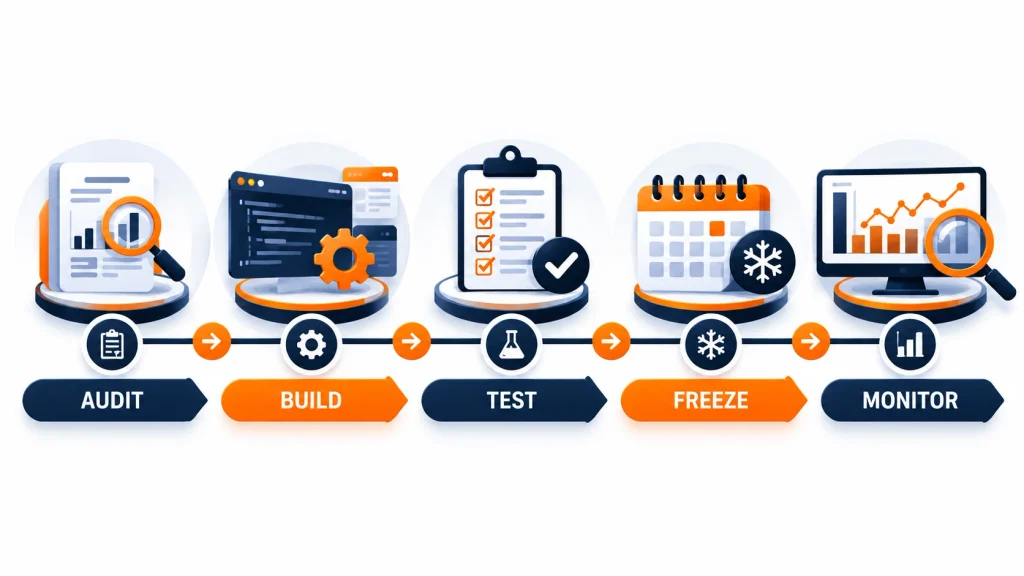
Black Friday Readiness Timeline: What to Do and When
A staged timeline prevents last-minute changes from creating new problems.
Eight to Six Weeks Before: Audit and Plan
- Review last year’s traffic peaks, error logs, and abandoned-cart patterns.
- Set targets for page speed, uptime, and checkout completion.
- Book load testing slots and confirm hosting capacity with the provider.
Five to Three Weeks Before: Build and Optimize
- Complete performance work on templates, images, scripts, and database queries.
- Finish campaign landing pages, promo logic, and pricing rules.
- Validate every third-party integration in a staging environment.
Two Weeks Before: Test and Freeze
- Run full load tests and fix bottlenecks.
- Complete security scans and payment testing.
- Announce a code freeze. Only critical fixes should pass after that point.
Event Week: Monitor and Respond
- Watch dashboards continuously.
- Keep a named on-call engineer for each system.
- Hold a rollback plan ready for every change made during the freeze.
Compressed Plan for Stores Starting Late
Stores beginning preparation with only four weeks left should shift priorities. During week one, conduct a quick audit of the checkout path, test payment functionality, and remove unused scripts. The second week focuses on caching, image compression, and optimizing the slowest database queries. In week three, perform load testing, apply security patches, and verify backup restores. Finally, reserve the fourth week for the code freeze, monitoring setup, and team briefings.
Site Speed and Performance: The First Priority
Speed influences both conversion and search visibility. Google’s Core Web Vitals set the benchmark: Largest Contentful Paint (LCP) at 2.5 seconds or less, Interaction to Next Paint (INP) at 200 milliseconds or less, and Cumulative Layout Shift (CLS) at 0.1 or less.
A solid approach to ecommerce performance optimization starts with measurement on real templates (home, category, product, cart, and checkout), not only the homepage. Lighthouse offers a free way to benchmark each template.
Front-End Performance Checks
- Compress images and convert them to WebP or AVIF, with explicit width and height attributes to prevent layout shift.
- Defer or remove non-essential scripts, including unused tracking tags and widgets.
- Inline critical CSS and lazy-load below-the-fold media.
- Preload the hero image and key fonts.
Back-End Performance Checks
- Enable full-page caching and object caching.
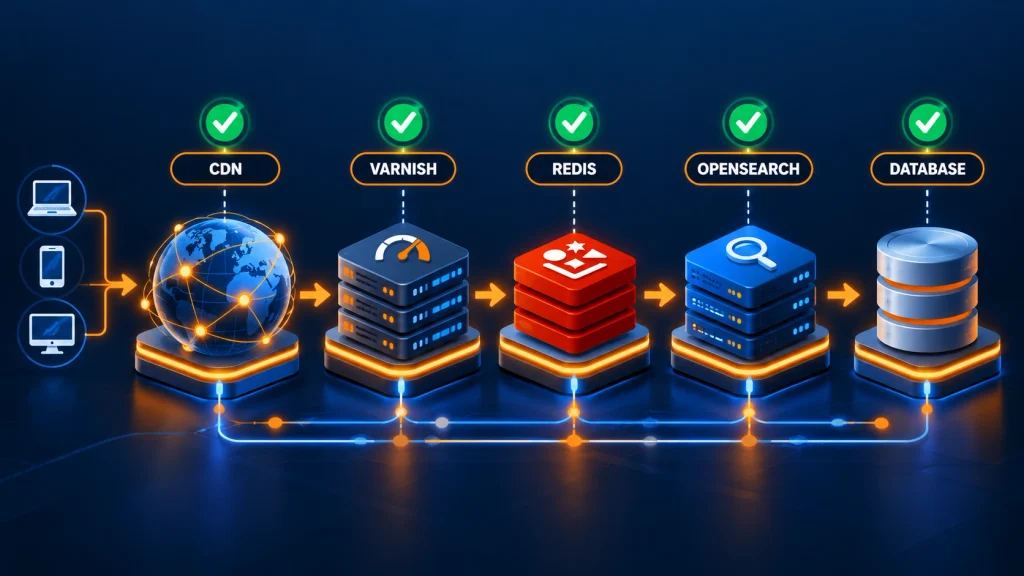
- Use a content delivery network (CDN) for static assets and edge caching.
- Review slow database queries and add missing indexes.
- Move heavy tasks, such as inventory syncs and email sends, to background queues.
Magento 2 Performance Optimization Essentials
Stores on Magento Open Source or Adobe Commerce benefit from a dedicated pass on Magento 2 performance optimization:
- Run production mode with static content deployed and compiled code generated.
- Configure Varnish for full-page caching and Redis for sessions and cache.
- Use OpenSearch (or Elasticsearch, depending on version) with tuned indexing.
- Switch indexers to “Update by Schedule” and verify cron health.
- Audit third-party extensions, since a single poorly built module can slow every request.
Teams without in-house capacity often engage specialists in Magento ecommerce development and Magento enterprise development to profile code paths, remove extension conflicts, and prepare the architecture for peak load.
Infrastructure and Hosting Readiness
Infrastructure decides whether a traffic spike becomes a record sales day or an outage.
Load Testing
Load testing simulates realistic shopper behavior at multiples of expected peak traffic. For accurate results, tests should include browsing, search, cart updates, coupon use, and full checkout, not only homepage hits. Open-source tools such as k6 support scripted scenarios and clear pass/fail thresholds.
Key questions to answer: At what request volume does response time degrade? Which component fails first? How quickly does the system recover once traffic drops?
Auto-Scaling and Capacity
- Confirm that servers, containers, or cloud resources scale automatically, or pre-scale ahead of announced campaign start times.
- Verify database connection limits and read-replica configuration.
- Ask the hosting provider about traffic-spike policies and escalation contacts.
Adobe Commerce Cloud and Managed Environments
Merchants using Magento 2 Commerce Cloud (Adobe Commerce on cloud infrastructure) should review environment sizing, Fastly CDN configuration, and deployment pipelines well before the freeze. Scheduled deployments, cron timing, and indexing windows deserve special attention, because a heavy reindex during a flash sale can compete with live traffic.
API Integration and Third-Party Service Checks
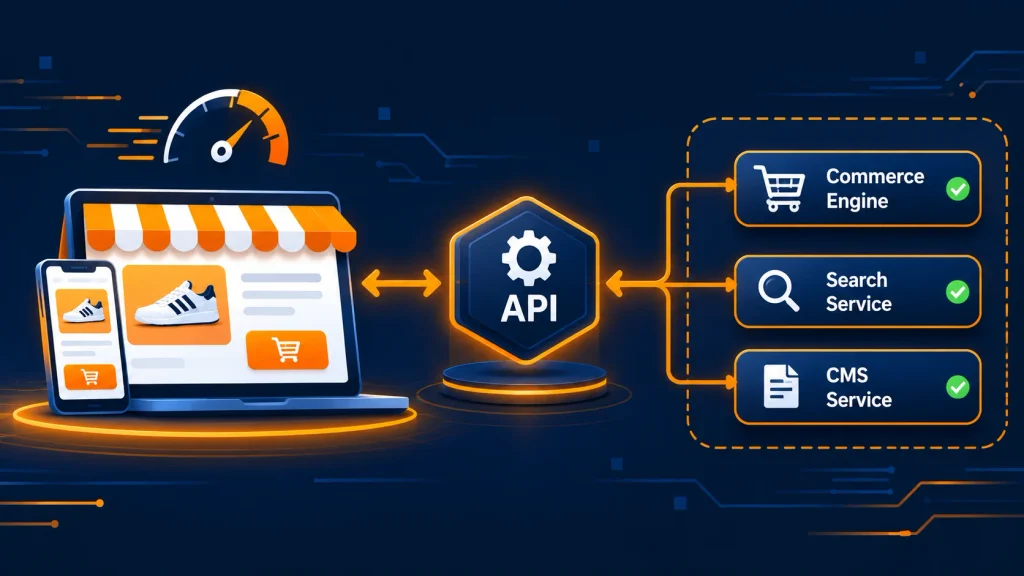
Modern stores depend on a chain of external systems: payment gateways, tax engines, shipping carriers, ERP, warehouse management, CRM, and email platforms. A failure in any link can stall orders.
Reliable ecommerce API integration services focus on resilience, not only connectivity. Recommended checks:
- Timeouts and retries: Set sensible timeouts and exponential backoff so slow services do not freeze checkout.
- Rate limits: Confirm the limits of each external API and request temporary increases where needed.
- Fallback behavior: Define what happens if a tax or shipping call fails (cached rates, a backup carrier, or a graceful error message).
- Webhook reliability: Test retry handling, duplicate event protection, and signature validation.
- Inventory sync accuracy: Overselling during a flash sale creates cancellations and support tickets, so real-time or near-real-time stock updates matter.
A well-designed ecommerce backend also isolates critical flows (cart, checkout, payment) from non-critical ones (recommendations, reviews, analytics). A failing secondary service then cannot block purchases.

Platform-Specific Black Friday Checks
Each platform has different strengths and risks. The checks below cover the most common setups.
Magento and Adobe Commerce
- Confirm the latest security patches are installed, using the Adobe Commerce developer documentation as the reference.
- Test checkout with every enabled payment and shipping method.
- Validate catalog price rules and cart price rules for stacking conflicts.
- Review message queue consumers and cron jobs.
Businesses planning upgrades or custom features before peak season can rely on Adobe Commerce development services for architecture reviews, module audits, and release management under tight deadlines.
Shopify and Shopify Plus
- Audit installed apps and remove any that inject heavy scripts.
- Test discount code logic, automatic discounts, and stacking behavior.
- Review theme performance using the guidance in Shopify’s performance best practices.
- Confirm checkout customizations and Shopify Functions behave correctly under load.
WooCommerce
- Use quality managed hosting with object caching.
- Disable or replace plugins that run expensive queries.
- Clean the database of expired transients, old sessions, and stale post revisions.
- Test payment gateways and stock handling with concurrent orders, following the WooCommerce developer resources.
BigCommerce
- Review theme scripts and Stencil performance.
- Verify API usage stays within rate limits listed in the BigCommerce developer documentation.
- Test promotions, shipping rules, and multi-currency settings.
Headless Commerce Builds
A decoupled storefront separates the front end from the commerce engine. The approach offers flexibility and speed but adds more moving parts. Skilled headless ecommerce development teams typically verify:
- Edge caching and incremental static regeneration rules.
- API gateway capacity and GraphQL or REST query efficiency.
- Graceful degradation if the commerce backend responds slowly.
- Consistent session and cart handling across front-end and back-end services.
Checkout, Payment, and Conversion Testing
Checkout deserves the most rigorous testing, since every failure there is a lost sale.
- Test guest checkout, account checkout, and express payment options on desktop and mobile.
- Place test orders with every payment method, including wallets and buy-now-pay-later options.
- Confirm promo codes, gift cards, and loyalty points calculate correctly.
- Verify order confirmation emails, invoices, and tracking messages send promptly.
- Check address validation, tax calculation, and shipping estimates across regions.
- Review fraud-screening rules so legitimate high-volume orders are not blocked.
Error messages should be clear and specific. A vague failure notice sends shoppers away, whereas a helpful one keeps the sale alive.
Security and Compliance Checklist
Peak season attracts bots, card testers, and attackers. Security work must finish before the code freeze.
- Patching: Update the platform core, extensions, plugins, and server software.
- Vulnerability scanning: Review the OWASP Top 10 risks, including injection, broken access control, and misconfiguration.
- Bot and DDoS protection: Configure a web application firewall, rate limiting, and CAPTCHA on sensitive forms. Cloudflare’s guide to DDoS attacks explains common attack patterns.
- Payment security: Confirm PCI DSS responsibilities, use tokenized payments, and monitor scripts running on checkout pages.
- Access control: Enforce multi-factor authentication for admin users and remove unused accounts.
- Backups: Run a full backup, then confirm a restore actually works.
Search Visibility and Structured Data Readiness
Organic traffic still matters during sales, and technical details determine whether campaign pages can be discovered and understood.
- Keep sale landing pages crawlable and indexable and include them in the XML sitemap.
- Use stable URLs for annual events so authority accumulates year after year.
- Add accurate Product structured data (price, availability, ratings) that matches visible page content. The Schema.org Product vocabulary lists supported properties.
- Confirm canonical tags, avoid duplicate promo pages, and keep out-of-stock pages informative.
- Review Google Search Console for coverage errors, Core Web Vitals reports, and sudden crawl issues before and during the sale.
In addition, clear page headings, concise answers near the top of key pages, and consistent product data help search engines and AI-driven assistants interpret and summarize store content accurately. Google’s guidance on helpful, people-first content applies equally to sale pages.
Monitoring, Alerts, and Incident Response
Monitoring turns problems into short events instead of long outages.
- Uptime checks: Monitor the homepage, category, product, cart, and checkout from multiple regions.
- Real-user monitoring: Track actual LCP, INP, and CLS from live visitors.
- Error tracking: Alert on spikes in 5xx errors, failed payments, and API timeouts.
- Business metrics: Watch conversion rate, orders per minute, and cart abandonment in real time.
- War room plan: Assign owners, a communication channel, escalation paths, and a decision-maker for rollbacks.
A status page and pre-written customer messages reduce confusion if an issue occurs.
Black Friday Technical Readiness Checklist: Final Go-Live Review
A compact final review keeps the last 48 hours calm.
- Page speed targets met on all key templates.
- Load test passed at planned peak multiples.
- Payment, tax, shipping, and inventory integrations verified.
- Security patches applied and scans cleared.
- Backups completed and restore tested.
- Promotions and pricing rules double-checked.
- Monitoring dashboards and alerts live.
- On-call roster and rollback plan confirmed.
- Customer support briefed on known issues and escalation paths.

Common Black Friday Technical Mistakes to Avoid
- Launching major features during the final week.
- Testing only the homepage rather than full purchase journeys.
- Installing extra marketing scripts that slow the storefront.
- Ignoring mobile performance, where most sale traffic arrives.
- Skipping rollback planning.
- Treating hosting capacity as someone else’s responsibility.
Frequently Asked Questions About the Black Friday Technical Readiness Checklist
When should Black Friday technical preparation start?
Preparation should begin eight to ten weeks before Black Friday. That window allows time for audits, performance work, load testing, and a code freeze without rushed changes. Stores starting later can follow the compressed four-week plan above.
What is the most important item on a Black Friday technical readiness checklist?
Checkout reliability ranks highest, since every error there directly stops revenue. Page speed and payment integration testing follow closely.
How much traffic should a load test simulate?
A load test should exceed the highest traffic recorded in previous sales, commonly by two to three times, to leave a safety margin for unexpected campaign success.
How does Magento 2 performance optimization help during sales?
Optimization through full-page caching, Redis, Varnish, tuned search, and extension audits reduces server load and response times. Pages then stay fast even when concurrent visitors rise sharply.
Is headless commerce better for Black Friday traffic?
Headless architecture can deliver faster storefronts and flexible scaling, but it also adds API dependencies. Results depend on caching strategy, API capacity, and fallback design.
What should happen if a payment gateway fails during the sale?
A backup payment method, clear error messaging, automatic retries for temporary faults, and active monitoring limit lost orders when a gateway experiences problems.
Why does a code freeze matter?
A code freeze stops new, untested changes from introducing bugs during peak demand. Only critical, reviewed fixes should pass after the freeze begins.
Which Core Web Vitals targets apply to eCommerce stores?
Google’s good thresholds are LCP at 2.5 seconds or less, INP at 200 milliseconds or less, and CLS at 0.1 or less.
Conclusion
Black Friday success depends on preparation done weeks earlier, not heroics on the day itself. Therefore, a disciplined black friday technical readiness checklist aligns speed, infrastructure, integrations, security, and monitoring into one coordinated plan. Consequently, stores that test early, freeze changes on schedule, and monitor closely give shoppers a smooth path to purchase and give revenue the best chance to hold under pressure.