

An eCommerce security checklist gives store owners and developers a repeatable method for closing the gaps attackers exploit most often. Black Friday 2026 lands on November 27, and peak traffic, flash discounts, and rushed releases create ideal cover for card skimming, credential stuffing, and bot abuse. One successful breach during the sales window can mean lost revenue, chargebacks, regulatory exposure, and damaged customer trust that outlasts the holiday season. The IBM Cost of a Data Breach Report tracks the financial impact each year, and retail incidents consistently carry a heavy price.
Quick answer: The highest-impact item on any eCommerce security checklist is mandatory multi-factor authentication on every admin, hosting, and payment-provider account, followed by fast patching and a web application firewall.
Why Does Black Friday Raise the Risk for Online Stores?
Short answer: Sales events bring heavy traffic, temporary plugins, rushed code changes, and stretched support teams, which weaken normal change control and give attackers cover.
Attackers follow money and distraction. The Verizon Data Breach Investigations Report repeatedly places stolen credentials and web application attacks among the leading breach patterns, and both thrive on high-volume retail traffic. Researchers at Sansec also document large-scale skimmer campaigns against Magento and Adobe Commerce stores, often timed around shopping peaks.
What are the main threats during peak season?
Quick answer: Payment skimming, account takeover, and bot or DDoS pressure.
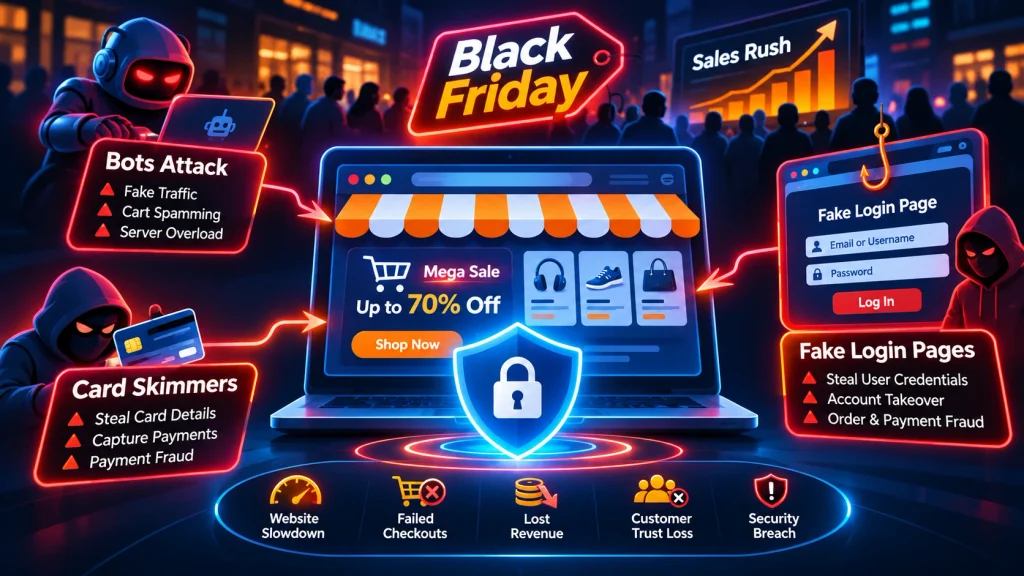
- Payment skimming: malicious JavaScript injected into checkout pages to capture card data.
- Account takeover: automated login attempts using passwords leaked from unrelated breaches. The Have I Been Pwned service shows how widely exposed credentials circulate.
- Bot and DDoS pressure: scalpers, inventory hoarders, and floods that slow or crash the storefront. Cloudflare explains the mechanics in what a DDoS attack is.
What Belongs on an eCommerce Security Checklist for 2026?
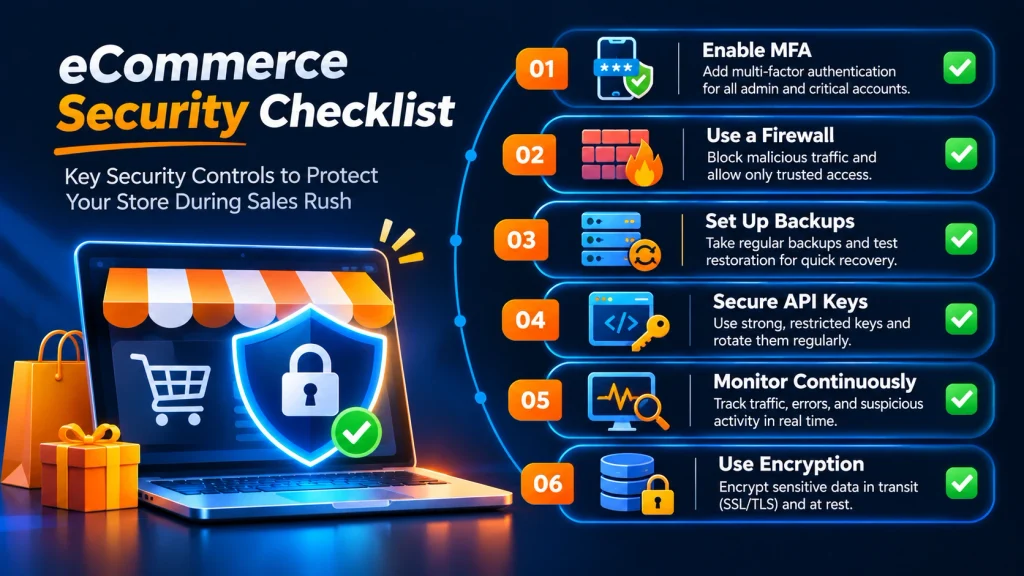
Short answer: Ten controls: MFA, patching, HTTPS with security headers, payment page protection, a web application firewall, API security, backend hardening, tested backups, monitoring, and an incident response plan.
Each control applies whether the store runs on Magento, Adobe Commerce, Shopify, WooCommerce, BigCommerce, or a custom headless build.
1. Why is multi-factor authentication the first control?
Quick answer: Stolen passwords are the most common entry point, and MFA blocks most automated takeover attempts.
Require MFA for admin panels, hosting dashboards, code repositories, DNS providers, and payment gateways. The CISA multi-factor authentication guidance explains why phishing-resistant methods such as hardware keys and passkeys outperform SMS codes, and NIST SP 800-63B sets the technical baseline for authenticator strength. Dormant staff and agency accounts should be removed before the sales window opens.
2. How often should the platform, extensions, and dependencies be patched?
Quick answer: Security releases should be applied as soon as staging tests pass, and always before the pre-sale code freeze.
Unpatched components remain a leading entry point. Core platform, plugins, themes, and server software all need updates. Subscribing to Adobe security bulletins for Magento and Adobe Commerce keeps critical fixes from waiting in an inbox, and the CISA Known Exploited Vulnerabilities Catalog shows which flaws are being used in real attacks right now.
3. Do HTTPS and security headers really stop attacks?
Quick answer: They block interception and many injected scripts, though neither replaces patching.
Serve every page over TLS and enable HSTS. A Content Security Policy restricts which scripts may run, and the MDN Content Security Policy documentation and the OWASP Content Security Policy Cheat Sheet show how to build one. Configuration quality can be verified with Qualys SSL Labs and the MDN HTTP Observatory.
4. How can payment pages and third-party scripts be protected?
Quick answer: Use hosted payment fields, keep an inventory of every checkout script, and monitor for unauthorized changes.
Hosted fields or redirect-based checkout keep card data away from store servers. PCI DSS 4.0 requirements 6.4.3 and 11.6.1 address script integrity on payment pages, and the PCI Security Standards Council publishes the full guidance.
5. Does a web application firewall stop bots?
Quick answer: A WAF blocks common attacks such as SQL injection and cross-site scripting, and bot management adds protection against automated abuse.
A web application firewall filters malicious requests before they reach the application. Rate limiting belongs on login, search, cart, and coupon endpoints, and challenge tools such as Google reCAPTCHA add friction for suspicious traffic.
6. How can every API endpoint be secured?
Quick answer: Scoped tokens, short token lifetimes, request signing, input validation, and rate limits.
Modern stores depend on dozens of integrations: ERP, CRM, shipping, tax, marketplaces, and payment services. Professional ecommerce API integration services should enforce these controls on every connection. The OWASP Top 10 and the OWASP API Security Project provide dependable baselines for common web and API flaws.
7. What does hardening the eCommerce backend involve?
Quick answer: Restricted admin access, least-privilege roles, encryption, disabled unused services, and separated environments.
The ecommerce backend holds orders, customer records, pricing rules, and admin tools, so exposure there causes the most damage. Admin URLs should be limited by IP or VPN, data encrypted at rest, and staging kept apart from production. WordPress-based stores should follow the WordPress hardening guide.
8. Why test backup restores before Black Friday?
Quick answer: A backup that has never been restored may fail exactly when needed.
Keep encrypted, versioned backups in a separate account or region. Run a full restore drill before November 27 and record the recovery time.
9. What should monitoring catch?
Quick answer: New admin users, modified checkout files, unusual outbound connections, and spikes in failed logins.
Centralize web server, application, and admin logs. Fast detection often decides whether an incident stays small or becomes a headline.
10. What goes into an incident response plan?
Quick answer: Named owners, processor contacts, customer communication steps, and a maintenance-mode procedure.
The NIST Cybersecurity Framework structures the work into identify, protect, detect, respond, and recover tasks. The FTC cybersecurity guidance for small businesses adds practical breach-response steps, and the UK NCSC small business guidance offers a second reference point.
How Does Security Differ Across eCommerce Platforms?
Short answer: Managed platforms shift infrastructure patching to the vendor, while self-hosted platforms leave server hardening, WAF setup, and updates with the merchant.
How secure are Magento enterprise development and Adobe Commerce builds?
Quick answer: Security depends heavily on custom module quality, patch speed, and admin access controls.
Teams investing in magento enterprise development should treat custom modules as part of the attack surface. Code review, static analysis, and dependency audits belong in every release pipeline. Strong magento ecommerce development also includes removing unused extensions, restricting admin access, and applying every quarterly and emergency patch promptly. Stores without in-house capacity often rely on specialized Adobe Commerce development services to maintain secure, upgrade-ready codebases, and the official Adobe Commerce developer documentation covers security-related configuration.
Magento 2 vs Adobe Commerce Cloud: which offers more built-in protection?
Quick answer: Adobe Commerce Cloud, because managed hosting, CDN, and WAF layers come bundled.
In the Magento 2 vs Adobe Commerce Cloud comparison, the gap is mostly about managed infrastructure. Self-hosted Magento Open-Source places server hardening, WAF configuration, and patch deployment on the merchant. Magento 2 Commerce Cloud bundles managed hosting with a CDN, a web application firewall layer, automated environments, and vendor-supported infrastructure, which reduces operational burden during peak season. Code hygiene remains the merchant’s responsibility in both models.
Do Shopify and BigCommerce need security work?
Quick answer: Yes. Server risk drops, but staff permissions, third-party apps, and API credentials still need review.
Hosted SaaS platforms handle server patching and PCI-compliant infrastructure, as described on the Shopify security page. Installed apps should be reviewed, unused ones removed, and least-privilege scopes applied, following the BigCommerce authentication documentation.
How can a WooCommerce store be hardened?
Quick answer: Limit plugins, keep PHP current, add a firewall, and disable file editing.
Only trusted, actively maintained plugins should run. XML-RPC and dashboard file editing should be locked down, and the WooCommerce security documentation lists further store-specific guidance.
Is Headless vs Traditional Commerce Safer?
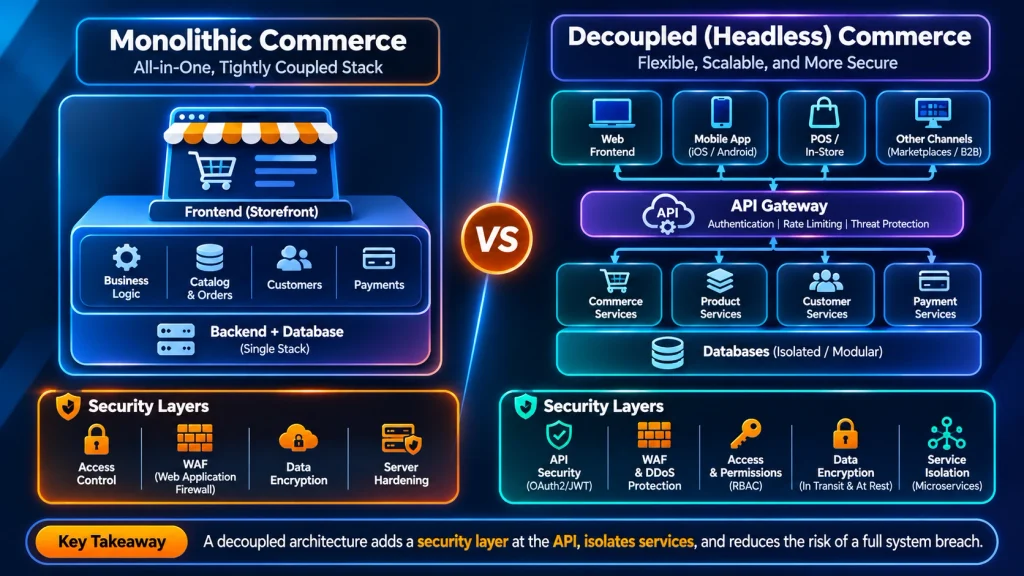
Short answer: Headless hides the admin from public traffic but expands the API surface, so safety depends on gateway controls and disciplined deployment.
The headless vs traditional commerce debate often centers on speed and flexibility, yet security deserves equal weight. A decoupled frontend limits the impact of theme vulnerabilities. In exchange, the API layer becomes the primary target. The MACH Alliance publishes vendor-neutral material on composable architectures.
What does a secure headless eCommerce architecture include?
Quick answer: An API gateway, a backend-for-frontend layer, disabled GraphQL introspection in production, and separate pipelines per service.
A well-designed headless eCommerce architecture typically includes:
- An API gateway with authentication, throttling, and logging
- A backend-for-frontend layer that keeps secret keys off the browser
- Disabled GraphQL introspection in production, as outlined in the OWASP GraphQL Cheat Sheet
- Separate deployment pipelines and secrets management per service
Reliable headless ecommerce development therefore requires threat modeling for every endpoint, not just visual testing. Stores weighing a migration should map data flows before choosing a stack.
Does Performance Optimization Belong in Security Planning?
Short answer: Yes. Faster, leaner stores lose fewer customers and expose fewer vulnerable components.
Sluggish pages can mask malicious scripts, and overloaded servers often fail open. Ecommerce performance optimization such as full-page caching, image compression, script pruning, and CDN offloading removes both friction and risk. Google’s Core Web Vitals guidance defines the metrics worth tracking. On Adobe-based stores, Magento 2 performance optimization typically covers Varnish or Fastly caching, database indexing, Redis sessions, and cleanup of unnecessary extensions. A leaner codebase means fewer vulnerabilities and faster incident response.
Is AI Product Data Enrichment Safe for Online Stores?
Short answer: Yes, when API keys are protected, personal data stays out of model inputs, and generated content is reviewed before publishing.
AI product data enrichment automates titles, attributes, descriptions, and categorization at scale, which speeds catalog launches before Black Friday. Keys belong in a secrets manager, every automated change should be logged, and output must be validated, since unreviewed content can introduce incorrect claims or injected markup into product pages. The NIST AI Risk Management Framework offers a structure for governing automated systems.
How Does the Right eCommerce Platform 2026 Choice Change With Security Needs?
Short answer: Platform choice should weigh patch responsibility, compliance coverage, role granularity, extension vetting, and audit logging alongside features and price.
Selecting the right eCommerce platform 2026 involves more than features. Key security questions include:
- Who patches the core, and how fast?
- Which compliance certifications cover the hosting environment?
- How granular are staff roles and API scopes?
- How mature is the extension and app review process?
- What logging, audit trails, and export options exist?
Merchants with complex catalogs, B2B workflows, or custom integrations often lean toward Adobe Commerce, while smaller teams may prefer the managed simplicity of Shopify or BigCommerce.
What Should Happen in the Final Seven Days Before Black Friday?
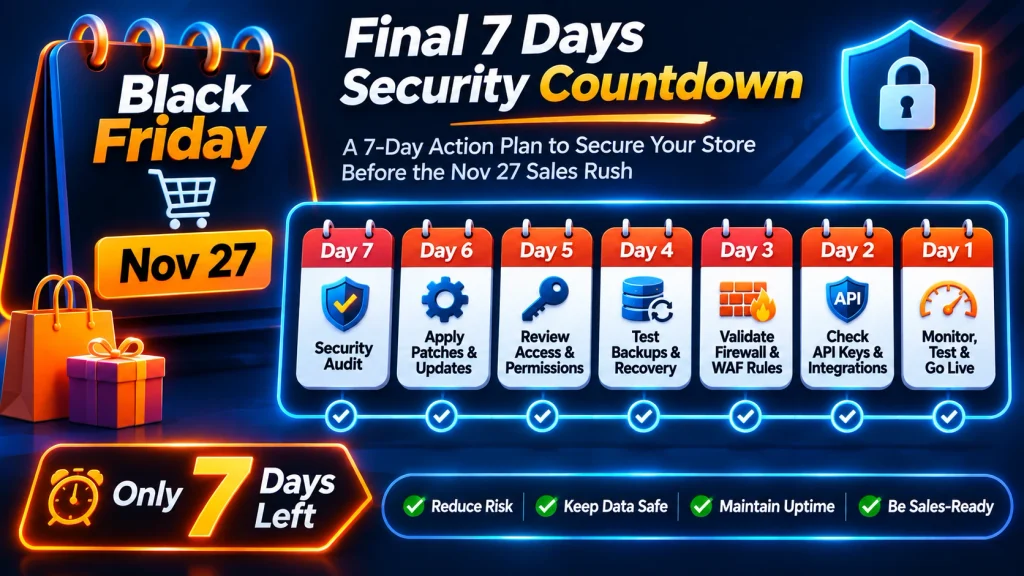
Short answer: Audit accounts, patch, scan, test restores, freeze code, and monitor hourly during the event.
- Days 7 to 6: Audit admin accounts, enable MFA, rotate passwords and API keys.
- Days 5 to 4: Apply pending patches, remove unused plugins, and review third-party scripts on checkout.
- Day 3: Run vulnerability scans and a load test with the WAF active.
- Day 2: Complete a backup restore drill and confirm monitoring alerts reach the on-call team.
- Day 1: Freeze code, confirm incident response contacts, and verify payment gateway status pages.
- Black Friday: Watch logs, failed logins, and checkout error rates hourly. Afterward, review findings and update the eCommerce security checklist for the next season.
Google also publishes guidance on recovering a hacked site, which protects search visibility if an incident occurs.
Frequently Asked Questions About Ecommerce Security
What should an eCommerce security checklist include?
A complete eCommerce security checklist covers MFA, patching, HTTPS, payment page protection, a web application firewall, API security, backend hardening, backups, monitoring, and an incident response plan.
What is the biggest security risk during Black Friday?
Credential stuffing and checkout script injection. High traffic hides automated login attacks and malicious JavaScript that steals payment details.
When should security preparation for Black Friday start?
At least 30 days ahead for patching and audits, with a code freeze about 72 hours before the sale begins.
Is Adobe Commerce Cloud more secure than Magento Open Source?
Adobe Commerce Cloud includes managed hosting, CDN, and WAF layers, which reduce infrastructure risk. Magento Open Source can be equally secure when the merchant handles patching, hardening, and monitoring correctly.
Is headless commerce safer than traditional commerce?
Headless commerce hides the admin from public traffic but expands the API surface. Safety depends on gateway controls, token scoping, rate limiting, and disciplined deployment.
How can card skimming be prevented?
Use hosted payment fields, a strict Content Security Policy, and continuous monitoring of every script on payment pages.
How often should an online store run security scans?
Weekly automated scans, plus a full scan before every major sale and after each significant release. Payment page script checks should run continuously.
Does site speed affect eCommerce security?
Yes. Performance work removes bloated plugins and unused scripts, which shrinks the attack surface and makes anomalies easier to spot.
Conclusion
Black Friday rewards preparation. A disciplined eCommerce security checklist, combined with platform-specific hardening, API protection, and tested recovery plans, keeps revenue flowing while attackers look elsewhere. Stores needing hands-on support can start with expert Magento ecommerce development and security reviews well before the next peak season.