
A Black Friday checklist is a time-ordered list of technical tasks that keeps an online store fast, secure, and ready to sell during peak demand. Black Friday 2026 falls on November 27, and Cyber Monday follows on November 30. Only eleven days remain for final fixes, so the Black Friday checklist 2026 below treats the weekend as an engineering sprint. Traffic multiplies, and small flaws become expensive.
What Should an eCommerce Store Fix Before Black Friday?
Short answer: An eCommerce store should fix performance, stability, and checkout risks first. Run a load test, freeze non-essential releases, optimize Core Web Vitals, scale hosting and CDN capacity, verify payments and API syncs, block bots, and set up monitoring with a tested rollback plan before traffic peaks.
Why Does Technical Readiness Decide Black Friday Revenue?
Paid traffic costs the most during sale events, so a slow or broken page wastes the highest-priced clicks of the year. The Baymard Institute cart abandonment research documents how checkout friction costs orders. Forecasts from the National Retail Federation and the U.S. Census Bureau eCommerce data show demand concentrated into a few days.
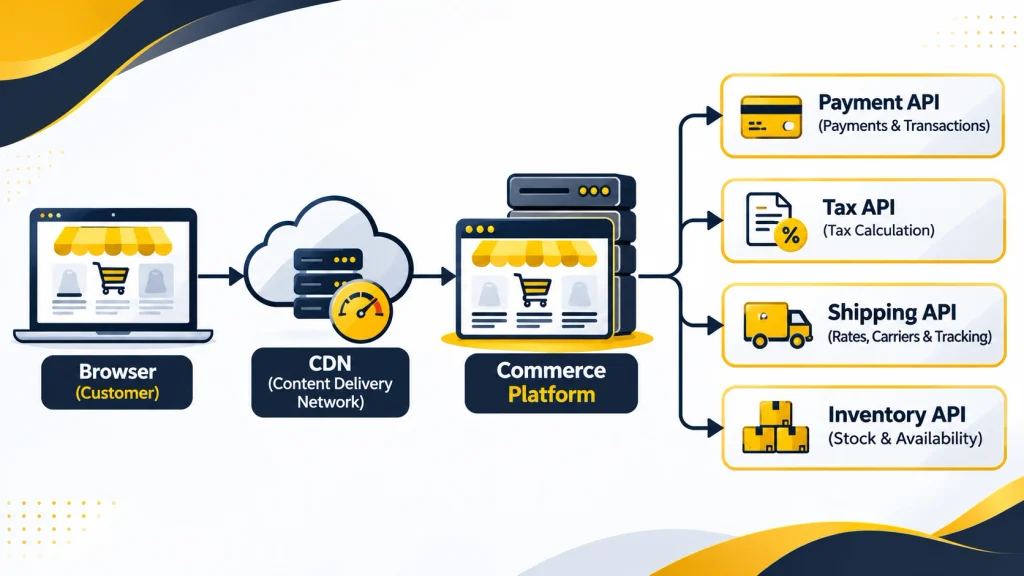
How Does an eCommerce Request Travel Through the Stack?
Short answer: A shopper request moves from the browser to a CDN, then to the commerce platform, which calls APIs for payments, tax, shipping, search, and inventory. A slowdown at any point delays the order. Headless commerce adds a separate front end that reaches the platform through APIs.
Magento, Adobe Commerce, Shopify, WooCommerce, and BigCommerce share the same chain. Platforms differ in who manages hosting, yet each depends on caching, APIs, and payment services.
Key Terms Used in the Checklist
- CDN (content delivery network): servers that store copies of static files and cacheable pages near shoppers.
- Core Web Vitals: Google’s metrics for loading (LCP), responsiveness (INP), and visual stability (CLS).
- API: a defined interface that lets systems exchange data, such as inventory or orders.
- Idempotency key: a unique token that makes repeated requests produce one result, which prevents duplicate orders.
- WAF (web application firewall): a filter that blocks malicious traffic before it reaches the store.
- Cache hit ratio: the share of requests answered from cache instead of the origin server.
- Headless commerce: an architecture where the front end is separate from the commerce engine and connected by APIs.
- Structured data: machine-readable markup, usually JSON-LD, that labels details such as price and availability.
- Code freeze: a period when only critical fixes are released.
The Black Friday Checklist: 15 Technical Steps
Step 1: Run a Load Test at Peak Volume
Short answer: Load testing simulates peak shopper traffic on a staging copy of the store to find where response times or error rates rise. Cover search, cart, and checkout, since those pages bypass the cache. Set targets from past analytics and planned ad spend, then fix the slowest bottleneck first.
Free tools such as k6 and Apache JMeter replay realistic shopper paths. A test that requests only the cached homepage proves little, because cart and checkout stress the application and database most. Avoid load testing live payment gateways.
A minimal k6 script (illustrative values, to be replaced with numbers from the store’s own analytics):
javascript
import http from 'k6/http';import { check, sleep } from 'k6';export const options = { stages: [ { duration: '5m', target: 200 }, { duration: '15m', target: 200 }, { duration: '5m', target: 0 }, ], thresholds: { http_req_failed: ['rate<0.01'], http_req_duration: ['p(95)<2000'], },};export default function () { const res = http.get('<https://staging.example.com/sale>'); check(res, { 'status is 200': (r) => r.status === 200 }); sleep(1);}
Done when: the test passes at the target load with error rate and p95 response time inside the set thresholds.
Step 2: Complete Ecommerce Performance Optimization
Short answer: Core Web Vitals are Google’s three user-experience metrics: Largest Contentful Paint for loading, Interaction to Next Paint for responsiveness, and Cumulative Layout Shift for stability. A page passes when 75 percent of real visits reach 2.5 seconds, 200 milliseconds, and 0.1 respectively.
| Metric | What It Measures | Good Threshold |
|---|---|---|
| Largest Contentful Paint (LCP) | Loading speed | 2.5 seconds or less |
| Interaction to Next Paint (INP) | Responsiveness | 200 milliseconds or less |
| Cumulative Layout Shift (CLS) | Visual stability | 0.1 or less |
Ecommerce performance optimization starts with these targets, documented in the web.dev Core Web Vitals guide. Further guides explain how to optimize LCP, improve Interaction to Next Paint, and fix layout shift. PageSpeed Insights reports field data from real visits and lab data from a simulated test. Field data from the Chrome UX Report decides the pass or fail result, so a good lab score alone is not enough.
Practical fixes: preload the hero image, set width and height on images, and defer third-party tags. A dedicated ecommerce performance optimization service can audit these items across templates.
Done when: field data for product, category, and checkout pages shows good results, or lab tests show clear improvement on all three metrics.
Step 3: Apply Magento 2 Performance Optimization
Short answer: Magento 2 performance optimization combines full-page caching, Redis for sessions and cache, a tuned OpenSearch service, production mode, and scheduled indexers. These settings reduce database and PHP work per request, which protects response times when many shoppers browse at once.
The stack typically includes Varnish for page caching, Redis for sessions and cache, and OpenSearch for catalog search. The Adobe Commerce performance best practices explain each setting. A specialist in Magento 2 performance optimization can find slow queries and heavy extensions quickly.
Pre-event status commands:
bash
bin/magento deploy:mode:showbin/magento cache:statusbin/magento indexer:statusbin/magento indexer:set-mode schedule
Scheduled indexers depend on working cron jobs, so confirm cron runs. Sale price changes can trigger reindexing, so load promotions before the code freeze and warm key category and landing pages afterward. A cold full-page cache sends the first wave of visitors straight to the origin server.
Done when: production mode is active, cache types are enabled, indexers show “ready,” and cron runs on schedule.
Step 4: Declare a Code Freeze
Short answer: A code freeze is a set period when only critical security fixes and tested hotfixes are deployed. Starting several days before Black Friday leaves time to catch regressions and prevents untested extension, theme, or tag changes from breaking checkout. The start date should match the store’s testing cycle.
Scope matters. Tag manager edits, new Shopify apps, WordPress plugin auto-updates, and pricing rule changes all count as deployments. Disable automatic updates, publish a release calendar, and name one person who approves exceptions.
Done when: automatic updates are off, the calendar is published, and an approver is named.
Step 5: Scale Hosting, CDN, and Database
Short answer: Scaling for Black Friday means confirming that servers, databases, and the CDN can absorb peak requests. A CDN stores copies of static files and cacheable pages near shoppers, reducing load on the origin server. Check autoscaling rules, database connection limits, and cache hit ratios before traffic arrives.
Cache hit ratio often matters more than raw server size, because every request served from the CDN never reaches the application. Cart, checkout, and account pages should bypass the cache, while category and product pages should stay cacheable. Teams on Magento 2 Commerce Cloud should review CDN rules and ask the provider about temporary capacity. The Cloudflare CDN guide explains the concept, and the MDN HTTP caching reference clarifies cache headers.
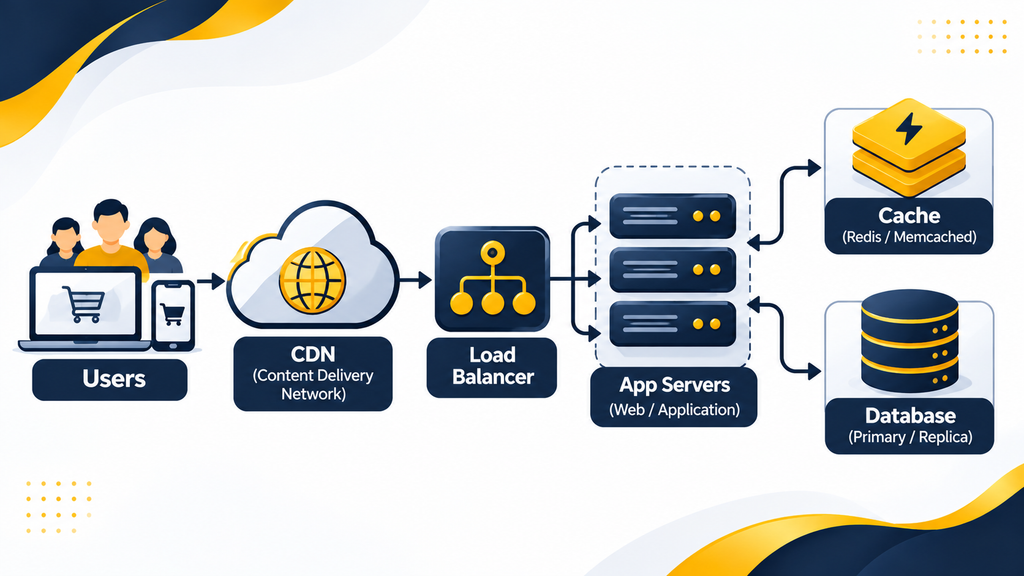
Done when: cache rules are reviewed, capacity is confirmed in writing, and the load test passed against the scaled setup.
Step 6: Audit the Ecommerce Backend
Short answer: The ecommerce backend is the layer behind the storefront that processes orders, payments, tax, shipping, and inventory. Common bottlenecks include slow database queries, backed-up message queues, and failing cron jobs. Reviewing slow query logs, queue depth, and scheduled jobs before Black Friday prevents delayed confirmations and stock errors.
Clear old logs, abandoned carts, and unused sessions that bloat tables. Confirm that order export jobs to the ERP or warehouse system keep pace with expected volume.
Done when: queues drain quickly, no critical slow queries remain, and order exports run without backlog.
Step 7: Harden Checkout and Payments
Short answer: Checkout testing confirms that every payment method, shipping option, tax rule, and coupon works on desktop and mobile. Include guest checkout, wallets, declined cards, and 3-D Secure challenges. Payment-page scripts also need review, because PCI DSS 4.0.1 requirements 6.4.3 and 11.6.1 cover script management and change detection.
Those two requirements became mandatory on March 31, 2025, and applicability depends on how payments are integrated. Confirm scope with the payment provider and the PCI Security Standards Council. The WCAG guidelines help keep forms accessible, which reduces input errors.
Done when: a full test-order matrix passes on mobile and desktop, and payment-page scripts are inventoried.
Step 8: Verify API Integrations and Syncs
Short answer: API integrations connect the store to ERP, CRM, shipping, tax, payment, and marketplace systems. Under heavy load, these links can fail quietly. Reliable integrations use retries with backoff, rate-limit handling, idempotency keys to prevent duplicate orders, and alerts when a sync falls behind.
Strong ecommerce API integration services plan for HTTP 429 (too many requests) and 503 responses by retrying with increasing delays and random jitter. The Stripe idempotent requests guide shows how idempotency keys work in practice.
Illustrative scenario (hypothetical, not a case study): A strong Black Friday checklist should include inventory synchronisation checks. If inventory syncs every ten minutes, a product with five units remaining could continue selling for up to ten minutes after stock reaches zero. Shortening the sync interval or implementing event-driven webhooks can reduce this overselling risk. A dedicated eCommerce API integration team can review these workflows and improve inventory accuracy before peak shopping traffic.
Done when: stock updates reach the storefront within seconds, and failed calls retry without creating duplicate orders.
Step 9: Strengthen Security and Bot Protection
Short answer: Security preparation blocks bots and attacks that target sale events. Deploy a web application firewall, rate limiting, and bot management to stop card testing, credential stuffing, and scraping. Enforce two-factor authentication for admin accounts, and patch known vulnerabilities before the code freeze begins.
Rate limits belong on login, payment attempt, and promo code endpoints, because attackers probe each of them. The OWASP Top Ten lists common web risks, and the OWASP Automated Threats project covers bot abuse. The CISA best practices add practical guidance, and the Cloudflare DDoS overview explains why retailers become targets.
Done when: WAF and rate-limit rules are active, admin accounts use two-factor authentication, and patches are applied.
Step 10: Improve Product Data With AI Product Data Enrichment
Short answer: AI product data enrichment uses machine learning to fill missing titles, attributes, sizes, materials, and descriptions across a catalog. Complete data improves filtering, site search, and shopping feed approval. Every generated attribute needs human review against the physical product, because wrong specifications cause returns and feed disapprovals.
Start with best-selling products and high-traffic categories. Identifiers such as GTINs and MPNs must come from suppliers and never from generation. Google Merchant Center lists required fields in its product data specification.
Done when: top products have complete, reviewed attributes, and the shopping feed shows no new errors.
Step 11: Publish Structured Data
Short answer: Structured data is markup, usually JSON-LD, that labels page details such as product name, price, availability, and ratings in a machine-readable format. Product and Offer markup helps search engines and AI systems interpret store pages. Values must match visible page content and update during sales.
Google documents the format in its product structured data guide, and Schema.org Offer lists supported properties. Use rating markup only when real customer reviews exist.
json
{ "@context": "<https://schema.org>", "@type": "Product", "name": "Example Running Shoe", "sku": "SHOE-001", "offers": { "@type": "Offer", "priceCurrency": "USD", "price": "79.00", "availability": "<https://schema.org/InStock>", "url": "<https://www.example.com/running-shoe>" }}
Markup does not guarantee rankings or AI citations. Google’s guidance on AI features in Search and its helpful content guidance both stress original, people-first content.
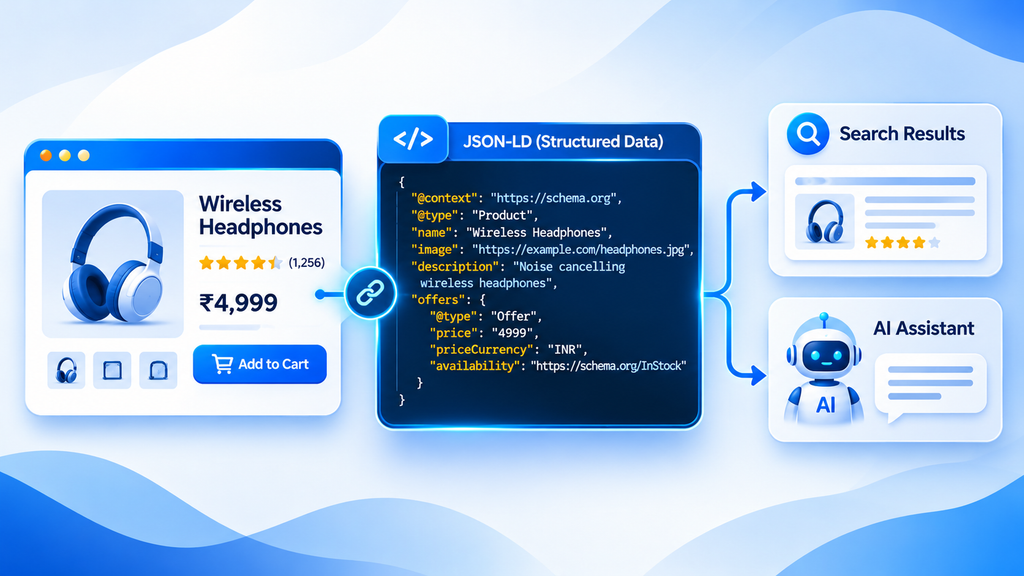
Done when: the markup validates, matches visible prices, and updates automatically during sales.
Step 12: Prepare Landing Pages and Search
Short answer: Sale landing pages should exist, load quickly, and be indexable before the event starts. Use permanent URLs that can be reused every year, link them from the main navigation, and avoid duplicates. Site search should handle typos, synonyms, and sale terms so shoppers find deals quickly.
A permanent URL such as /black-friday/ can accumulate links and authority year after year, while a new URL each season starts from zero. Confirm that no staging noindex rule carried over to production, using Google’s robots meta tag documentation. Keep discount claims truthful, because the FTC advertising guidance covers pricing and promotion rules.
Done when: landing pages are live, indexable, linked from navigation, and search returns relevant results for sale terms.
Step 13: Test Email, SMS, and Cart Recovery
Short answer: Email and SMS preparation covers sender authentication, send throttling, personalization checks, and abandoned-cart flows. Verify SPF, DKIM, and DMARC records, stagger large sends, and test automations end to end. Suppression rules prevent duplicate messages, which protects sender reputation during high-volume campaigns.
Large senders must meet mailbox provider rules, outlined in Google’s email sender guidelines. SMS campaigns also require valid customer consent, which varies by country.
Done when: authentication records pass, test sends render correctly, and abandoned-cart flows fire once per cart.
Step 14: Set Up Monitoring and a War Room
Short answer: Monitoring tracks uptime, error rates, checkout conversion, payment success, queue depth, and server load on one dashboard. Alerts need clear thresholds and named owners. A war room is a scheduled coordination routine with short check-ins during peak hours, so problems reach the right person within minutes.
Server health alone can look normal while orders quietly drop. Track orders per minute against the same hour last week, and run a synthetic checkout test every few minutes. Schedule check-ins from Thursday evening through Cyber Monday.
Done when: alerts fire in a test, each system has an on-call owner, and the check-in schedule is published.
Step 15: Write a Rollback Plan
Short answer: A rollback plan defines how to return the store to a known-good state if a release or change fails. It includes tested backups, a documented rollback procedure, feature flags where possible, and a customer status message. Practicing the procedure beforehand shows how long recovery takes.
A complete Black Friday checklist should document who approves emergency changes and how payment, inventory, and support teams communicate during an incident. Test backup restoration before the sale begins. Remember, a backup that has never been restored is an assumption, not a reliable recovery plan.
Done when: a restore test succeeded, and the measured recovery time is written down.
Platform Comparison for Black Friday Readiness
| Platform | Hosting Model | Who Manages Scaling | Main Black Friday Focus |
|---|---|---|---|
| Magento Open Source | Self-hosted | Merchant or hosting partner | Full-page cache, Redis, OpenSearch, indexers, extension audit |
| Adobe Commerce (cloud infrastructure) | Managed cloud hosting | Shared between platform and merchant configuration | CDN rules, scaling plan, custom code, integrations |
| Shopify | SaaS | Shopify | Theme speed, app audit, discount logic, checkout customizations |
| WooCommerce | Self-hosted on WordPress | Merchant or hosting provider | Host capacity, object cache, plugin audit, CDN |
| BigCommerce | SaaS | BigCommerce | Theme performance, API usage, promotions, integrations |
| Headless (any engine) | Front end hosted separately | Merchant plus platform vendor | API rate limits, edge caching, fallback pages |
Magento and Adobe Commerce
Large catalogs often need Magento enterprise development for B2B features and pricing rules. Ongoing Magento ecommerce development should end with regression tests on checkout, promotions, and indexers. Teams needing deeper help can review Adobe Commerce development services for sale-readiness audits. The Adobe Commerce developer documentation covers caching, queues, and cloud settings.
Shopify
Shopify manages hosting, so priorities shift to theme speed, app audits, and discount logic. Confirm that custom checkout code uses supported Checkout Extensibility methods. Stores planning custom storefronts can read Shopify’s headless documentation.
WooCommerce
WooCommerce depends on hosting quality and plugin discipline. Use object caching, a CDN, and a staging site, and limit active plugins. The WooCommerce documentation offers performance and security advice. Also check database autoload size.
BigCommerce
BigCommerce handles infrastructure, so focus on theme speed, promotions, and integrations. The BigCommerce developer documentation covers storefront and API options.
Headless Commerce
Headless ecommerce development separates the front end from the commerce engine, with APIs connecting both layers. Plan edge caching, rate limits, and fallback pages, because a failure in either layer affects shoppers. A headless ecommerce development team can map these dependencies.
Magento 2 vs Adobe Commerce Cloud: Which Suits Black Friday?
Short answer: Magento Open Source is a free, self-hosted platform where the merchant manages hosting, scaling, and security. Adobe Commerce adds commercial features and, on cloud infrastructure, managed hosting with a built-in CDN. The choice depends on catalog complexity, traffic, budget, and in-house engineering capacity.
A fair Magento 2 vs Adobe Commerce Cloud review compares total cost, scaling limits, support response times, and the engineering hours needed for upgrades and security patches.
Headless vs Traditional Commerce: What Changes on Sale Days?
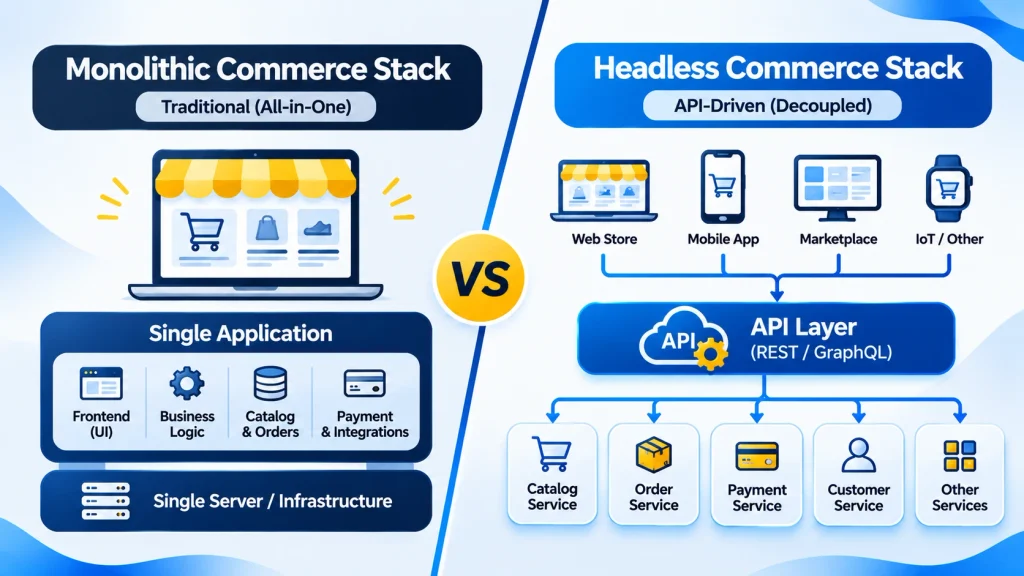
Short answer: Traditional commerce keeps templates and logic in one system, so testing stays simple. Headless commerce delivers flexible, fast front ends but adds API dependencies that need caching and monitoring. Stores with small engineering teams often keep a traditional setup through Black Friday and migrate later.
| Factor | Traditional Commerce | Headless Commerce |
|---|---|---|
| Architecture | Front end and engine in one system | Separate front end connected through APIs |
| Testing scope | Smaller, one system | Larger, multiple services |
| Front-end flexibility | Limited by templates | High |
| Main sale-day risk | Server and database load | API limits, edge caching, service dependencies |
| Best fit | Small teams, fast launches | Custom experiences across channels |
A headless ecommerce architecture usually includes a commerce engine, a content layer, a search service, and a front end served from the edge.
How Can a Store Choose the Right eCommerce Platform in 2026?
Short answer: The right eCommerce platform in 2026 fits catalog size, team skills, integrations, and growth goals. Shopify and BigCommerce suit quick launches, WooCommerce suits content-led stores, and Magento or Adobe Commerce suit complex catalogs and B2B models. Headless suits brands needing custom experiences across channels.
Questions to answer first:
- How many SKUs, variants, and price rules exist?
- Which ERP, CRM, and shipping tools need integration?
- Does the team include developers for ongoing maintenance?
- What peak traffic is expected during sale events?
What Are the Most Common Black Friday Technical Mistakes?
The most common Black Friday checklist mistakes include testing only the cached homepage, deploying changes during sale week, relying on lab speed scores instead of real-user field data, allowing inventory synchronisation delays, and skipping backup restoration tests. Each issue can be prevented by following the right technical steps before Black Friday traffic arrives.
- Load tests that skip search, cart, and checkout.
- Last-minute plugin, app, or tag updates.
- Staging
noindexrules left on production pages. - Monitoring servers but not orders per minute.
- Backups that have never been restored.
Eleven-Day Black Friday Checklist Countdown
- November 16–18: Load test, fix bottlenecks, audit apps and plugins.
- November 19–21: Finish payment, API, and inventory tests. Publish landing pages and structured data.
- November 22: Start the code freeze. Verify backups and rollback.
- November 23–25: Run the security scan, email tests, and a monitoring drill.
- November 26: Staff the war room. Confirm CDN and server capacity.
- November 27–30: Monitor, respond, and record lessons for 2027.
Frequently Asked Questions
When should a store start its Black Friday checklist?
Preparation works best eight to twelve weeks before Black Friday, which leaves time for load testing, fixes, and retesting. Stores inside the final two weeks should prioritize load tests, checkout testing, payment verification, security patches, and a code freeze, then monitor closely through Cyber Monday.
What crashes websites most often on Black Friday?
Overloaded databases, uncached pages, slow third-party scripts, and exhausted server resources cause most sale-day failures. Traffic that bypasses the cache, such as search, cart, and checkout requests, puts the heaviest load on the application and database, so load tests should cover those paths specifically.
How fast should a product page load?
Google’s Core Web Vitals treat a Largest Contentful Paint of 2.5 seconds or less as good, measured at the 75th percentile of real visits. Interaction to Next Paint should be 200 milliseconds or less, and Cumulative Layout Shift 0.1 or less. Mobile results deserve separate attention.
Does Magento handle Black Friday traffic well?
Magento can handle high traffic when configured correctly. Full-page caching with Varnish, Redis for sessions and cache, OpenSearch for catalog search, scheduled indexers, and scalable hosting all reduce load. Results depend on hosting, extensions, and code quality, so load testing remains necessary.
Is headless commerce better for Black Friday?
Headless commerce can improve front-end speed and flexibility, but it adds API dependencies that need caching, rate-limit handling, and monitoring. Stability matters more than novelty in peak week. Stores with small engineering teams often keep a traditional setup now and plan a headless migration for a quieter period.
What is a code freeze in eCommerce?
A code freeze is a set period when only critical security fixes and tested hotfixes are deployed. The goal is to prevent untested changes, such as extension updates or theme edits, from breaking checkout during peak traffic. Tag manager changes and app installs should be included in the freeze.
Conclusion
A strong Black Friday checklist turns a stressful shopping weekend into a controlled operation. This Black Friday checklist covers fast page loading, stable APIs, secure checkout, accurate product data, and clear monitoring to protect revenue across Magento, Adobe Commerce, Shopify, WooCommerce, BigCommerce, and headless commerce platforms.
Complete all 15 technical steps, test your rollback plan, and verify your infrastructure before peak traffic arrives. A well-prepared Black Friday checklist helps your eCommerce business spend Black Friday selling instead of firefighting.