
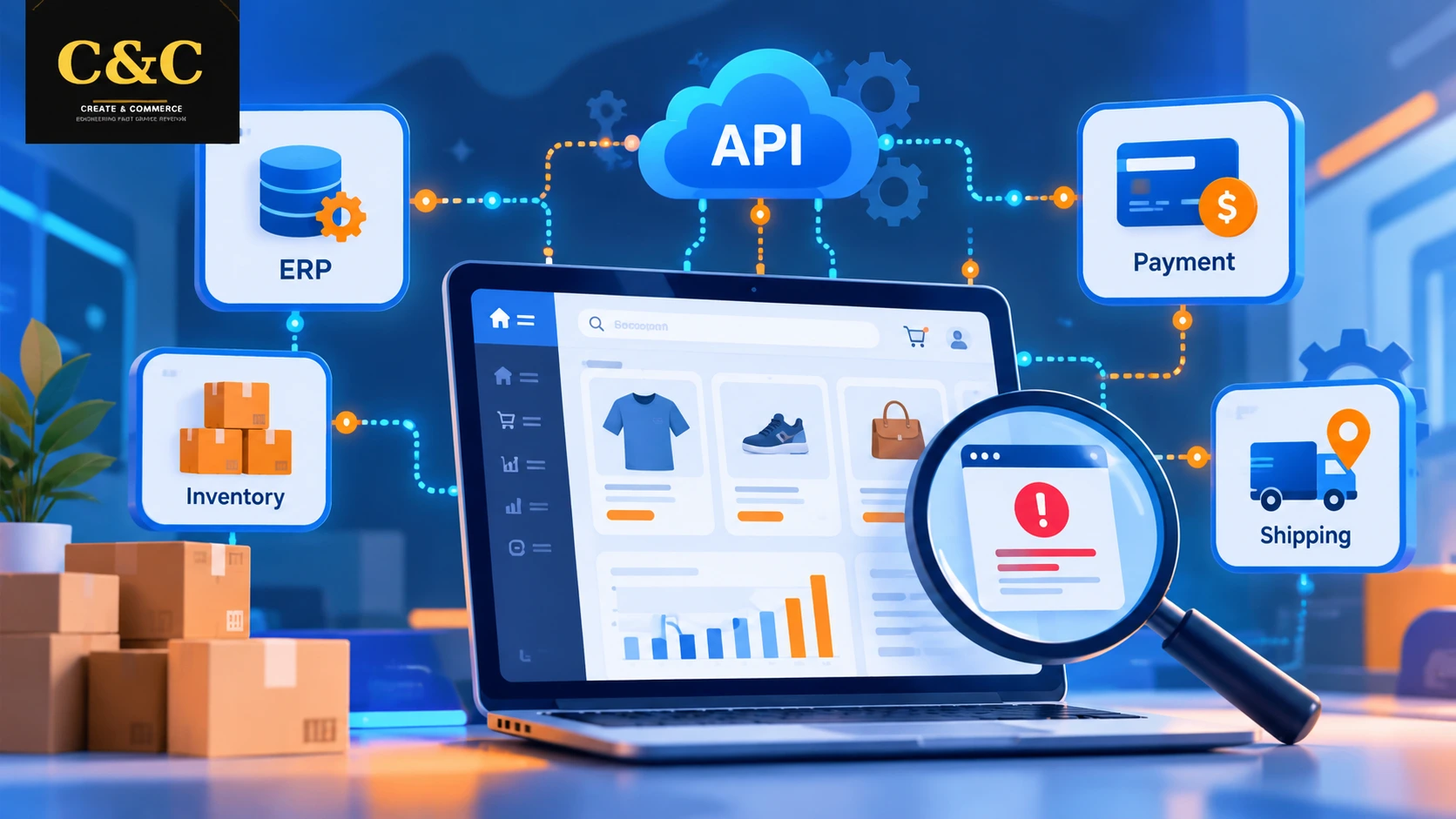
Adobe Commerce integration testing confirms that the storefront, the ecommerce backend, and every connected service exchange accurate data without failure. Modern stores rely on ERP platforms, payment gateways, shipping carriers, CRMs, and marketing tools. A single broken API call can stall orders, corrupt inventory, or block checkout. A structured testing approach exposes such problems before customers encounter them.
For brands investing in magento enterprise development, integration quality directly affects revenue, reporting accuracy, and customer trust. The sections below cover what to test, how to find API and data errors, which test cases work best, and which practices keep integrations stable over time.
Why Adobe Commerce Integration Testing Matters for Ecommerce Backend Stability
Unit tests confirm that individual code blocks work. Integration tests confirm that separate modules and external systems work together. Many production incidents originate in the gaps between systems rather than inside a single component.
Common Failure Points in Connected Stores
Most integration issues follow familiar patterns:
- Mismatched field formats between Adobe Commerce and an ERP
- Expired or misconfigured API tokens
- Timeouts during high-volume order imports
- Duplicate or missing SKUs after catalog syncs
- Incorrect tax or shipping calculations returned by third-party services
The Business Cost of Skipped Testing
Undetected integration errors lead to oversold products, delayed shipments, failed payments, and inaccurate financial reports. Moreover, fixing such issues after launch costs far more than catching them in staging. Support tickets, refunds, and lost trust add to the bill.
A Real-World Style Example of a Silent Sync Failure
Consider an illustrative scenario. A store syncs inventory from an ERP every 15 minutes. After an ERP update, stock quantities arrive as decimal strings such as “10.0000” instead of whole numbers. A custom module rejects the records without raising an error, so Adobe Commerce keeps showing outdated stock. Popular products oversell for two days before a customer complaint reveals the gap.
An integration test with a schema check on the inventory payload would have failed immediately in staging. The fix required only a type cast and a validation rule. Such cases show why data comparison matters as much as endpoint testing.
Core Areas Covered in Adobe Commerce Integration Testing
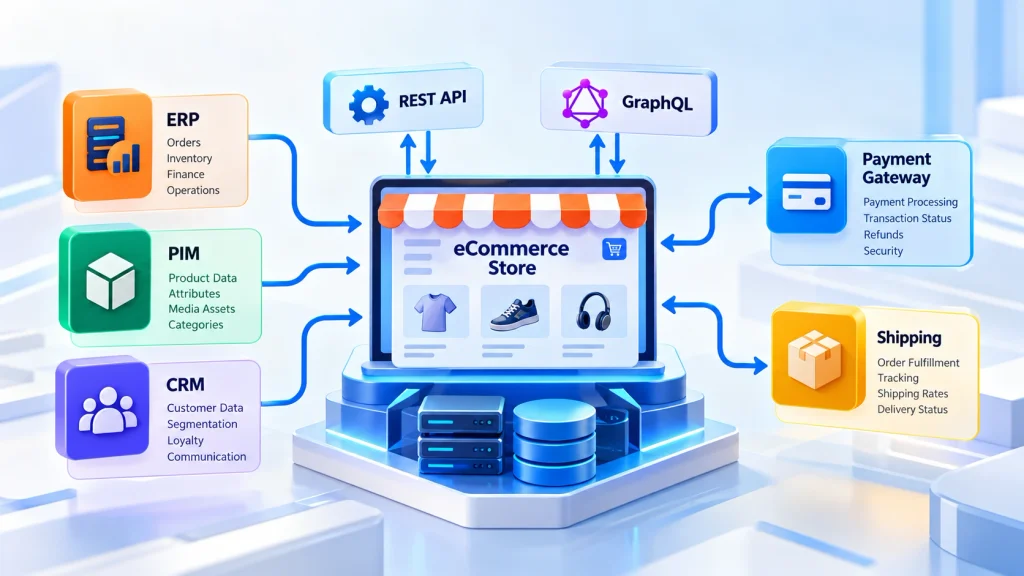
A complete test plan touches every system that sends or receives store data. Three areas deserve the most attention.
REST and GraphQL API Validation
Adobe Commerce exposes REST and GraphQL endpoints for catalog, cart, customer, and order operations. Testing should verify status codes, response schemas, authentication behavior, pagination, and error messages. The official Adobe Commerce developer documentation describes endpoint structures and authentication options. In addition, the GraphQL reference lists the queries and mutations that deserve automated assertions.
Data Synchronization Checks
Product, price, stock, customer, and order data often move between Adobe Commerce and ERP, PIM, CRM, or OMS platforms. Test cases should confirm that records match on both sides after every sync cycle. Edge cases such as partial updates and deleted items need coverage as well.
Payment, Shipping, and Tax Workflows
Checkout depends on several external calls. Each path needs coverage for success, decline, timeout, and retry scenarios. Consequently, no order is lost or charged twice.
Setting Up a Reliable Test Environment for Integration Testing
A staging environment that mirrors production produces the most trustworthy results. The Adobe Commerce integration testing guide explains how the built-in framework is configured and executed.
Using Magento 2 Commerce Cloud Environments for Testing
Teams on magento 2 commerce cloud can rely on integration and staging environments that replicate production architecture. Pushing code to a staging branch before production allows full integration runs against realistic configuration, services, and caching layers.
Recommended Test Environment Elements
- Sandbox credentials for every third-party service
- Anonymized production-like data sets
- Mock servers for unavailable or rate-limited services
- Centralized logging and monitoring
Step-by-Step Process for Finding API Errors
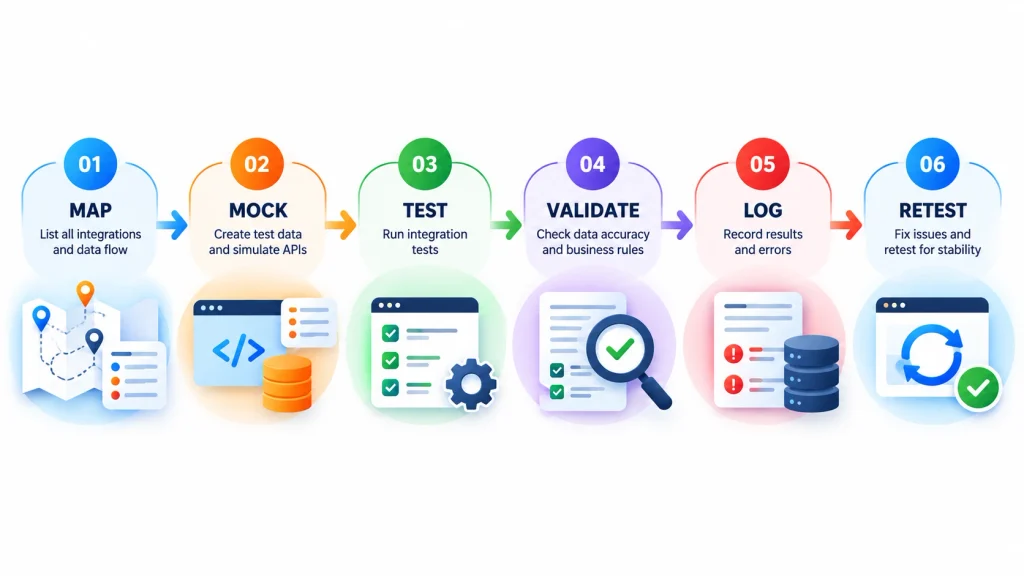
A repeatable process makes errors easier to find and fix. Follow the order below.
- Map every integration point. List each endpoint, direction of data flow, and owner.
- Define expected contracts. Document request payloads, response schemas, and error codes.
- Use an API client. Tools such as Postman allow repeatable request collections and automated assertions.
- Test negative scenarios. Send invalid tokens, malformed JSON, and oversized payloads to confirm graceful failures.
- Inspect logs. Review
var/logfiles and API gateway logs for silent failures. - Retest after fixes. Run the full collection again to catch regressions.
Security checks belong in the same cycle. The OWASP API Security Project lists common weaknesses worth validating.
Sample Integration Test Cases
- TC-01, valid order push to ERP: place a test order and trigger the export. Expected result: the ERP receives one order with matching totals.
- TC-02, expired API token: call an endpoint with an expired token. Expected result: a 401 response and no data change.
- TC-03, payment gateway timeout: simulate a delayed gateway response. Expected result: the order stays pending and no duplicate charge occurs.
- TC-04, stock update with bad format: send a quantity as text. Expected result: the record is rejected and the error is logged.
- TC-05, cancelled order: cancel a paid order. Expected result: inventory is restored and a refund request is created.
Common Error Messages and Fixes
- 401 “The consumer isn’t authorized to access %resources”: the integration lacks the needed ACL resource. Grant the resource in the integration settings.
- 404 “No such entity with %fieldName = %fieldValue”: the request contains a wrong ID or SKU. Verify identifiers against the source system.
- GraphQL “The current customer isn’t authorized.”: the customer token is missing or invalid. Regenerate the token and resend the request.
- 429 Too Many Requests: a rate limit was reached. Add backoff and reduce request frequency.
- 500 with a report ID: an unhandled exception occurred in a module. Search the matching report file in
var/report. - 504 Gateway Timeout: an upstream service is slow or a query is heavy. Optimize the request or raise timeout limits carefully.
Detecting Data Errors Across Connected Systems
Data errors rarely trigger visible exceptions. Therefore, detection requires deliberate comparison.
Reconciliation Techniques
- Compare record counts between Adobe Commerce and the source system
- Run checksum or field-level comparisons on sampled records
- Validate currency, decimal precision, and date formats
- Confirm inventory deltas after order placement and cancellation
Monitoring for Silent Failures
Queue consumers, cron jobs, and webhooks can fail without alerts. Dashboards and alert rules for stalled queues, repeated retries, and unusual error rates reveal such issues quickly.
Security and Access Control Testing for Adobe Commerce Integrations
Every integration widens the attack surface of an ecommerce backend. API tokens, webhooks, and admin-level integration accounts each act as a potential entry point. Security checks inside Adobe Commerce integration testing reduce the risk of data leaks and unauthorized changes.
Token and Permission Checks
- Confirm that each integration holds only the ACL resources required for its task
- Verify that revoked or expired tokens fail immediately
- Test key rotation to ensure connected systems recover without downtime
- Check that customer tokens cannot read another customer’s data
Data Protection and Payment Safety
Customer and payment details must never appear in logs, error messages, or webhook payloads. Test cases should confirm that personal data is masked, webhook signatures are verified, and every endpoint enforces HTTPS. Payment workflows should also follow the PCI Security Standards Council requirements for cardholder data handling.
Integration Testing Across Magento, Shopify, WooCommerce, BigCommerce, and Headless Commerce
The core method stays consistent across platforms: define contracts, test endpoints, and reconcile data. Differences appear in implementation, as the sections below show.
Magento Ecommerce Development Testing Priorities
Deep customization makes testing essential in magento ecommerce development. Every extension and custom module adds integration points, and each one needs coverage for upgrades and configuration changes. Queues and indexers deserve special attention.
Shopify, WooCommerce, and BigCommerce Considerations
- Shopify: webhook reliability needs close attention, and test plans should respect the published Shopify API rate limits to avoid throttled requests.
- WooCommerce: plugin conflicts and WordPress hooks often cause unexpected behavior.
- BigCommerce: catalog and checkout API behavior should be validated alongside third-party apps.
Headless Ecommerce Development and API Contract Testing
Headless ecommerce development separates the frontend from the backend. Therefore, API contracts become the most critical layer, and every GraphQL query from the frontend needs coverage. Contract tests should run whenever the frontend or backend changes. A renamed field or altered response shape can break the storefront without any server error.
Magento 2 Performance Optimization During Integration Testing
Functional accuracy alone is insufficient. Slow API responses damage conversions and search visibility, and Google measures page experience through Core Web Vitals.
Measuring Response Times and Load
Teams focused on magento 2 performance optimization should measure response times, cache behavior, indexer duration, and database query load while integrations run. Load tests against key endpoints show how connected systems behave under peak traffic.
Ecommerce Performance Optimization Targets
Effective ecommerce performance optimization starts with clear targets. Examples include API responses under a defined threshold, no growth in queue backlog during sales events, and stable checkout completion rates under load.
Automation and CI/CD for Adobe Commerce Integration Testing
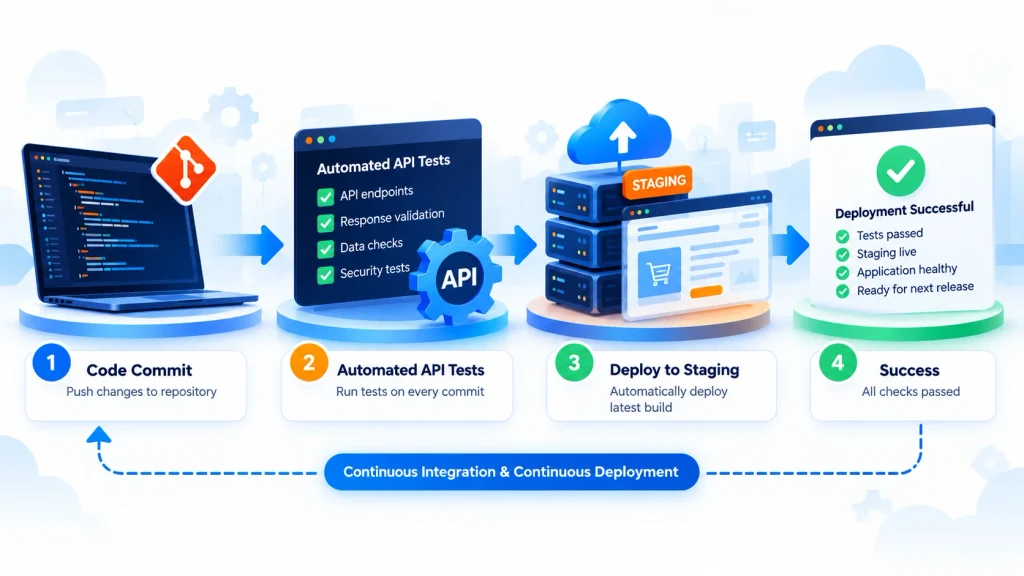
Manual checks cannot keep pace with frequent releases. Automated suites run on every commit catch regressions early. Adobe Commerce supports integration tests through a PHPUnit-based framework, and the PHPUnit documentation covers assertions, data providers, and test suite configuration.
API suites from Postman or similar tools can also be triggered inside CI pipelines. Finally, failed tests should block deployment until resolved.
Best Practices for Dependable Integrations
- Version every API contract and review changes before release
- Keep test data isolated and resettable
- Log request and response IDs for traceability
- Add retries with backoff for unstable services
- Schedule regression runs after every extension or platform upgrade
- Review integrations quarterly as business rules evolve
Pre-Launch Integration Testing Checklist
A final review before go-live catches gaps that isolated test runs miss. The checklist below groups the most important checks into two areas.
Functional Readiness Checks
- All sample test cases pass against the staging environment
- Order, inventory, customer, and price syncs match the source systems
- Payment, shipping, and tax paths succeed, fail, and retry correctly
- Negative scenarios return clear errors without data changes
- Load tests confirm stable response times at expected peak traffic
Operational Readiness Checks
Technical success alone does not guarantee a smooth launch. Operational preparation keeps small issues from becoming outages.
- Alerts exist for stalled queues, failed cron jobs, and repeated API errors
- A rollback plan is documented and tested
- A runbook lists owners and escalation contacts for every integration
- Logs are centralized and searchable by request ID
- Close monitoring continues for the first 30 days after launch
Adobe Commerce Development Services for Integration Testing
Complex eCommerce stores with multiple connected systems often benefit from specialist support. Professional Adobe Commerce development services provide architecture review, test automation, and ongoing monitoring. Dedicated eCommerce API integration services add contract design, error handling, and synchronization monitoring for ERP, CRM, payment, and shipping connections.
Related guidance is available on our eCommerce development services, Magento 2 performance optimization, and headless commerce development pages.
Frequently Asked Questions About Adobe Commerce Integration Testing
What is Adobe Commerce integration testing?
Adobe Commerce integration testing verifies that modules, APIs, and external systems such as ERP, payment, and shipping services work together correctly and exchange accurate data.
Which tools help find API errors in Adobe Commerce?
Postman, PHPUnit-based integration tests, GraphQL clients, log analyzers, and monitoring platforms are commonly used to detect and diagnose API issues.
How often should integration tests run?
Automated tests should run on every code change. A full regression suite should run before each release and after every upgrade.
Can the same approach apply to Shopify, WooCommerce, and BigCommerce?
Yes. Contract validation, negative testing, and data reconciliation apply to every platform. However, platform-specific limits and hooks need individual attention.
Why does headless commerce need extra integration testing?
Headless setups rely entirely on APIs to connect the frontend and backend. Consequently, any contract change can break the storefront without warning.
What is the most common cause of silent data errors?
Format mismatches between systems, such as text values in numeric fields, are a frequent cause. Schema validation and reconciliation checks catch such problems early.
What should be tested before an Adobe Commerce launch?
Order, inventory, and price syncs, payment and shipping paths, negative scenarios, access permissions, load behavior, alerts, and the rollback plan should all be verified in staging.
Conclusion
Adobe Commerce integration testing protects revenue by exposing API failures and data mismatches before launch. A clear process of mapping integrations, validating contracts, reconciling data, and automating regression checks keeps the ecommerce backend dependable as the store grows. Consistent testing turns integrations from a risk into a competitive advantage.