
Every commerce platform migration begins long before the first line of data moves. A technical audit before migration is the diagnostic stage that uncovers hidden risks, outdated code, broken integrations, and data inconsistencies that could otherwise derail a launch. Skipping a technical audit before migration is one of the leading reasons commerce projects run over budget, lose search rankings, or suffer downtime after go-live. The sections below outline what a proper audit covers and why each check matters, across Magento, Shopify, WooCommerce, BigCommerce, Adobe Commerce, and headless commerce environments.
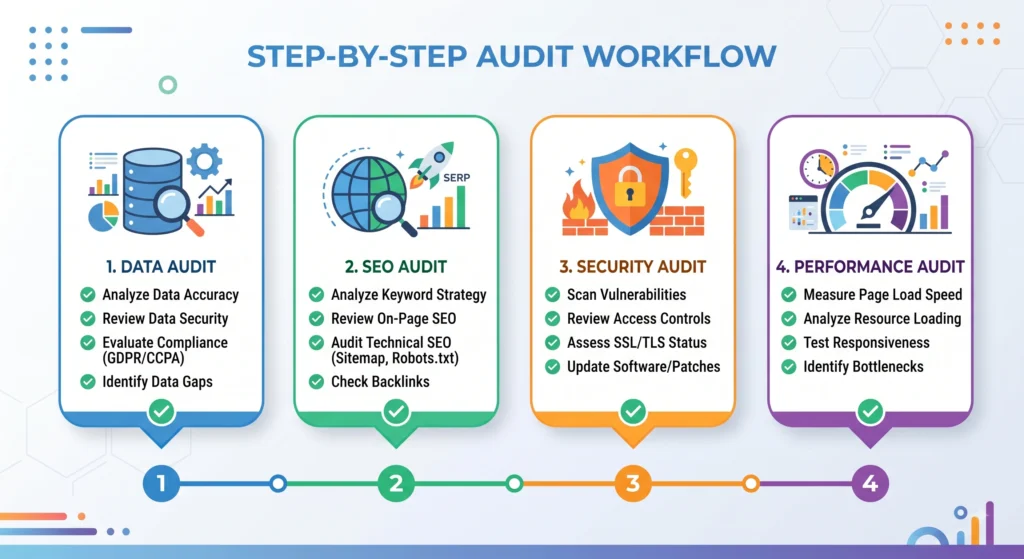
Why a Technical Audit Before Migration Matters
Migrating a storefront is not simply a matter of copying products from one platform to another. Catalog structures, URL patterns, checkout logic, tax rules, shipping configurations, and third-party integrations all behave differently depending on the destination platform. A technical audit before migration builds a complete map of the existing system so that nothing gets lost, duplicated, or broken during the transition.
Without an audit, common outcomes include duplicate content penalties from search engines, broken redirects, missing product attributes, failed payment gateways, and abandoned custom features that customers relied on daily. A structured audit reduces guesswork and replaces it with a documented plan.
Core Areas Covered in a Technical Audit Before Migration
Data Integrity and Catalog Structure
Product catalogs accumulate inconsistencies over time duplicate SKUs, orphaned categories, missing attributes, and inconsistent pricing rules. An audit reviews the catalog schema, custom attributes, product relationships (configurable, bundled, grouped), and inventory data to confirm everything maps cleanly to the new platform’s data model.
SEO and URL Architecture
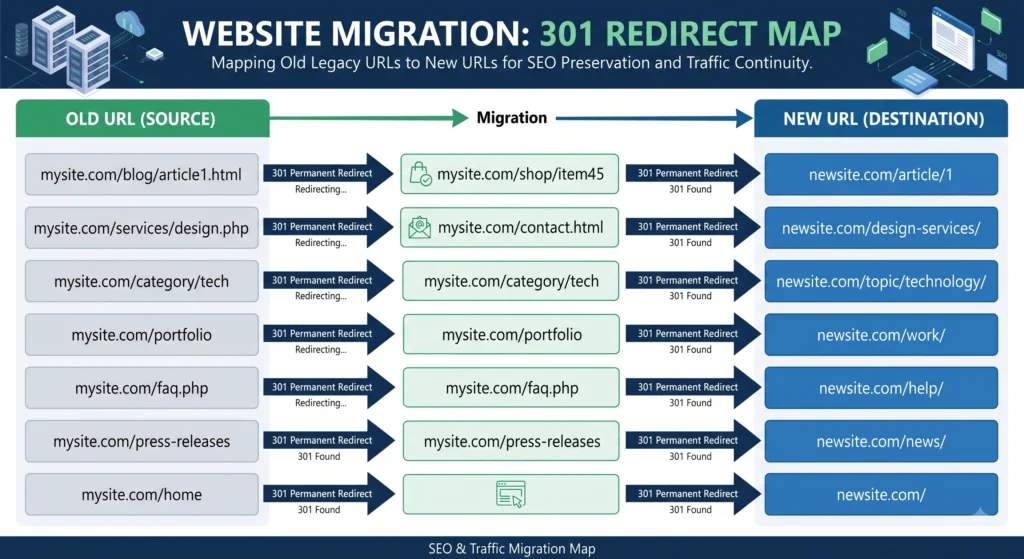
Search visibility is fragile during any migration. Auditors document existing URL structures, canonical tags, meta titles, structured data (schema markup), XML sitemaps, and current keyword rankings. A redirect map is built ahead of time so that every legacy URL points to its correct new destination, preserving link equity and avoiding a traffic drop after launch. Reviewing Core Web Vitals benchmarks at this stage helps set realistic performance targets for the new site.
Site Performance and Core Web Vitals
Page speed, server response times, image optimization, and caching configuration are benchmarked before migration begins. These numbers become the baseline against which the new environment gets measured, ensuring performance does not regress after cutover.
Third-Party Integrations and Extensions
Most storefronts rely on a web of extensions payment gateways, tax calculation services, email marketing platforms, ERP and CRM connections, loyalty programs, and shipping carriers. Auditors catalog every active integration, confirm whether equivalent connectors exist on the target platform, and flag any custom-built middleware that will need rebuilding. A detailed platform migration services review at this stage often shortens the overall project timeline.
Custom Code and Theme Architecture
Heavily customized themes and modules are a common source of post-migration bugs. Reviewing custom code identifies which features are essential, which are redundant, and which can be replaced with native platform functionality reducing long-term maintenance overhead.
Technical Audit Before Migration: Security and Compliance
PCI compliance status, SSL configuration, user roles and permissions, and outdated software versions are reviewed to confirm no vulnerabilities carry over into the new environment. Checking current requirements against the PCI Security Standards Council guidelines is a standard part of this step.
Hosting and Infrastructure
Server specifications, CDN configuration, database size, and traffic patterns are documented to right-size infrastructure on the destination platform and avoid performance bottlenecks during peak traffic.
Platform-Specific Considerations

Magento and Adobe Commerce
Magento and Adobe Commerce installations often carry years of custom modules, layout overrides, and third-party extensions. An audit here focuses heavily on identifying deprecated modules, database indexing issues, and custom checkout logic that must be rebuilt or reconfigured during migration.
Shopify
Shopify audits typically center on theme customizations built with Liquid, app dependencies, and how meta fields are structured, since these directly affect how product data transfers to a new environment.
WooCommerce
WooCommerce runs on WordPress, so audits include a review of plugin conflicts, database table health, and custom post types used for products, alongside standard commerce data checks.
BigCommerce
BigCommerce audits examine API usage, custom app connections, and how multi-storefront or multi-currency configurations are set up, since these features vary significantly between commerce platforms.
Headless Commerce
Headless architectures decouple the frontend from the backend, so audits focus on API contracts, content delivery network setup, and how the frontend framework consumes commerce data confirming that the same performance and flexibility carry over to the new stack.
Building the Pre-Migration Checklist
A completed technical audit before migration typically results in a checklist covering:
- Full catalog export and data mapping document
- Redirect map for every indexed URL
- List of integrations with migration status for each
- Performance baseline report
- Security and compliance summary
- Custom feature inventory with migration priority ranking
- Hosting and infrastructure requirements for the new environment
Working through this checklist before development begins turns migration into a controlled, predictable process rather than a reactive one. A post-migration testing guide pairs well with the checklist above once development is complete.
Common Mistakes to Avoid During a Migration Audit
Even well-planned projects run into avoidable trouble. A few recurring mistakes show up across most technical audit before migration processes:
- Treating the audit as a formality rather than a working document that guides development decisions
- Skipping the redirect map and relying on the new platform to “figure it out” automatically
- Underestimating custom code that has no direct equivalent on the destination platform
- Ignoring mobile performance in favor of desktop benchmarks alone
- Delaying stakeholder sign-off on the audit findings, which pushes discovery of problems into the build phase instead of before it
Catching these issues during the audit phase is far cheaper than fixing them after launch.
Tools Commonly Used in a Technical Audit Before Migration
A technical audit before migration typically draws on a mix of tools rather than a single platform:
- Crawling tools (such as Screaming Frog or Sitebulb) to map existing URLs, redirects, and metadata
- Performance testing tools (such as Lighthouse or GTmetrix) to benchmark speed and Core Web Vitals
- Database inspection tools specific to the current platform, used to review catalog and order data structure
- API testing tools (such as Postman) for cataloging integration endpoints, especially in headless commerce setups
- Security scanners to flag outdated software versions and exposed vulnerabilities
Combining automated scans with manual review by a developer produces the most reliable picture of what needs attention.
Typical Timeline and Team Roles for a Migration Audit
A technical audit before migration usually involves a small cross-functional group rather than a single person:
- A developer or technical lead reviews code, database structure, and integrations
- An SEO specialist documents URL architecture, rankings, and redirect requirements
- A project manager consolidates findings into the pre-migration checklist and assigns priority levels
- A stakeholder or business owner signs off on which custom features are essential versus optional
For a mid-sized catalog, this group can typically complete the audit and produce a finalized checklist within one to three weeks, depending on how many integrations and customizations are in place.
Technical Audit Before Migration: Frequently Asked Questions
What happens if a technical audit before migration gets skipped?
Skipping the audit stage commonly leads to lost search rankings, broken integrations, missing product data, and unexpected downtime after launch, since problems surface only after the new system goes live.
How long does a typical technical audit take?
Timelines vary based on catalog size and complexity, but most audits for mid-sized commerce sites take between one and three weeks to complete thoroughly.
Does every platform migration need the same type of audit?
Core areas like data integrity, SEO, and security apply universally, but platform-specific checks differ Magento and Adobe Commerce audits focus more on custom code, while headless commerce audits focus more on API architecture.
Can an audit be done without a developer?
Certain parts, like reviewing a sitemap or checking page speed scores, can be handled by a marketing team, but a full technical audit generally requires developer involvement to review code, database structure, and integrations properly.
Does a technical audit affect search rankings during migration?
A well-executed audit protects search rankings by mapping redirects and preserving metadata and structured data ahead of time, minimizing the visibility loss that often accompanies a platform change.
Conclusion
A technical audit before migration is not an optional formality it is the foundation that determines whether a platform switch goes smoothly or turns into a costly recovery project. Covering data integrity, SEO, performance, integrations, security, and hosting before development starts gives every stakeholder a clear, documented path forward. Reviewing a completed migration case study alongside the checklist above offers a realistic picture of how the process plays out from start to finish.