

Slow backend response times cost online retailers real revenue every single day. Server-side performance tuning for eCommerce stores addresses the root causes of sluggish page loads, checkout delays, and cart abandonment the parts of a store’s infrastructure that shoppers never see but always feel. A storefront can look polished and still lose sales if the server underneath struggles to process requests, query the database, or render pages fast enough.
The sections below break down five practical, technical fixes that consistently improve backend speed for online stores, along with platform-specific notes for Magento, Shopify, WooCommerce, headless commerce setups, BigCommerce, and Adobe Commerce.
Why Server-Side Performance Tuning Matters for Online Stores
Every additional second of server response time increases the likelihood of a visitor leaving before a page finishes loading. Search engines also factor page speed into ranking decisions, so poor server-side performance tuning can quietly suppress organic visibility even when product content and design are strong. According to Google’s Core Web Vitals guidelines, server response time is a direct input into overall page experience scoring.
Three business outcomes are directly tied to backend speed:
- Conversion rate: faster checkout flows reduce friction at the exact moment a purchase decision is made.
- Search visibility: Core Web Vitals and server response time (TTFB) factor into ranking signals.
- Infrastructure cost: an inefficient backend often means paying for more server resources than actually necessary.
Fix 1: Optimize Database Queries and Indexing
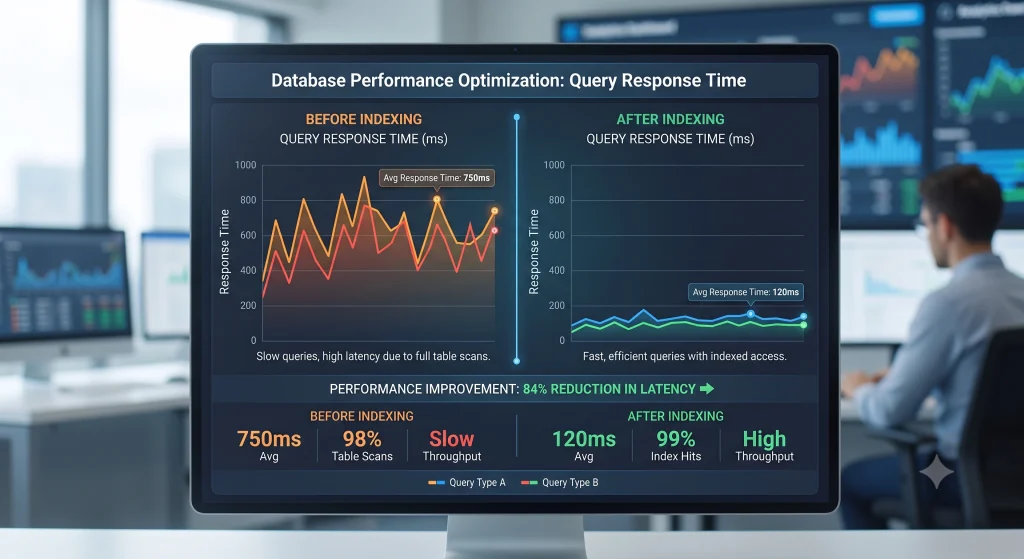
Database bottlenecks are among the most common causes of slow eCommerce backends, especially on catalogs with thousands of SKUs, layered navigation, or heavy filtering. Database-level server-side performance tuning typically delivers the largest single improvement of any fix on this list.
Practical steps include:
- Reviewing slow query logs weekly and rewriting queries that scan full tables instead of using indexes.
- Adding composite indexes on columns used together in WHERE clauses, such as product status and category ID.
- Archiving old order and log data instead of leaving years of records in active tables.
- Replacing repeated N+1 queries in custom modules or themes with batched queries.
A well-indexed database can cut catalog page load times dramatically without touching the front end at all.
Fix 2: Implement Server-Side Caching
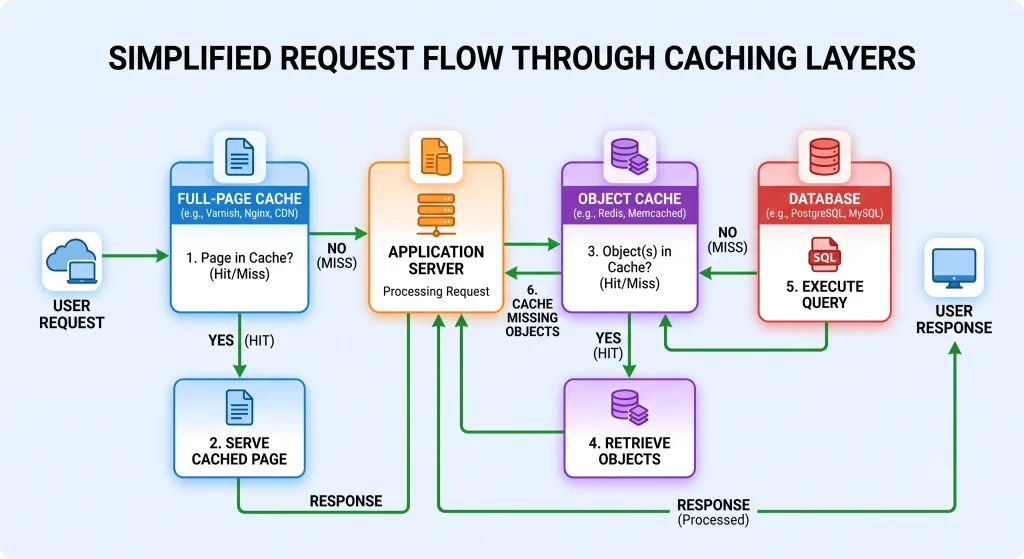
Full-page caching, object caching, and opcode caching each solve a different bottleneck, and combining them produces the largest gains for server-side performance tuning projects.
- Full-page caching (Varnish, built-in platform caches) stores rendered HTML so repeat visits skip the entire rendering pipeline.
- Object caching (Redis or Memcached) stores frequently requested data session information, cart contents, product attributes in memory instead of hitting the database repeatedly.
- Opcode caching (OPcache for PHP) avoids recompiling PHP scripts on every request.
Cache invalidation rules matter as much as caching itself. Product updates, price changes, and stock level changes need to clear only the relevant cached pages rather than flushing the entire cache, which would otherwise create a temporary slowdown spike after every catalog update.
Fix 3: Upgrade PHP Versions and Tune Server Resources for Server-Side Performance Tuning
Running an outdated PHP version is one of the simplest fixes with an outsized impact on server-side performance tuning results. Newer PHP releases include substantial performance improvements at the language engine level, independent of any application code changes.
Additional tuning steps:
- Matching PHP-FPM worker pool size to actual server memory and CPU core count, rather than leaving default values in place.
- Setting realistic memory limits per process to avoid swapping.
- Reviewing max execution time settings so long-running import or export scripts do not block customer-facing requests.
Hosting providers that specialize in eCommerce platforms typically publish recommended PHP-FPM configurations for common traffic ranges, which serve as a solid starting baseline for server-side performance tuning.
Fix 4: Serve Static Assets Through a Content Delivery Network with Server-Side Performance Tuning
Images, CSS, JavaScript, and font files add up quickly on product-heavy catalogs. Routing static assets through a content delivery network moves that load away from the origin server entirely, reducing both response time and server strain during traffic spikes such as flash sales or holiday promotions. This step is a core part of server-side performance tuning for any catalog with heavy imagery.
Combine a Delivery Network with Server-Side Performance Tuning:
- Image compression and next-gen formats (WebP or AVIF) to shrink file sizes further.
- Lazy loading for below-the-fold product images.
- Long cache-control headers for assets that rarely change, such as logos and icons.

Fix 5: Choose the Right Hosting Architecture
No amount of code-level tuning compensates for hosting infrastructure that cannot handle peak load. Shared hosting environments often struggle once a catalog grows past a few thousand products or traffic becomes seasonal and spiky a hosting mismatch undermines every other server-side performance tuning effort.
Architecture Options Worth Comparing for Server-Side Performance Tuning:
- Managed cloud hosting built specifically for a given platform, offering auto-scaling during traffic surges.
- Containerized environments (Docker/Kubernetes) that isolate services and scale individual components independently.
- Dedicated database servers, separated from application servers, for catalogs with heavy read/write demands.
Load testing before major sales events simulating concurrent checkout sessions reveals bottlenecks long before real customers encounter them. A related breakdown of provider options is available in the hosting comparison guide for online stores.
Platform-Specific Notes on Server-Side Performance Tuning
Magento
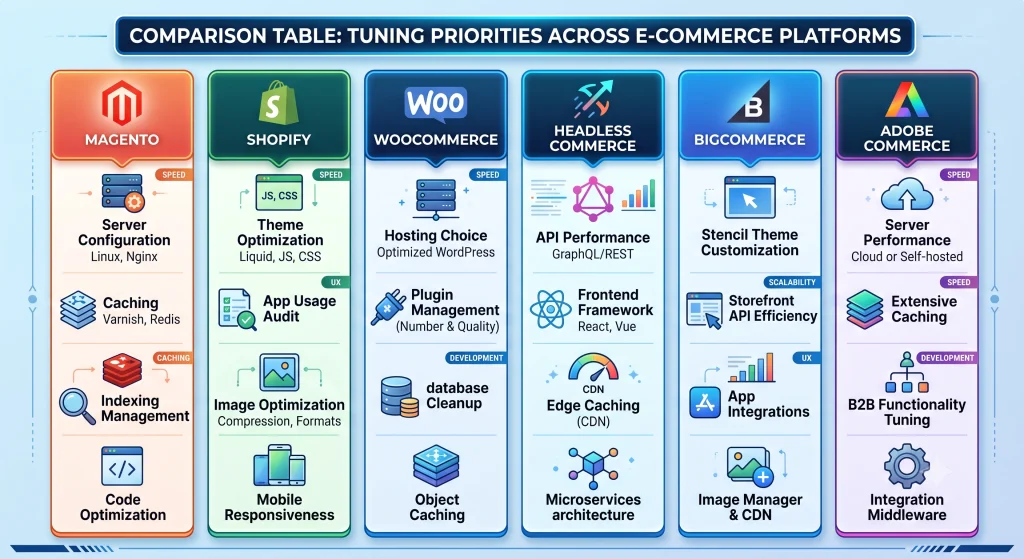
Magento benefits heavily from Redis for session and cache storage, Elasticsearch or OpenSearch for catalog search, and Varnish for full-page caching. Reindexing schedules should run during low-traffic windows to avoid competing with live customer requests, keeping server-side performance tuning efforts intact during peak hours.
Shopify
Shopify handles most server-side infrastructure automatically, so tuning efforts shift toward theme code efficiency, minimizing third-party app scripts, and reducing Liquid render complexity on high-traffic templates such as collection and product pages.
WooCommerce
Because WooCommerce runs on standard WordPress hosting, database table bloat from order and session data is a frequent slowdown source. Object caching, a dedicated database server for larger stores, and a caching plugin configured for WooCommerce’s dynamic cart and checkout pages are essential parts of server-side performance tuning on that stack.
Headless Commerce
Headless commerce setups separate the storefront from the backend commerce engine, communicating through APIs. Performance tuning shifts toward API response time, GraphQL query efficiency, and edge caching of API responses at the CDN layer, since the frontend framework alone cannot compensate for a slow backend API.
BigCommerce
BigCommerce manages core infrastructure on the platform side, so tuning attention goes toward Stencil theme optimization, reducing custom script overhead, and using the platform’s built-in edge caching effectively for high-traffic storefronts.
Adobe Commerce
Adobe Commerce (Magento’s enterprise tier) adds built-in Fastly integration and cloud infrastructure tooling. Fine-tuning Fastly VCL rules, database read replicas, and scheduled indexing jobs delivers the largest server-side performance tuning gains for large catalogs with complex pricing rules.
Frequently Asked Questions About Server-Side Performance Tuning
What is server-side performance tuning in eCommerce?
Server-side performance tuning refers to optimizing backend infrastructure database queries, caching layers, server configuration, and hosting architecture so pages load faster and checkout processes run reliably under traffic load.
How much can caching improve page load speed?
Full-page and object caching combined often cut server response time by more than half on catalog and product pages, though exact gains depend on traffic patterns and how well cache invalidation rules are configured.
Does upgrading PHP really make a measurable difference?
Yes. Each major PHP release has historically delivered noticeable execution speed improvements at the engine level, meaning identical application code runs faster simply by upgrading the underlying PHP version.
Is a content delivery network necessary for a small store?
Even small catalogs benefit from a delivery network once product images and scripts add meaningful weight to page load, particularly for shoppers located far from the origin server.
How often should database indexing be reviewed?
Reviewing slow query logs and indexing strategy on a monthly basis is reasonable for growing catalogs, with more frequent reviews recommended around major sales events or after significant catalog expansion.
Conclusion
Backend speed is rarely solved with a single change. Database efficiency, caching layers, PHP configuration, asset delivery, and hosting architecture all interact, and neglecting any one of them creates a bottleneck that limits the benefit of tuning the others. Store owners who treat server-side performance tuning as an ongoing maintenance practice rather than a one-time fix see the most consistent gains in speed, search visibility, and conversion rate over time.