

A storefront can pass every technical checklist fast indexing, zero downtime, clean server logs and still send shoppers away empty-handed. Magento search is a common example of that gap. The engine returns results in milliseconds, the catalog is fully indexed, and yet a shopper typing “blue running shoes size 9” walks away with nothing relevant on the screen. The system worked; the customer did not get what was needed.
That disconnect is not rare. It shows up across small boutique stores and large enterprise catalogs alike. A broken feature is rarely the cause. Instead, the real issue is a mismatch: what search engineering measures is not the same as what shoppers actually experience with Magento search on a daily basis.

Why Technically Correct Magento Search Still Frustrates Shoppers
Search health dashboards typically track uptime, query response time, and index freshness. None of those metrics say anything about relevance. A query can return in 80 milliseconds and still surface the wrong products, an empty results page, or items sorted in an order that makes no sense to a human browsing with intent.
Magento search built on Elasticsearch or OpenSearch indexing is designed to be fast and stable, not necessarily to understand intent. A shopper searching for “waterproof jacket” expects outerwear; a literal keyword match might return a jacket with “water-resistant” nowhere in the title, or worse, unrelated accessories that happen to share a tag. The infrastructure is doing exactly what it was configured to do matching strings while missing the shopping goal behind the string.
For a broader look at how search performance is defined technically, Google Search Central documentation outlines the difference between crawlability, speed, and relevance signals that also apply conceptually to on-site search engines.
Common Gaps Between Functional Magento Search and Customer Expectations
Relevance Versus Exact Matching
Out-of-the-box relevance scoring often weighs exact text matches heavily. It rarely has enough context about which fields matter most to buyers. A brand name typed by mistake, or a partial model number, can push the right product far down the results page even though the underlying data exists in the catalog. Magento search relevance tuning through Elastic’s relevance ranking guide explains how scoring algorithms weigh fields differently by default.
Synonym and Typo Handling
Shoppers rarely type perfect queries. “Sneakers” and “trainers,” “TV” and “television,” or a simple typo like “wather bottle,” all describe the same intent but can return very different or empty result sets if synonym dictionaries and fuzzy matching are not configured deliberately. Algolia’s guide to typo tolerance is a useful external reference for how fuzzy matching is typically handled outside Magento’s native tooling.
Attribute and Filter Alignment
A search result set might be technically accurate yet practically unusable if filters do not map to how customers actually shop. Sorting by “newest” when the audience cares about “in stock and shippable today” is a subtle mismatch that quietly increases bounce rate.
Search that is fast but irrelevant is, from a business standpoint, no better than search that is slow.
Comparing Magento Search Behavior Across Commerce Platforms
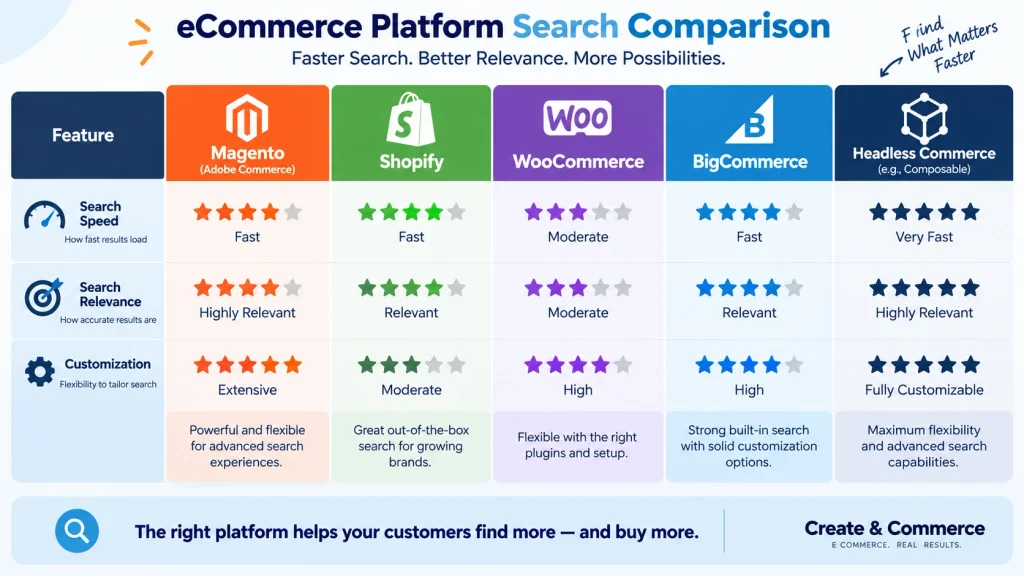
The tension between technical success and customer success is not unique to one platform. Each major commerce system approaches search differently, and each carries its own trade-offs.
Magento and Adobe Commerce Search
Adobe Commerce’s official search documentation shows granular control through Elasticsearch or OpenSearch, along with attribute-level weighting and merchandising rules. That flexibility is powerful but demands active tuning left untouched, default settings tend to favor exact-match precision over intent-based relevance.
Shopify Search
Shopify’s search and discovery documentation describes predictive search and basic synonym support included natively. The trade-off is less deep customization compared to an Adobe Commerce or headless setup, unless a dedicated search app is layered on top.
WooCommerce Search
WooCommerce’s core search functionality inherits WordPress’s native search by default, which is text-based and limited for large catalogs. Merchants running sizable inventories usually add a dedicated search plugin or an external indexing service to reach acceptable relevance.
BigCommerce Search
BigCommerce’s faceted search feature set provides merchandising tools within its native platform, generally requiring fewer add-ons than WooCommerce for mid-sized catalogs, though very large or highly specialized catalogs may still benefit from an external search layer.
Headless Commerce Search
In a headless architecture, search is often decoupled entirely from the storefront and handled through a dedicated service such as Elasticsearch, Algolia, or a similar API-driven engine. That separation allows fine control over ranking logic and UI presentation, but it also means relevance tuning becomes an explicit engineering task rather than a platform default.
Across every one of these systems, the underlying lesson repeats: a working index is only the starting point, not the finish line for the search experience shoppers actually rely on.
Diagnosing the Magento Search Disconnect: A Practical Framework
Before rebuilding an index or switching search vendors, a structured review tends to surface the real issue faster than guesswork.
- Log real queries. Reviewing actual search terms typed by shoppers, especially the ones producing zero results, reveals patterns no dashboard metric will show.
- Compare intent to output. For a sample of common queries, checking whether the top three results genuinely match shopper intent not just keyword overlap highlights relevance gaps quickly.
- Test on mobile and desktop separately. Autocomplete behavior, filter visibility, and result-page layout can differ enough between devices to change conversion outcomes.
- Audit synonym and stopword lists. Many relevance issues trace back to missing synonym entries or overly aggressive stopword filtering that strips meaningful terms from a query.
- Check attribute completeness. Products missing key attributes, tags, or descriptive text simply cannot surface for the queries shoppers use to find them.
A detailed breakdown of shopper search behavior and expectation patterns is available through the Baymard Institute’s e-commerce search research, and the Nielsen Norman Group’s search usability studies add further context on how shoppers scan result pages.
Improving Magento Search Without Breaking What Works
Fixing relevance does not require discarding a stable technical setup. Several adjustments tend to produce measurable improvement without introducing new risk:
- Weight fields deliberately. Boosting product name and SKU fields above generic description text usually sharpens results for branded and model-number searches.
- Build a living synonym dictionary. Adding common misspellings, regional terms, and category synonyms based on real query logs closes many zero-result gaps.
- Enable merchandising rules for top queries. Manually curating results for the highest-traffic search terms ensures the most important products surface first, even while broader relevance tuning continues.
- Reconsider default sort order. Aligning default sorting with purchase-relevant signals, such as availability and popularity, rather than pure recency, often reduces bounce.
- Review Elasticsearch or OpenSearch configuration regularly. Index settings that were correct at launch can drift out of alignment as the catalog grows, so periodic review not a one-time setup keeps relevance stable long term.
The Magento DevDocs technical reference and OpenSearch relevance tuning guide both offer configuration-level detail for teams managing indexing directly.
Real-World Signals That Magento Search Is Failing Customers
Certain patterns tend to appear consistently on storefronts where search is technically healthy but commercially underperforming. A rising percentage of sessions that end after a single search query, without any product click, usually signals a relevance problem rather than a performance problem. Similarly, a high proportion of searches followed immediately by browsing through category navigation suggests shoppers do not trust the search results enough to rely on them.
Session recordings and heatmap tools such as Hotjar’s search behavior tracking or Microsoft Clarity can surface these moments directly, showing exactly where a shopper abandons a search results page. Reviewing a sample of these recordings alongside the zero-result query log often reveals the same handful of root causes repeating across many sessions.
Building a Long-Term Governance Process for Magento Search
Treating search as a one-time project tends to produce short-lived improvement. A governance process, reviewed on a recurring schedule, keeps relevance aligned with an evolving catalog and shifting shopper language. A practical structure typically includes three things:
- A monthly review of the zero-result query log
- A quarterly audit of synonym and attribute completeness
- A named owner a merchandising team member or a technical lead accountable for acting on findings rather than simply collecting them
Documentation matters as much as process. Keeping a changelog of relevance adjustments, alongside the reasoning behind each change, makes it possible to reverse a decision that does not perform as expected without guessing which setting caused a regression. The Adobe Commerce merchandising documentation and Search Engine Land’s ongoing coverage of search relevance provide additional grounding for teams building this kind of ongoing process.
Measuring Success Beyond Uptime and Response Time
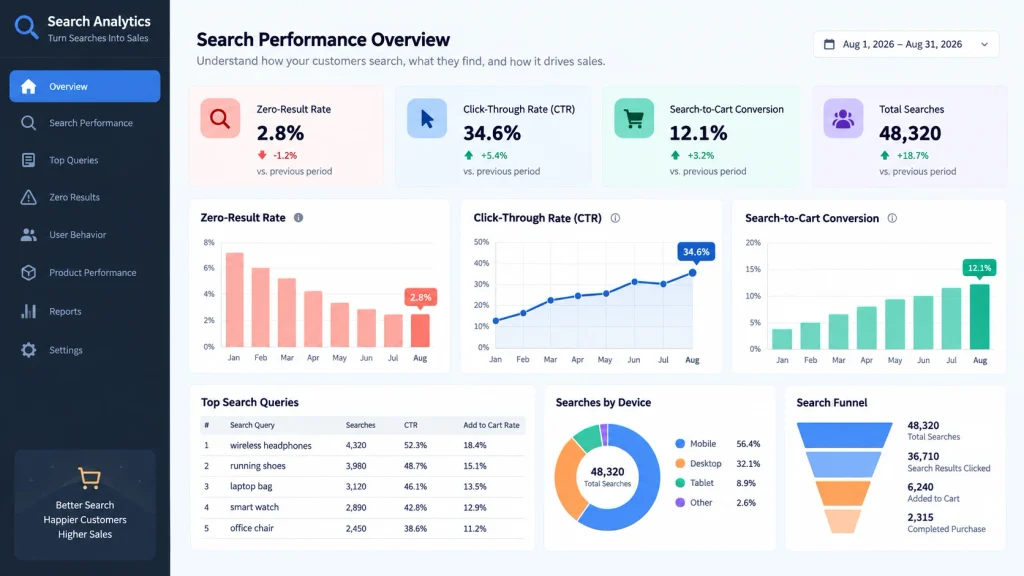
A search system should ultimately be judged by outcomes that matter to the business: zero-result query rate, search-to-cart conversion rate, and search-driven revenue share. Tracking those figures alongside traditional technical metrics gives a fuller picture of whether search is actually helping customers complete a purchase or simply responding fast to a request that goes nowhere.
Store teams that treat search as an ongoing merchandising responsibility reviewed monthly alongside promotions and catalog updates tend to see steadier improvement than teams that treat it as a one-time technical project. Search tuning, much like on-site SEO discussed in Moz’s beginner’s guide to SEO, rewards continuous small adjustments over infrequent large overhauls. Accessibility also deserves attention here, since search fields and result pages should meet the W3C Web Accessibility Initiative guidelines so every shopper, regardless of ability, can use search effectively.
Common Mistakes That Undermine Search Optimization Efforts
Even well-intentioned tuning work can backfire. A few mistakes show up again and again across storefronts trying to fix relevance.
- Over-boosting a single field. Pushing product name weight too high can bury accurate matches found through description or attribute text instead.
- Ignoring mobile autocomplete. Desktop testing alone misses layout and speed issues that only appear on smaller screens.
- Ranking by margin instead of relevance. Prioritizing high-margin products in results can quietly erode shopper trust if the top result stops matching intent.
- Treating synonyms as a one-time task. Language shifts with every new product line and seasonal trend, so a synonym list built once and never revisited slowly loses accuracy.
- Skipping A/B testing before a full rollout. A relevance change that looks correct in a spreadsheet can still reduce conversion once real shoppers interact with it.
Avoiding these missteps takes discipline, but it protects the gains already made through earlier tuning work. Small, tested changes tend to outperform large, unverified ones.
The Role of AI and Personalization in Modern Search
Search engines are increasingly expected to do more than match text. Shoppers now compare storefronts against experiences shaped by large retailers, where results feel personalized rather than purely mechanical. Machine-learning-based ranking models make that possible. They factor in browsing history, past purchases, and session behavior then reorder results for a specific visitor instead of showing the same list to everyone.
Adding personalization does not require abandoning existing infrastructure. Many teams layer a recommendation or ranking service on top of an already-stable index, using signals such as click-through data and cart additions to refine order over time. The underlying lesson stays consistent: personalization improves outcomes only when it sits on top of accurate, well-maintained relevance not as a substitute for it. A search engine that cannot match the right products to a plain-text query will not benefit from personalization layered on top of a weak foundation.
Frequently Asked Questions
Why does search return zero results even when the product exists in the catalog?
Zero-result queries usually trace back to missing synonyms, overly strict stopword filtering, or incomplete product attributes rather than a technical failure. Reviewing actual search logs typically identifies the exact term causing the gap.
Is Elasticsearch or OpenSearch required for good relevance on Magento?
Both engines provide the indexing foundation needed for advanced relevance tuning, but neither guarantees good results automatically. Configuration field weighting, synonyms, and merchandising rules determines the actual shopper experience with Magento search.
How often should search relevance be reviewed?
A monthly review cycle, aligned with catalog updates and seasonal query trends, tends to catch drift before it noticeably affects conversion. Larger catalogs or highly seasonal businesses may benefit from more frequent checks.
Does switching commerce platforms automatically fix poor search relevance?
Not on its own. Every major platform, including Shopify, WooCommerce, BigCommerce, and headless setups, requires deliberate relevance tuning. Migrating without addressing synonym lists, field weighting, and attribute completeness tends to reproduce the same problem on new infrastructure.
What is the fastest first step toward improving search relevance?
Reviewing the list of top zero-result and low-conversion search terms is typically the fastest starting point, since it points directly at the queries losing sales today rather than requiring a full system audit.
Conclusion
Search infrastructure that never goes down is a baseline expectation, not a competitive advantage. The stores that consistently convert search traffic are the ones treating relevance as an ongoing merchandising discipline one grounded in real shopper queries, tested regularly across devices and platforms, and refined long after the initial technical setup is considered complete. A stable Magento search deployment paired with a disciplined review process turns a purely technical achievement into a measurable business result.