

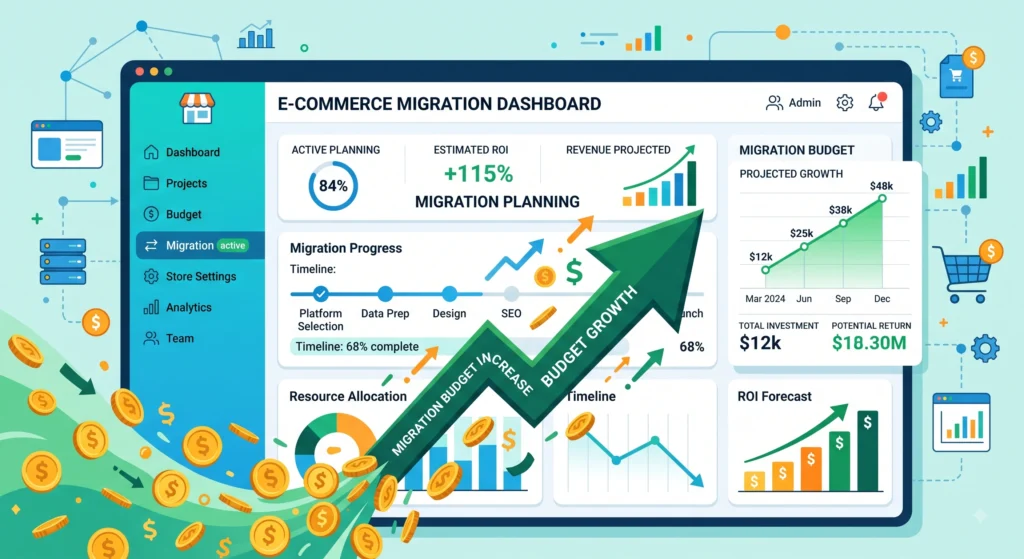
Moving away from Magento or upgrading to a newer platform is a major financial decision for online retailers. A Magento migration budget depends on store size, catalog complexity, and custom features. It also depends on the platform you choose, such as Adobe Commerce, Shopify, WooCommerce, BigCommerce, or headless commerce. Understanding the migration cost before starting the project can prevent budget overruns. It also helps avoid unexpected costs during development.
A typical Magento migration budget ranges from a few thousand dollars for a small catalog moving to WooCommerce, to well over six figures for an enterprise store rebuilding on Adobe Commerce with custom integrations. The guide below breaks down every cost category, compares platform-specific pricing, and outlines hidden expenses that often get left out of initial project estimates.
Why Businesses Migrate Away From or Within Magento
Several factors typically trigger a migration decision. Magento Open Source requires significant developer resources to maintain, host, and secure. Adobe Commerce, the paid enterprise tier, carries licensing fees that scale with revenue and can become costly for growing merchants. Security patches, extension conflicts, and self-hosting costs push many store owners to consider SaaS platforms like Shopify Plus or BigCommerce Enterprise.
Common Magento Migration Budget Triggers Include:
- Rising hosting and maintenance costs on self-hosted Magento
- Adobe Commerce licensing fees increasing after a revenue threshold is crossed
- A need for faster page load speeds and better checkout conversion
- Desire for a headless commerce architecture to support multiple storefronts
- Outgrowing WooCommerce or Shopify and needing enterprise-grade catalog management
- Frequent security vulnerabilities and patch management burden
Core Cost Components of a Magento Migration Budget
Every migration project includes similar cost categories, regardless of the platform. Accurate budgeting means estimating each cost separately instead of using one lump-sum estimate.
Discovery and Planning
Before development starts, the discovery phase reviews the store’s data, custom features, integrations, and business needs. Discovery typically costs between $1,500 and $10,000 (approximately ₹1.4 lakh to ₹9.5 lakh) depending on catalog size and system complexity. Skipping this phase can cause migration costs to increase during the project.
Platform Licensing and Subscription Fees
- Magento Open Source: free to download, but self-hosting costs apply
- Adobe Commerce (Magento Enterprise): licensing starts around $22,000 per year (approximately ₹21 lakh) and scales with gross merchandise value, often reaching $100,000+ (roughly ₹95.5 lakh+) annually for larger merchants
- Shopify Plus: typically $2,000–$40,000+ per month (approximately ₹1.9 lakh–₹38.2 lakh+ per month) depending on negotiated revenue-based pricing
- BigCommerce Enterprise: custom pricing, generally starting around $1,000–$2,500 per month (roughly ₹95,500–₹2.4 lakh per month) for high-volume stores
- WooCommerce: the core plugin is free, though hosting, premium extensions, and a WordPress environment carry ongoing costs
Data Migration: Magento Migration Budget
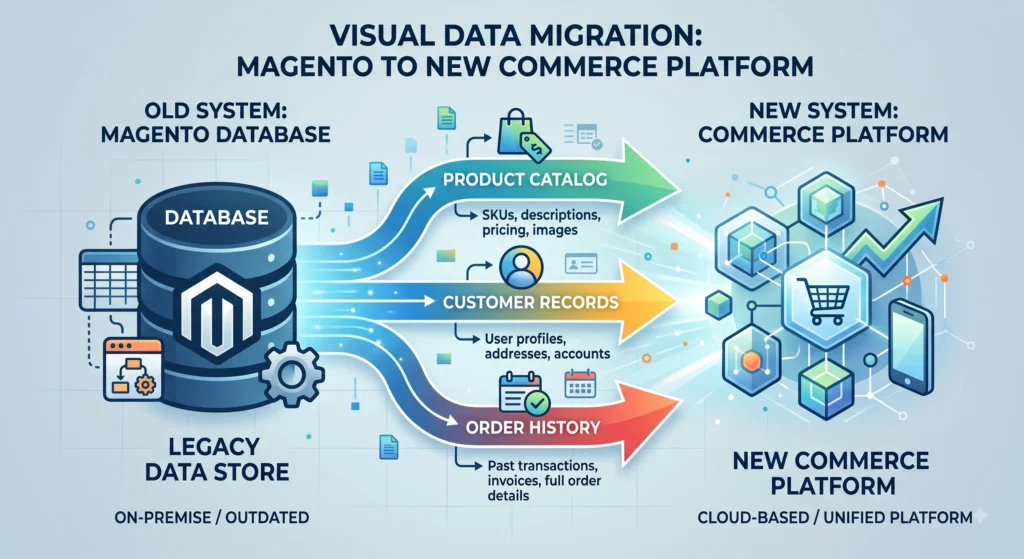
Product catalogs, customer records, order history, reviews, and SEO metadata all need to move accurately to the new platform, following a structured data migration checklist. Data migration costs range from $2,000 for a small catalog (roughly ₹1.9 lakh) (under 1,000 SKUs) to $25,000 or more (approximately ₹23.9 lakh+) for enterprise catalogs with complex attribute sets, multiple warehouses, or B2B pricing tiers.
Theme and Design Development: Magento Migration Budget
- A pre-built theme customized to match branding: $3,000–$10,000 (approximately ₹2.9 lakh–₹9.5 lakh)
- A fully custom storefront design: $15,000–$60,000+ (roughly ₹14.3 lakh–₹57.3 lakh+)
- Headless commerce frontend built on React, Next.js, or Vue: $30,000–$150,000+ (approximately ₹28.6 lakh–₹1.43 crore+), reflecting the added engineering effort of decoupled architecture
Custom Functionality and Extensions
Loyalty programs, subscription billing, custom checkout flows, B2B quoting tools, and ERP or CRM integrations all add development time. Extension licensing on Magento alone can add $500 to $5,000 per extension annually (roughly ₹47,750 to ₹4.8 lakh), while custom-built features are typically billed at development agency hourly rates, which commonly range from $75 to $250 per hour (approximately ₹7,160 to ₹23,875 per hour).
Third-Party Integrations and Magento Migration Budget
Payment gateways, tax calculation services, shipping carriers, email marketing platforms, and inventory management systems each require configuration and testing. Integration costs typically fall between $1,000 and $8,000 per system (approximately ₹95,500 to ₹7.6 lakh), depending on how much custom logic is required to connect them.
Quality Assurance and Testing
Cross-browser testing, mobile responsiveness checks, checkout flow validation, and load testing are essential before launch, and following an ecommerce QA testing checklist reduces the risk of post-launch bugs. QA budgets generally represent 10–15% of total development cost and should never be treated as optional.
Training and Documentation for Magento Migration Budget
Store administrators and support staff need onboarding on the new platform’s dashboard, order management tools, and content editing workflows. Training sessions and documentation typically add $1,000–$5,000 (approximately ₹95,500–₹4.8 lakh) to a project budget.
Post-Launch Support and Maintenance
Bug fixes, performance monitoring, and ongoing updates after launch are frequently underestimated. A reasonable allocation is 15–20% of the original development cost annually for continued support.
Platform-by-Platform Budget Comparison
Migrating to Adobe Commerce: Magento Migration Budget
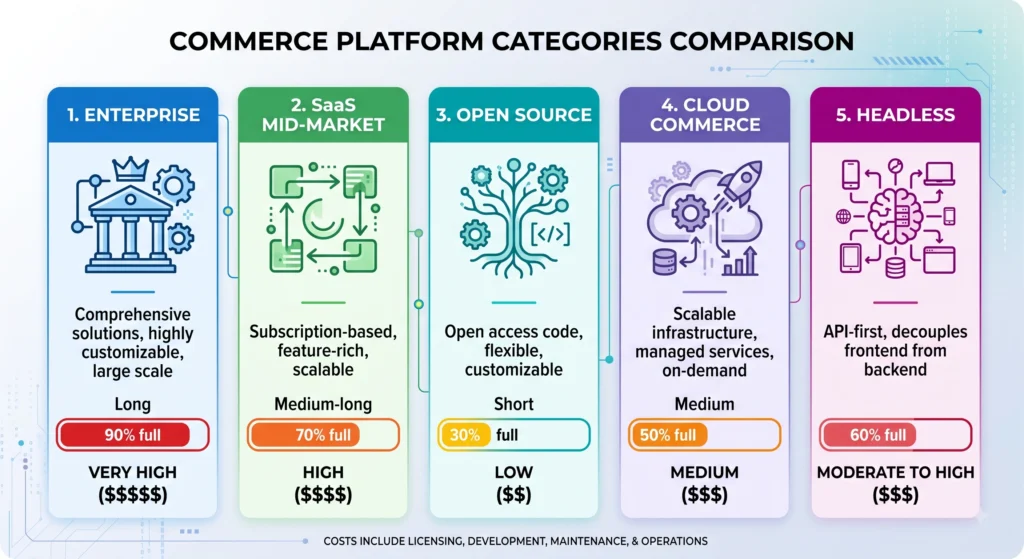
Adobe Commerce remains the closest like-for-like upgrade path from Magento Open Source, since both share the same underlying codebase. Migration costs here tend to be dominated by licensing fees rather than rebuild effort, since existing extensions and themes are often partially compatible. Total budgets typically range from $50,000 to $250,000+ (approximately ₹47.75 lakh to ₹2.39 crore+), factoring in licensing, cloud infrastructure, and enterprise-level customization.
Migrating to Shopify or Shopify Plus
Shopify migrations are popular among merchants seeking reduced infrastructure overhead, since hosting, security, and PCI compliance are handled by the platform. Budgets generally range from $10,000 to $80,000 (approximately ₹9.5 lakh to ₹76.4 lakh), with Shopify Plus projects at the higher end due to checkout customization and app ecosystem costs.
Migrating to WooCommerce: Magento Migration Budget
WooCommerce appeals to smaller merchants already comfortable with WordPress. Because the platform is open source and plugin-based, migration budgets tend to fall between $5,000 and $30,000 (approximately ₹4.8 lakh and ₹28.65 lakh), though costs rise quickly if extensive custom development or a large catalog is involved.
Migrating to BigCommerce
BigCommerce offers a middle ground between Shopify’s simplicity and Adobe Commerce’s flexibility, with strong built-in B2B and multi-storefront features. Typical migration budgets range from $15,000 to $70,000 (approximately ₹14.3 lakh to ₹66.85 lakh), depending on catalog complexity and integration needs.
Migrating to Headless Commerce
A headless commerce approach decouples the frontend presentation layer from the backend commerce engine, often using a platform like Adobe Commerce, BigCommerce, or Shopify as the backend with a custom-built frontend. Because engineering effort is higher, budgets commonly range from $75,000 to $300,000+ (approximately ₹71.6 lakh to ₹2.87 crore+), making headless commerce best suited for larger brands prioritizing performance, flexibility, and omnichannel delivery.
Sample Budget Breakdown for a Mid-Sized Store
A mid-sized retailer with roughly 5,000 SKUs migrating from Magento Open Source to a new platform can expect costs distributed across every phase of the project. Discovery and planning generally accounts for $5,000 to $8,000 (approximately ₹4.8 lakh to ₹7.6 lakh), while first-year platform licensing typically falls between $10,000 and $40,000 (roughly ₹9.5 lakh and ₹38.2 lakh) depending on the destination platform chosen. Data migration for a catalog of this size usually costs $6,000 to $15,000 (approximately ₹5.7 lakh to ₹14.3 lakh), and theme or design work adds another $8,000 to $25,000 (roughly ₹7.6 lakh to ₹23.9 lakh).
Custom features and third-party integrations tend to represent the largest variable cost, ranging from $10,000 to $35,000 (approximately ₹9.5 lakh to ₹33.4 lakh) depending on complexity. Quality assurance and testing typically requires $4,000 to $10,000 (roughly ₹3.8 lakh to ₹9.5 lakh), while training and documentation for staff adds a further $1,500 to $4,000 (approximately ₹1.4 lakh to ₹3.8 lakh). Combined, a project of this size lands in an estimated total range of $44,500 to $137,000 (approximately ₹42.5 lakh to ₹1.31 crore), though actual figures shift considerably based on region, agency rates, and the number of custom features required. Enterprise brands with millions in annual revenue should expect budgets well beyond this range.
Hidden Costs That Often Get Overlooked: Magento Migration Budget
- SSL certificates and domain configuration on the new environment
- SEO redirect mapping to preserve search rankings after the URL structure changes
- Loss of historical analytics data if not properly exported beforehand
- Staff productivity loss during the learning curve on a new admin dashboard
- Extension or app compatibility gaps discovered mid-project
- Additional QA rounds after unexpected bugs surface post-launch
- Content migration for blog posts, landing pages, and marketing assets separate from the product catalog
Timeline Considerations That Affect Budget
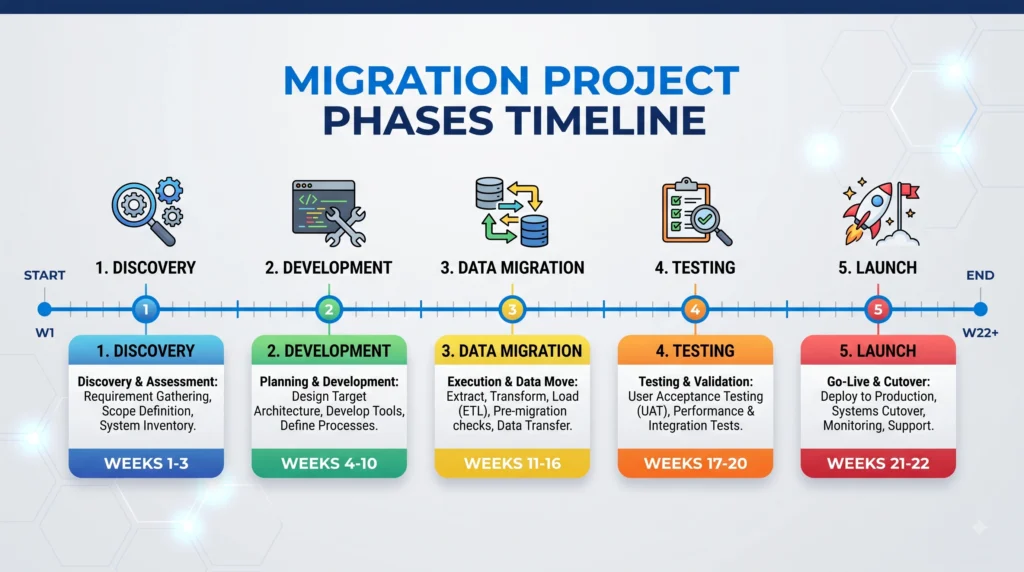
Migration timelines typically range from six weeks for a small WooCommerce project to six months or longer for an enterprise headless commerce build. Rushed timelines tend to increase hourly costs due to overtime or parallel development tracks, while overly long timelines increase total spend through extended agency retainers. A realistic middle-ground timeline, paired with clear milestone-based payments, tends to produce the most predictable budget outcomes.
Tips for Controlling Migration Costs
Careful planning consistently reduces overall spend more than any single cost-cutting tactic. A few practices that keep budgets on track include:
- Auditing existing extensions and custom code before scoping the new build, to avoid paying for features nobody uses
- Prioritizing a phased rollout launching core commerce functionality first, then layering in advanced features post-launch
- Choosing a platform whose native feature set already covers most requirements, reducing custom development
- Requesting itemized quotes from development agencies rather than a single bundled number
- Setting aside a contingency buffer of 15–20% for unexpected technical issues
How to Choose the Right Platform for a Given Budget
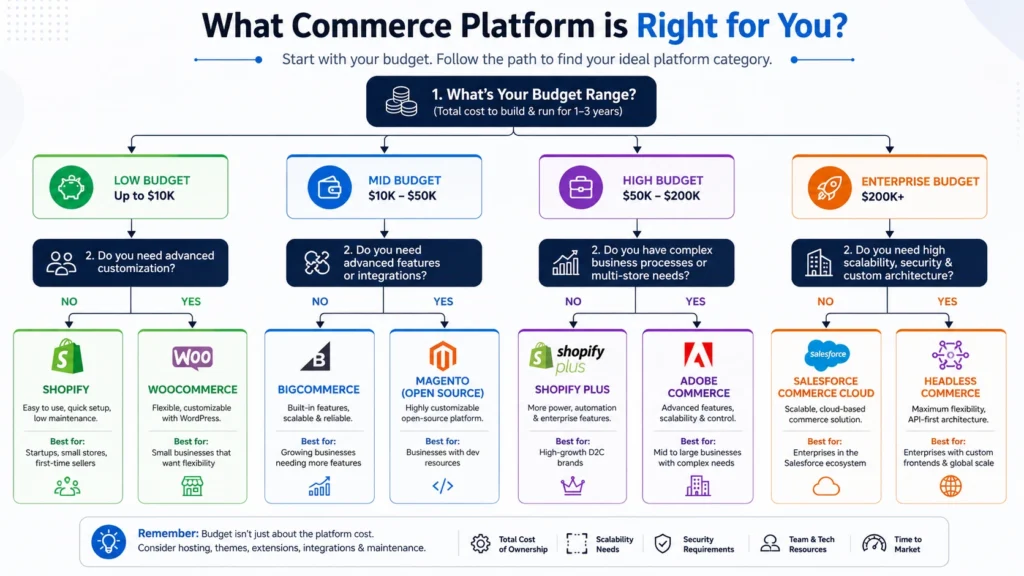
Selecting a destination platform should start with budget constraints rather than feature wish lists, since the gap between the cheapest and most expensive options can exceed $200,000 (approximately ₹1.91 crore) for the same catalog size. A few guiding questions help narrow the decision before requesting quotes from a development agency.
- Is monthly cash flow or annual licensing preferred? SaaS platforms like Shopify and BigCommerce spread cost as a predictable subscription, while Adobe Commerce often requires a larger annual commitment.
- How much custom development is realistically needed? Stores with straightforward catalogs rarely justify the added engineering cost of a fully custom or headless commerce build.
- Is B2B functionality, multi-currency support, or complex tiered pricing required? These requirements often push the budget toward Adobe Commerce or BigCommerce Enterprise rather than entry-level Shopify or WooCommerce plans.
- What is the projected growth over the next three to five years? A platform that fits current revenue but cannot scale affordably often results in a second, more expensive migration down the line.
Questions to Ask a Development Agency Before Signing a Contract
Vetting a development partner properly prevents the majority of budget overruns that occur mid-project. A written scope of work should never be the only safeguard the following questions help surface hidden costs before a contract is signed.
- Does the quoted price include QA and post-launch bug fixes, or are those billed separately?
- How are change requests handled once development has started, and what is the hourly rate for scope additions?
- What happens if data migration reveals corrupted or incomplete records in the existing catalog?
- Is SEO redirect mapping included, or does it require a separate specialist?
- What ongoing support retainer is recommended after launch, and what does it cover?
- Can references or case studies from similarly sized migrations be provided?
Agencies unwilling to answer these questions in detail, or those offering a single flat number without an itemized breakdown, tend to be the source of the largest budget surprises later in a project.
Frequently Asked Questions About Magento Migration Budget
How much does a basic Magento migration typically cost?
A basic migration for a small catalog moving to a platform like WooCommerce or standard Shopify can range from $5,000 to $15,000 (approximately ₹4.8 lakh to ₹14.3 lakh), while larger or more complex projects run significantly higher.
Is Adobe Commerce more expensive than Shopify Plus long-term?
Licensing structures differ significantly Adobe Commerce charges a flat annual fee tied to revenue, while Shopify Plus pricing is often negotiated based on sales volume. For many mid-sized merchants, Shopify Plus offers lower predictable costs, though Adobe Commerce may provide more built-in flexibility for complex B2B catalogs.
Does data migration ever get skipped to save money?
Skipping proper data migration is not recommended, since losing historical order data, customer accounts, or SEO metadata can damage both operations and search rankings. Cutting corners here often costs more in the long run through lost revenue and support headaches.
How long does a typical Magento migration take?
Timelines range from six weeks for small, straightforward projects to six months or more for enterprise-level headless commerce builds involving custom integrations.
Are there ongoing costs after a migration is complete?
Yes. Hosting or platform subscription fees, extension licensing, and a support retainer for bug fixes and updates typically continue well beyond the launch date, and should be budgeted as a recurring annual expense rather than a one-time cost.
Which platform offers the lowest total cost of ownership?
For smaller catalogs, WooCommerce generally offers the lowest total cost due to its free core software, though hosting and premium plugins add up over time. For larger enterprise catalogs, total cost of ownership depends heavily on transaction volume, custom feature needs, and whether a SaaS or self-hosted model is chosen.
Conclusion
A Magento migration budget is rarely a single number it is a combination of discovery work, licensing, data migration, design, custom development, testing, training, and ongoing support. Costs vary widely depending on the destination platform, with WooCommerce and Shopify generally offering lower entry points and Adobe Commerce or headless commerce architectures suited to larger, more complex catalogs. Building a realistic budget from the start, including a contingency buffer for hidden costs, remains the most reliable way to avoid overspending and keep a migration project on track from discovery through launch.