

Online shopping behavior now favors instant experiences. Magento 2 speed can determine whether a store earns a sale or loses a visitor within seconds. A storefront that hesitates to load is treated by shoppers the same way a locked door is treated by someone standing outside a shop the next option is only a click away. This article breaks down why Magento 2 speed matters so much for stores built on this platform, what typically slows a catalog down, and which fixes produce measurable gains in revenue. Every section below ties back to one core idea: Magento 2 speed is a revenue metric, not just a technical one.
Why Magento 2 Speed Matters for Online Stores
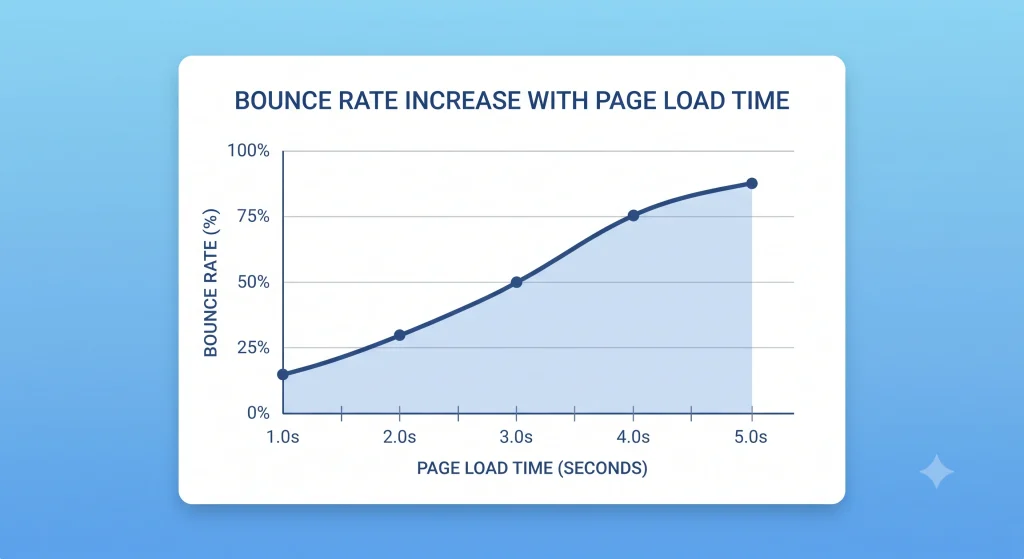
Every additional second a product page takes to load increases the chance that a shopper will leave. Retail data collected across thousands of storefronts consistently shows that pages loading within two seconds convert at a noticeably higher rate than pages crossing the four- or five-second mark. According to page speed research from Think with Google, patience for digital storefronts has been shrinking year over year, particularly on mobile devices where network conditions vary widely.
For merchants running a catalog on this platform, the stakes are higher than average because the architecture is resource-intensive by design. Themes, extensions, and unoptimized media can slow a default installation without proper tuning. Magento 2 speed, therefore, is not a cosmetic concern it is a lever that touches bounce rate, cart abandonment, search rankings, and customer lifetime value at the same time.
The Direct Link Between Load Time and Revenue
Multiple retail studies link a one-second delay to lower conversion rates. The reported decrease often ranges from seven to ten percent, depending on the industry. For a mid-sized store generating six figures in monthly revenue, that delay translates into thousands of dollars lost every month, compounding as traffic scales during peak shopping seasons. Reviewing Google’s PageSpeed Insights tool offers a quick, free way to see how a specific storefront measures up against this benchmark.
Search Visibility and Speed
Search engines consider page experience signals such as load time and interactivity when ranking pages. The Core Web Vitals guidelines from web.dev outline exactly which speed-related metrics carry the most weight. A slow catalog can also lose search visibility. Crawlers and ranking systems may view slow pages as a poor user experience.
Key Factors That Affect Magento 2 Speed
Several technical layers combine to determine how fast a storefront responds. Identifying which layer is the bottleneck is the first step toward improving Magento 2 speed in a measurable way.

Server and Hosting Environment
Shared or undersized hosting is one of the most common root causes of poor performance. A catalog with thousands of SKUs, multiple currencies, or heavy traffic needs suitable infrastructure. This includes enough RAM, SSD storage, and a well-tuned database. Reviewing a hosting comparison guide for online stores before committing to a plan can prevent this bottleneck from forming in the first place.
Third-Party Extensions
Extensions add functionality but also add overhead. Each module can add database calls, JavaScript, and CSS to every page load. Regular extension audits help identify essential modules and remove those that slow the store.
Caching Configuration
Full-page caching, Varnish, and Redis are commonly used to reduce server strain by serving pre-built pages instead of regenerating them on every request. Misconfigured or disabled caching is one of the fastest ways to cripple response times. A detailed caching configuration guide can walk through the correct setup for each layer.
Image and Media Optimization
Large, uncompressed product images are a frequent culprit behind slow catalog and product pages. Serving images in modern formats, applying lazy loading, and using a content delivery network for media assets can cut page weight substantially without reducing visual quality.
Code-Level Performance
Unminified JavaScript and CSS, excessive database queries, and outdated PHP versions all contribute to slower rendering. Keeping the platform updated to a current, supported version and following the performance best practices documentation published by the platform maintainers ensures that code-level improvements are actually applied.
Magento 2 Speed and Conversion Rate Correlation Data
Benchmarking across storefronts reveals a consistent pattern: as load time increases past the two-second threshold, both bounce rate and cart abandonment climb sharply. Stores that fall below a three-second load time on mobile devices tend to retain significantly more visitors through the checkout funnel than those exceeding five seconds. Running a free speed test through GTmetrix is a useful exercise for any store owner trying to understand where a catalog currently stands against industry averages.
Speed is not merely a technical metric it functions as a trust signal. Shoppers associate a fast, responsive storefront with a legitimate, well-run business, while a sluggish one raises subconscious doubts about reliability, even when the product catalog itself is strong.
How Slow Magento 2 Speed Affects Different Business Models
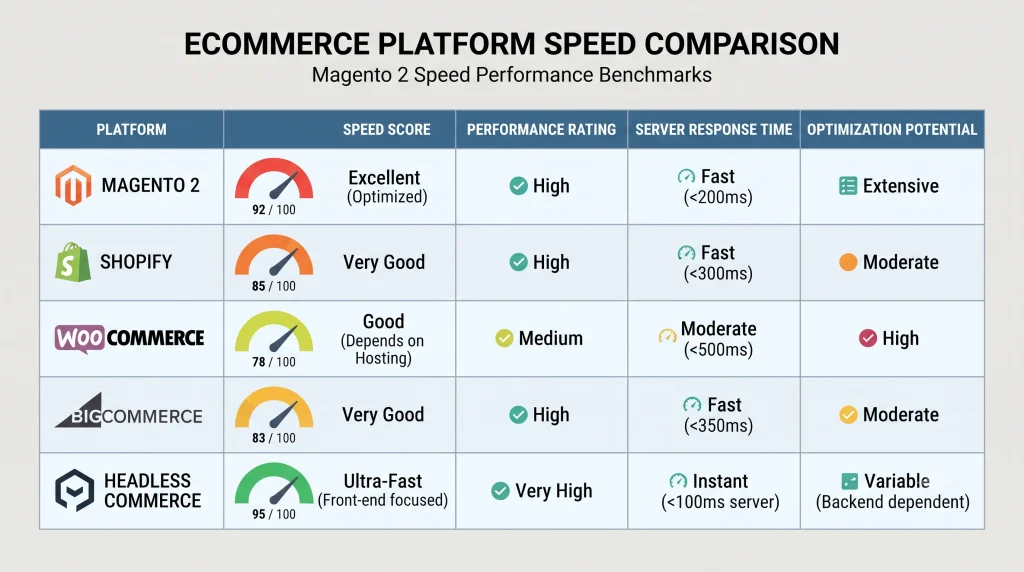
Performance expectations differ slightly depending on the platform a business runs on, but the underlying principle speed drives conversion holds true everywhere.
Magento 2 (Adobe Commerce)
Highly customizable and enterprise-capable, but performance requires active management of caching, indexing, and server resources. Stores with large catalogs benefit most from investing in dedicated infrastructure, since Magento 2 speed tends to degrade faster than average as catalog size and traffic grow without proactive tuning.
Shopify
A hosted platform where much of the infrastructure tuning is handled automatically, though heavy apps and unoptimized themes can still introduce delays similar to those seen on self-hosted platforms.
WooCommerce
Runs on WordPress, so performance is tied closely to hosting quality, plugin count, and database health. Without careful management, page speed can degrade quickly as a catalog grows.
BigCommerce
Another hosted option with built-in performance advantages, though theme customization and third-party app integrations remain common sources of slowdown.
Headless Commerce
Decoupling the frontend from the backend allows front-end rendering to be optimized independently, often producing faster perceived load times, though it requires more engineering investment to implement and maintain.
Across every model, the conclusion is the same: infrastructure choices and ongoing maintenance determine whether a storefront feels instant or sluggish to the shopper on the other end.
The Best Ways to Boost Magento 2 Speed
- Enable full-page caching and configure Varnish for production environments rather than relying on default settings.
- Audit and remove unused extensions on a quarterly basis to reduce unnecessary overhead.
- Compress and lazy-load images across category and product pages.
- Upgrade to a current PHP version supported by the platform for measurable backend gains.
- Use a content delivery network to serve static assets closer to the shopper’s location.
- Minify JavaScript and CSS and combine files where possible to reduce request counts.
- Optimize the database by cleaning logs, reindexing regularly, and removing orphaned data.
- Choose hosting built for the platform’s resource demands rather than generic shared hosting, following the server sizing recommendations published for growing catalogs.
Implementing even three or four of these practices tends to produce a noticeable improvement in Magento 2 speed within a single optimization cycle.
Common Mistakes That Undermine Magento 2 Speed
Even well-intentioned optimization efforts can be undone by a handful of recurring mistakes. Recognizing these early prevents wasted development time and keeps performance gains from quietly slipping away.
- Skipping post-deployment testing. A theme update or new extension can silently add seconds to load time if speed is not re-tested immediately after every release.
- Leaving developer mode or debug tools active in production. Settings meant for a staging environment often get left on, adding unnecessary processing overhead to live storefronts.
- Uploading images at full camera resolution. Product photography straight from a camera or supplier, without resizing or compression, is one of the heaviest and most avoidable sources of page weight.
- Stacking multiple analytics and marketing scripts. Tag managers, heatmap tools, chat widgets, and ad pixels each add their own render-blocking requests, and the combined weight is rarely audited as a group.
- Treating caching as a “set and forget” task. Cache configurations can be invalidated by updates or misconfigured modules, so periodic verification is necessary rather than a one-time setup.
- Ignoring mobile performance separately from desktop. A storefront that scores well on desktop can still lag significantly on mobile networks if responsive assets and mobile-specific caching are not tested independently.
Avoiding these patterns keeps optimization work from being undone by small, easily overlooked oversights.
Tools to Measure and Monitor Magento 2 Speed

Consistent monitoring prevents performance from silently degrading as new extensions, themes, or content get added over time. Commonly used tools include Google Lighthouse, server-level monitoring dashboards, and synthetic testing tools that simulate shopper journeys from multiple locations and device types. Establishing a monthly review cadence, guided by an internal performance monitoring checklist, keeps regressions from going unnoticed until they show up in conversion reports.
Long-Term Business Benefits of Optimizing Page Speed
The advantages of a faster storefront extend well beyond a single conversion rate metric, compounding over months and years of operation.
- Stronger organic search performance. Faster pages are favored by ranking algorithms, which gradually increases qualified organic traffic without additional ad spend.
- Lower paid advertising costs. Landing page experience factors into quality scores on major ad platforms, so a faster site often reduces cost-per-click over time.
- Higher average order value. Shoppers who experience a smooth, responsive browsing session tend to explore more products and add more items to cart before checking out.
- Improved repeat purchase rate. A fast, frustration-free experience builds the kind of trust that brings customers back for future purchases rather than switching to a competitor.
- Reduced support burden. Fewer failed transactions and timeout errors mean fewer customer service tickets related to checkout or page-loading issues.
Taken together, these compounding effects mean that Magento 2 speed pays dividends across nearly every part of the business, not just the immediate purchase funnel.
Frequently Asked Questions
What is the true impact of Magento 2 speed on conversion rate?
Even a one-second delay in page load has been associated with meaningful conversion losses in retail benchmarking studies. Stores loading within two to three seconds consistently outperform slower competitors in checkout completion rates.
What is considered a good load time for a Magento 2 store?
A load time under three seconds on desktop and mobile is generally considered acceptable, with sub-two-second load times representing a strong benchmark for competitive retail categories.
Do extensions really make a Magento 2 store slow so much?
Yes. Each extension adds additional code, database calls, and sometimes external requests. A store running dozens of unaudited extensions frequently sees compounding slowdowns that are difficult to diagnose without a systematic review.
Is upgrading hosting alone enough to fix slow speed?
Better hosting helps but rarely solves the problem completely. Caching configuration, code optimization, and image handling all need to be addressed alongside infrastructure upgrades for lasting results.
How often should Magento 2’s speed be tested?
Monthly testing is a reasonable baseline, with additional checks recommended after major updates, new extension installations, or significant catalog changes.
Conclusion
Performance is no longer a background technical detail it is a front-line factor in whether an online store converts visitors into paying customers. Magento 2 speed influences bounce rate, checkout completion, search visibility, and long-term customer trust all at once. Store owners who treat performance optimization as an ongoing discipline, rather than a one-time fix, tend to see compounding benefits in both traffic retention and revenue over time. Prioritizing Magento 2 speed today builds a stronger, more resilient storefront for every shopping season ahead.