
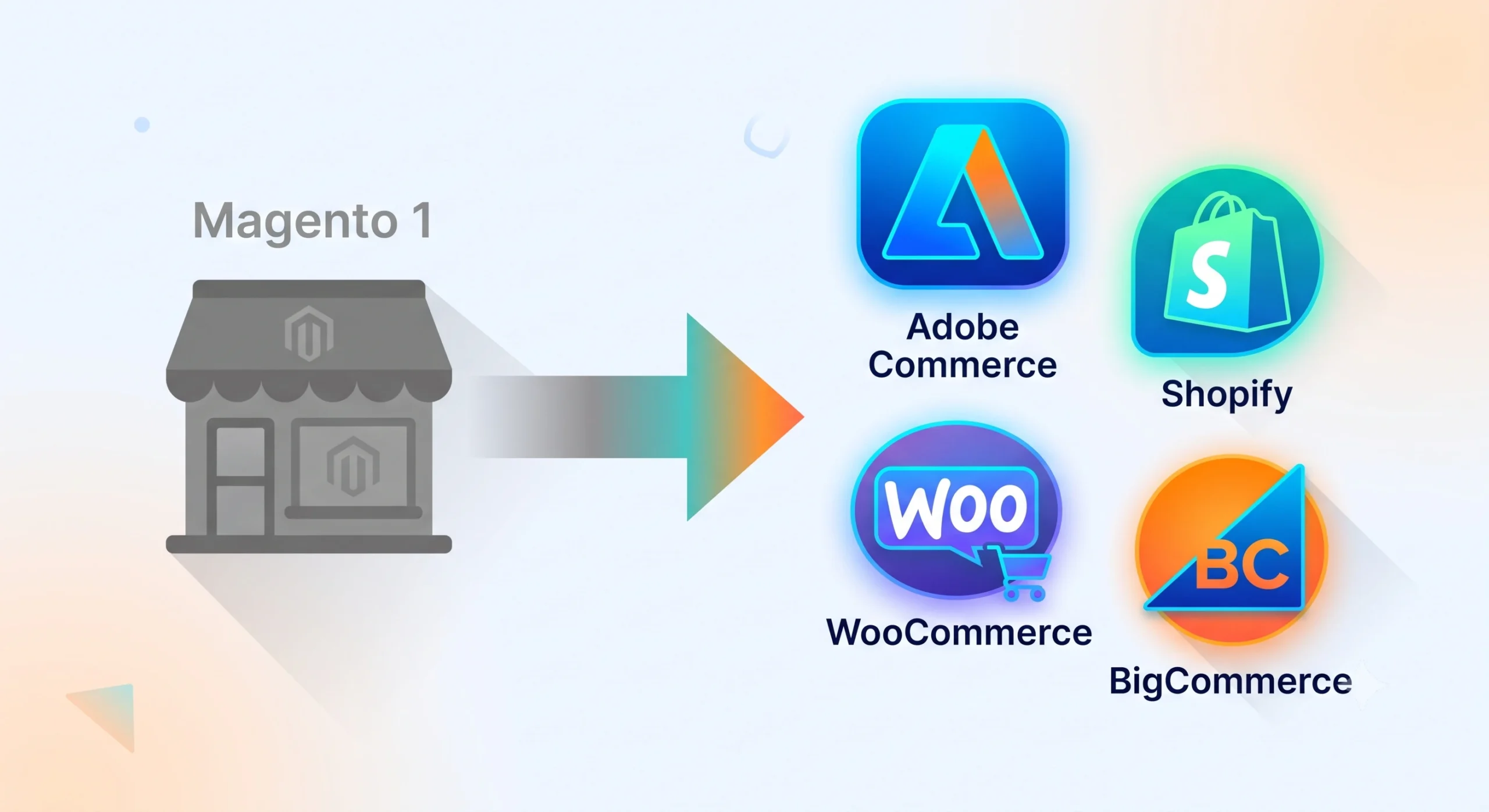
Magento 1 end of life is no longer a future concern it is a present-day operational risk for any storefront still running on the platform. Official support, security patches, and PCI compliance updates stopped years ago, yet a surprising number of merchants continue processing live transactions on unsupported code. What follows is a practical breakdown of what the shutdown actually means, what dangers come with staying put, and what the realistic paths forward look like.
What Magento 1 End of Life Actually Means
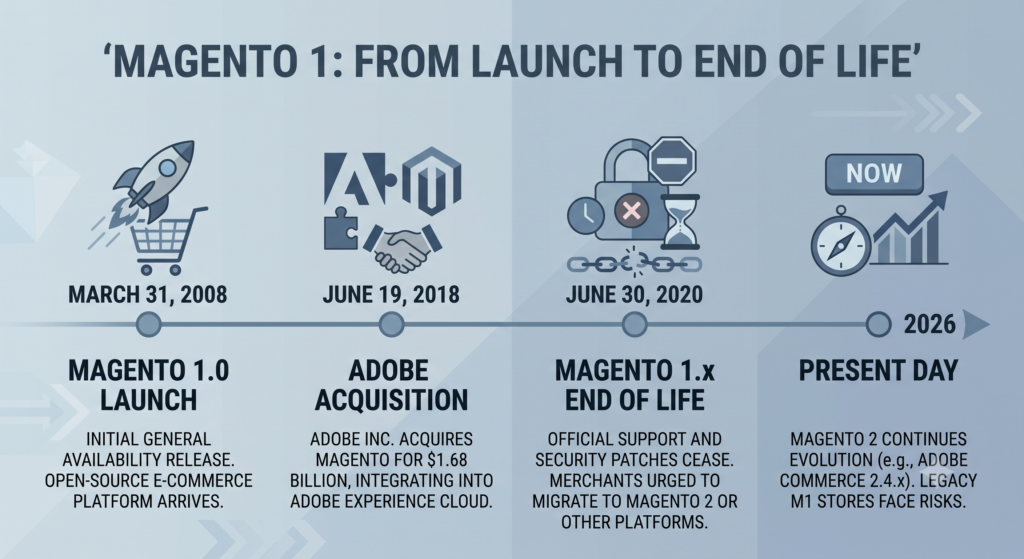
Adobe, which acquired Magento in 2018, formally retired Magento 1 in June 2020. That retirement covered core software updates, security patches, and quality fixes. Extended support for PCI DSS compliance tools lingered briefly afterward but has since expired as well. In practical terms, Magento 1 end of life means:
- No new security patches, ever again
- No PCI DSS compliance updates
- No official bug fixes from Adobe
- Extension developers gradually abandoning Magento 1 compatibility
- Hosting providers slowly phasing out server environments built for the platform
Stores still live on Magento 1 today are effectively running on frozen code in an environment that keeps evolving around them.
The Increasing Risk of Remaining on an Unsupported Platform
Magento 1 End of Life: Security Vulnerabilities Pile Up
Every month without a patch is another month exploits go unaddressed. Unsupported ecommerce software is a known target for card-skimming malware and checkout injection attacks. Breaches tied to abandoned Magento 1 stores have made headlines repeatedly since the shutdown, and the pattern is not slowing down.
PCI Compliance Becomes Nearly Impossible
Payment processors require active PCI DSS compliance to keep accepting cards. Without ongoing patches, meeting that bar on a platform past Magento 1 end of life becomes a losing battle and processors have been known to flag or restrict merchants who fall out of compliance.
Extensions and Integrations Stop Working
Magento 1 support is gradually being dropped by payment gateways, shipping calculators, tax tools, and marketing plugins. A checkout that works today may break the moment a payment provider retires its old API version.
Magento 1 End of Life: Developer Talent Is Shrinking
Fewer agencies and freelancers want to maintain legacy Magento 1 codebases. Finding qualified help gets harder and more expensive every year that passes since Magento 1 end of life took effect.
Migration Paths Beyond Magento 1 End of Life
There is no single “correct” replacement; the right fit depends on catalog size, technical resources, and growth plans. Below is a list of the top five travel destinations.
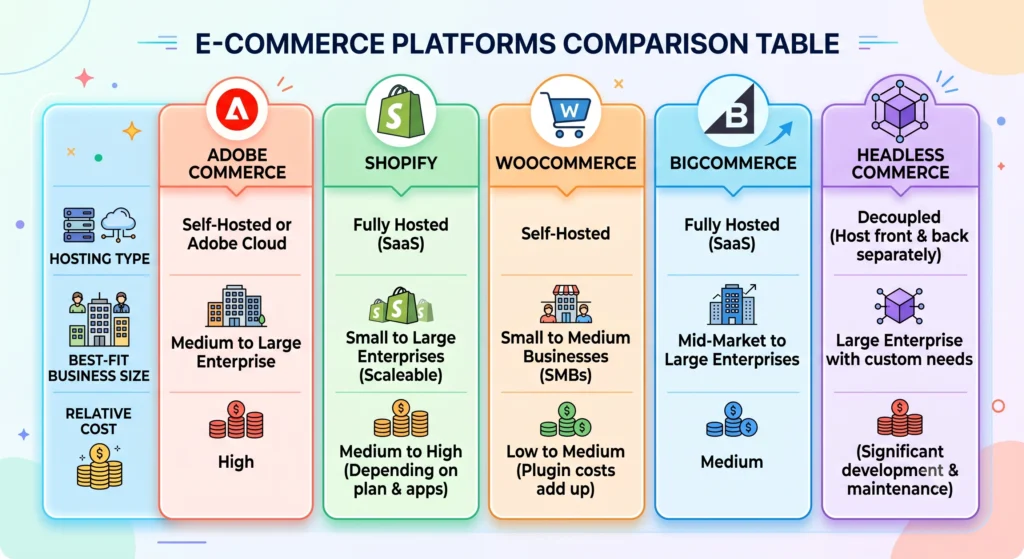
Adobe Commerce (Magento 2)
For brands with heavy customization, large catalogs, or complex B2B logic, Adobe Commerce is the most direct successor to a platform past Magento 1 end of life. It keeps a similar architecture and extension ecosystem to Magento 1 while adding modern performance tooling, built-in B2B features, and active security support.
Shopify
Shopify suits merchants who want a hosted, low-maintenance environment with a large app marketplace and fast setup times. Migration effort is moderate, and ongoing platform upkeep is handled entirely by the vendor.
WooCommerce
Built on WordPress, WooCommerce appeals to brands that already run content-heavy sites and want tight control over hosting and customization at a lower cost of entry than enterprise platforms.
BigCommerce
BigCommerce offers a middle ground SaaS convenience with strong native features for multi-channel selling, without as much reliance on third-party apps as some competitors.
Headless Commerce Architecture
For brands prioritizing custom front-end experiences across web, mobile, and emerging channels, a headless commerce setup decouples the storefront from the backend engine. Platforms like Adobe Commerce, BigCommerce, and Shopify all offer headless-ready APIs, letting a separate front-end framework handle the customer-facing experience while the backend manages inventory, orders, and pricing.
Signs a Store Is Overdue for Migration
Some warning signs make the case for movement more urgent than a general sense of caution. A payment gateway or shipping carrier discontinuing Magento 1 support is one of the clearest signals, since it forces an immediate workaround regardless of broader plans. Repeated flags from a payment processor about compliance status is another those flags rarely resolve on their own and tend to escalate toward transaction holds. A pattern of slow page loads or unexplained downtime often points to server environments that hosting providers no longer actively maintain for the platform. Difficulty finding a developer willing to touch the codebase, or quotes that keep climbing for routine fixes, both reflect a shrinking pool of specialists and rising costs that only grow steeper with time. Any one of these signs on its own is worth acting on; several appearing together usually means the timeline has already moved from “someday” to “now.”
Choosing the Right Replacement Platform
A short framework helps narrow the decision:
- Catalog complexity large, multi-attribute catalogs often favor Adobe Commerce or a headless build.
- Internal technical resources limited in-house development points toward Shopify or BigCommerce; strong development capacity opens up WooCommerce or headless options.
- Budget for ongoing maintenance SaaS platforms bundle hosting and security; self-hosted options require separate infrastructure planning.
- Growth and channel plans omnichannel or app-based ambitions often justify a headless architecture from the start.
A deeper platform-by-platform breakdown is available in the ecommerce platform comparison guide, which covers pricing tiers and feature sets in more detail.
Planning a Budget for the End-of-Life Migration of Magento 1
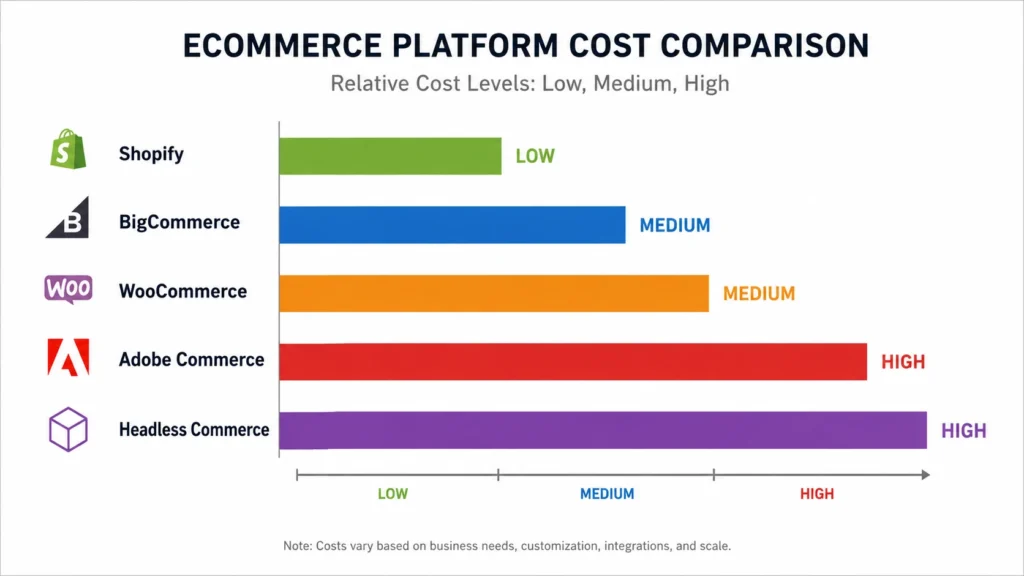
Budget planning around a Magento 1 end of life migration varies widely by platform choice. Shopify and BigCommerce typically involve subscription-based pricing with predictable monthly costs, app fees, and transaction charges layered on top. WooCommerce shifts spending toward hosting, security plugins, and developer time, since the core software itself is free. Adobe Commerce carries the highest licensing cost among the group, reflecting its enterprise feature set, but often proves cost-effective for large catalogs that would otherwise need heavy custom development elsewhere. Headless builds add front-end development costs on top of whichever backend platform gets selected a higher upfront investment that can lower long-term maintenance overhead for brands running multiple channels.
Common Mistakes That Derail a Migration
Several avoidable mistakes tend to slow down or derail moves away from Magento 1:
- Skipping a full data audit before moving, leading to lost product attributes, broken customer records, or missing order history.
- Ignoring URL mapping, which causes steep search ranking drops that proper redirects could have prevented.
- Underestimating extension dependencies, leaving checkout, tax, or shipping logic broken on launch day.
- Rushing the timeline to beat a deadline, which often skips adequate testing and surfaces as bugs during peak traffic.
- Treating the move as a one-time technical project rather than an ongoing platform relationship, leading to under-budgeting for maintenance once the new store goes live.
Steps for a Smooth Transition
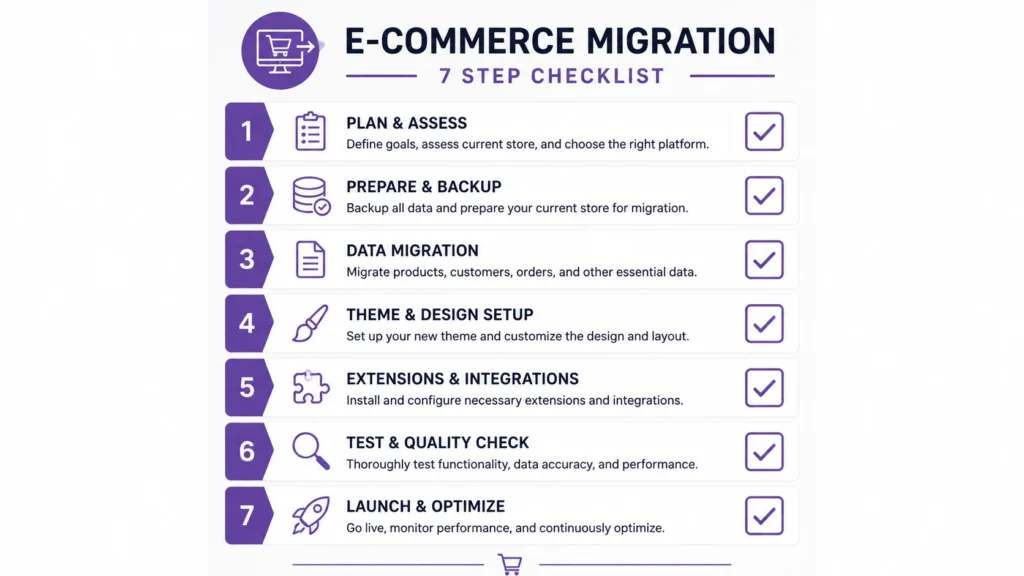
- Audit the current store catalog size, custom code, extensions, and integrations in active use.
- Back up everything database, media files, and order history before any migration work begins.
- Select a target platform based on the framework above.
- Map data migration products, customers, order history, and SEO redirects.
- Preserve URL structure where possible, or set up 301 redirects to protect existing rankings.
- Test payment gateways, tax rules, and shipping logic thoroughly before launch.
- Run a parallel staging environment to catch issues before the live cutover.
A step-by-step walkthrough of this process is covered in the Magento 2 migration guide for teams evaluating that route specifically.
What to Expect After the Launch of a New Platform
Launch day is not a finish line, but rather a transformation. Even with properly managed redirection, traffic and conversion patterns usually decline significantly during the first few weeks as search engines and returning customers get used to a new domain structure or checkout process. During this window, careful tracking of site speed, cart abandonment rates, and payment success rates identifies problems that staging environments occasionally overlook during actual traffic. Ongoing maintenance also looks different from the Magento 1 era: SaaS platforms like Shopify and BigCommerce handle security patching automatically, Self-hosted solutions like WooCommerce and Adobe Commerce still need frequent updates, but they are supported by an active codebase rather than a frozen one.
Magento 1 End of Life: Frequently Asked Questions
Is Magento 1 still usable after end of life?
Technically the software still runs, but it no longer receives security patches or compliance updates, so continued use carries growing risk with each passing month.
How urgent is moving off Magento 1?
Very. Security exposure compounds over time, and PCI compliance already lapsed for most Magento 1 environments, putting card processing privileges at risk.
What is the easiest platform to migrate to from Magento 1?
Shopify and BigCommerce typically involve the shortest setup timelines since both are hosted SaaS platforms. Adobe Commerce offers the closest architectural match for stores with heavy customization.
Does migrating away from Magento 1 hurt search rankings?
Rankings can dip temporarily during any platform change, but proper URL mapping and 301 redirects generally preserve most existing search equity.
Is headless commerce worth it for a small catalog?
Usually not immediately headless setups add development overhead that pays off most for brands needing highly custom front-end experiences or multiple sales channels.
How long does a typical migration take?
Ranges widely: a lean catalog moving to Shopify might take a few weeks, while a large, custom Magento 1 build moving to a headless architecture can take several months.
Conclusion
Magento 1 end of life closed the door on new security patches, PCI compliance updates, and official support years ago, and the gap between that unsupported platform and modern requirements only widens with time. Delaying a decision does not remove the risk it just shifts more of the exposure onto checkout security, compliance status, and site stability. Brands that treat the shutdown as a planning trigger rather than a background fact tend to land on a platform, whether Adobe Commerce, Shopify, WooCommerce, BigCommerce, or a headless build with a smoother launch and significantly less exposure along the way, that suits current catalog size, technical resources, and future ambitions.