
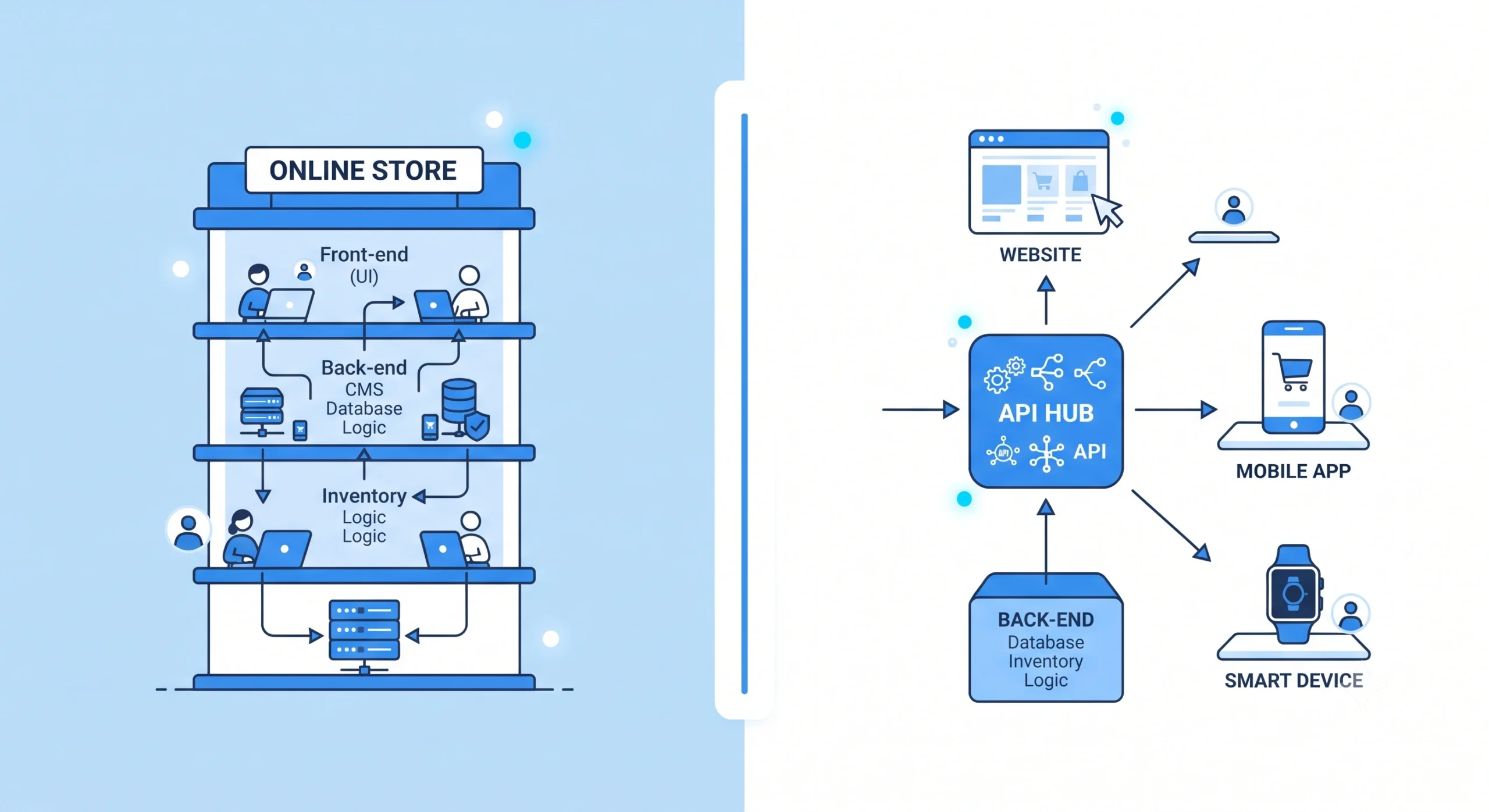
Choosing between headless commerce and traditional eCommerce is one of the most important architecture decisions facing online retailers today. The choice affects site speed, design flexibility, scalability, and how easily a catalog can expand across web, mobile, and emerging sales channels. This guide compares both models in detail, reviews leading platforms such as Shopify, WooCommerce, Magento, Adobe Commerce, and BigCommerce, and explains which situations favor a decoupled approach over a traditional setup.
What Is Traditional eCommerce?
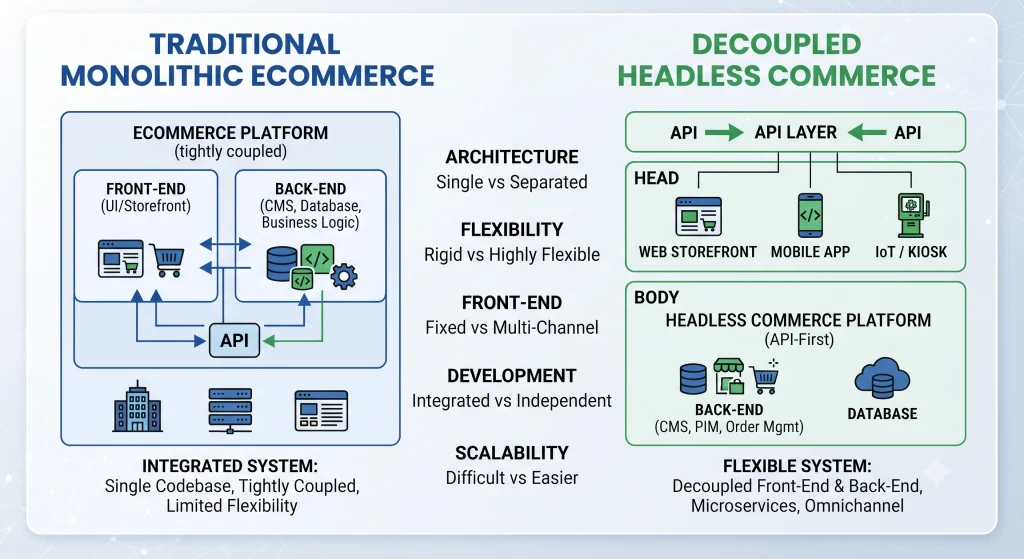
Traditional eCommerce combines the front-end, which shoppers see, and the back-end, which manages inventory, checkout, and payments, into a single connected system. Platforms such as Shopify, WooCommerce, and Magento Open Source built their reputation on this bundled model. It remains a straightforward option for smaller catalogs and businesses looking for a simpler launch.
Core traits of traditional eCommerce:
- Front-end and back-end are packaged together
- Pre-built themes reduce design and development time
- A single admin dashboard manages products, checkout, and content
- Hosting and security are typically handled by the platform provider
What Is Headless Commerce?
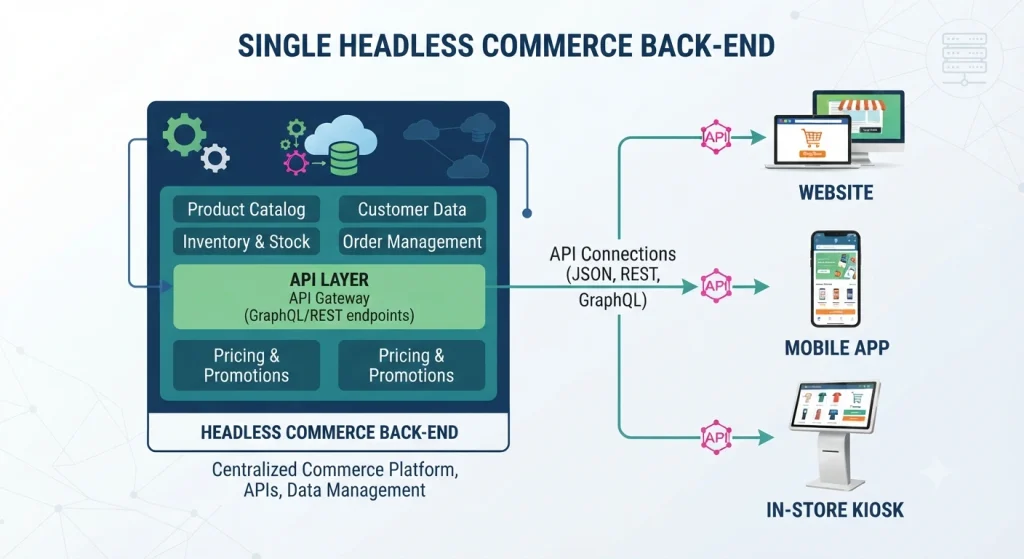
Headless commerce decouples the front-end presentation layer from the back-end commerce engine, connecting the two through APIs instead of a fixed template system. This structure allows a headless commerce storefront to be built with any framework React, Vue, or Next.js while a single back-end simultaneously powers a website, a mobile app, and even connected retail devices. Enterprise brands increasingly adopt headless commerce specifically to support this kind of multi-channel expansion.
Core traits of headless commerce:
- Front-end and back-end operate independently through APIs
- One back-end distributes content across multiple channels
- Page speed and creative flexibility increase significantly
- A skilled development team is generally required for setup and maintenance
Headless Commerce vs Traditional eCommerce: Key Differences
Architecture
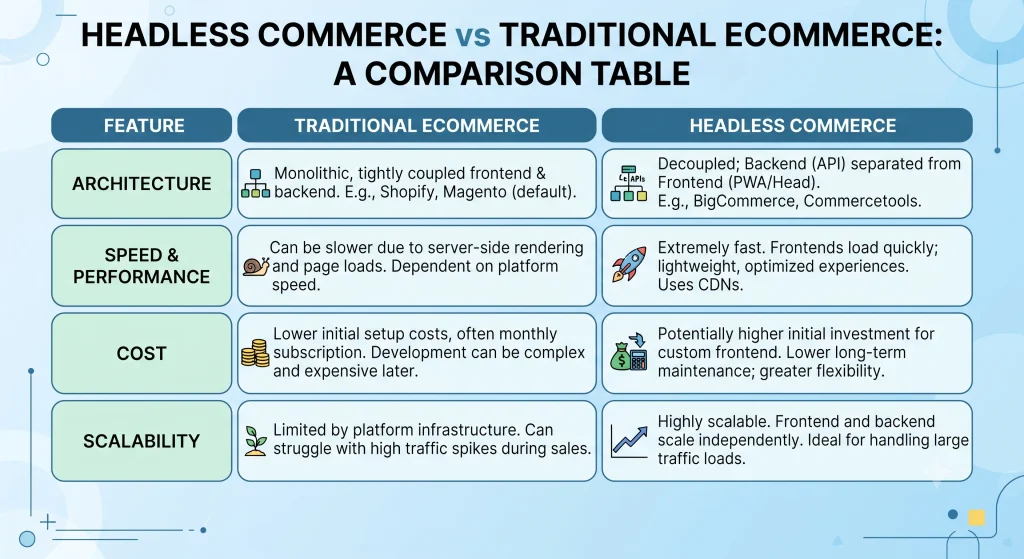
Traditional systems bundle the storefront and commerce functionality into one package, simplifying management. A decoupled architecture separates presentation from business logic, giving development teams greater control over how content and shopping experiences are delivered.
Flexibility and Customization
Design changes on a traditional platform depend largely on available themes and plugin compatibility. A decoupled storefront provides greater freedom because the front-end can be designed independently of back-end restrictions.
Performance and Speed
Modern storefronts built with frameworks and content delivery networks can load faster than heavily plugin-dependent traditional stores, particularly when the implementation is properly optimized.
Cost and Resources
Traditional platforms generally cost less to launch because themes and apps are readily available. A decoupled setup requires custom development, which raises upfront costs but may reduce long-term technical debt for businesses with complex requirements.
Scalability in Headless Commerce
Brands selling across websites, mobile applications, and physical retail can benefit from a centralized back end that feeds multiple channels. Traditional platforms may require additional configuration as the number of channels grows.
SEO Considerations
Search visibility depends heavily on site speed, technical implementation, and clean code. A modern storefront can perform strongly when these elements are implemented correctly. According to Google’s guidance on page experience, user experience and technical factors remain important regardless of the commerce architecture powering the back end.
Popular Traditional eCommerce Platforms
Shopify
A hosted platform known for fast setup and a large app marketplace. Shopify provides built-in payment processing and a wide range of themes, making it suitable for small and mid-sized catalogs that do not yet require a decoupled storefront.
WooCommerce
A WordPress plugin that converts an existing website into a full online store. WooCommerce suits content-driven brands already using WordPress and can support more flexible storefront implementations through its REST API.
Magento and Adobe Commerce
Magento Open Source and its enterprise counterpart, Adobe Commerce, serve larger catalogs that require advanced customization and B2B functionality. Adobe Commerce also offers PWA Studio, providing a path toward a decoupled storefront experience.
BigCommerce
BigCommerce provides strong native features out of the box and supports an “open SaaS” model. This allows businesses to introduce a more flexible storefront without necessarily completing a full platform migration.
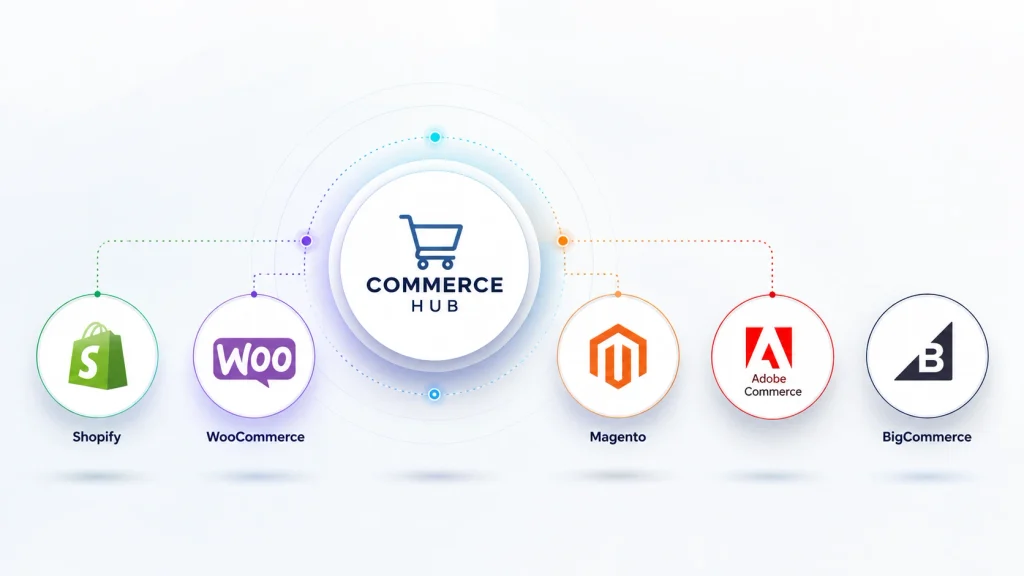
Leading Headless Commerce Platforms and APIs
Several familiar commerce platforms now support API-driven storefronts, meaning brands do not always need to abandon their existing back end to adopt a more flexible front-end architecture.
- Shopify Hydrogen and the Storefront API: enables a fully custom front-end built on Shopify’s commerce engine
- BigCommerce Open API: supports headless commerce front-ends built with any framework
- Adobe Commerce with PWA Studio: pairs enterprise commerce logic with a headless commerce front-end
- commercetools and Shopware: composable, API-first platforms built for headless commerce from the ground up
Advantages and Trade-offs of Headless Commerce
Traditional eCommerce works well when:
- A smaller catalog needs a fast, low-cost launch
- Limited in-house development resources are available
- A single web storefront currently covers the sales strategy
Headless commerce works well when:
- Multiple channels app, web, marketplace, kiosk need one unified back-end
- Page speed and highly custom design rank as top priorities
- A dedicated development team can maintain ongoing API connections
- Rapid, frequent front-end updates are part of the growth plan
Real-World Scenarios for Headless Commerce Adoption
A decoupled storefront tends to make the most sense in specific business scenarios rather than for every online store. Reviewing these patterns can help determine whether this approach fits a similar business situation.
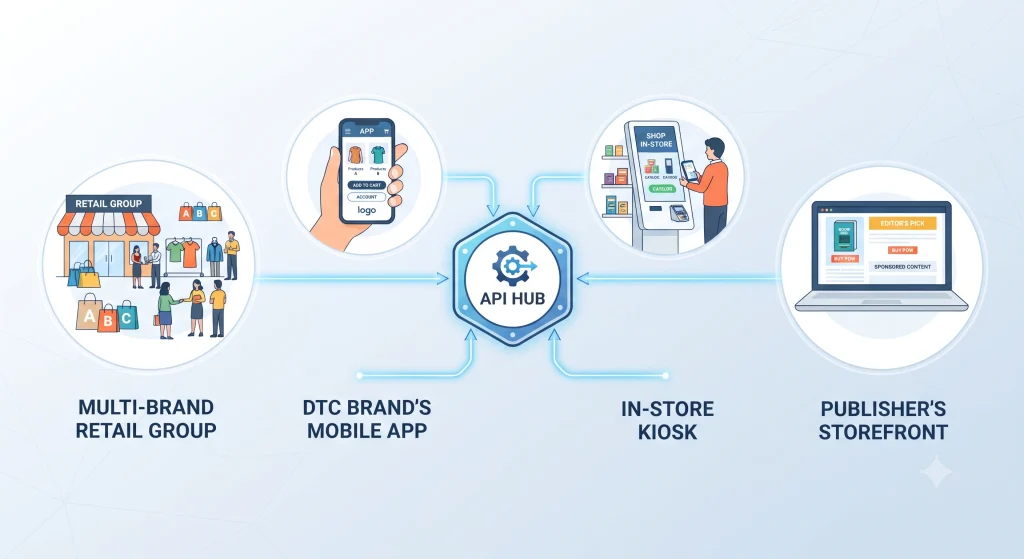
Multi-Brand Retail Groups
A parent company managing several distinct brands may use a decoupled storefront so one back end can serve multiple branded websites. Each brand can maintain its own design without duplicating inventory or checkout systems.
Direct-to-Consumer Brands Expanding Into Apps
Brands that start with a single website and later launch a mobile app may adopt a more flexible architecture because one commerce engine can power both experiences through the same API layer.
Retailers Blending Online and In-Store Experiences
Retail chains connecting online catalogs to in-store kiosks, digital signage, or connected fitting rooms can use a centralized commerce system to keep pricing and inventory synchronized across physical and digital touchpoints.
Content-Heavy Publishers Adding a Storefront
Media and publishing sites that introduce a shop section may choose a decoupled storefront so the store can match the existing website’s design system instead of being constrained by separate platform templates.
Which Is Right: Traditional or Headless Commerce?
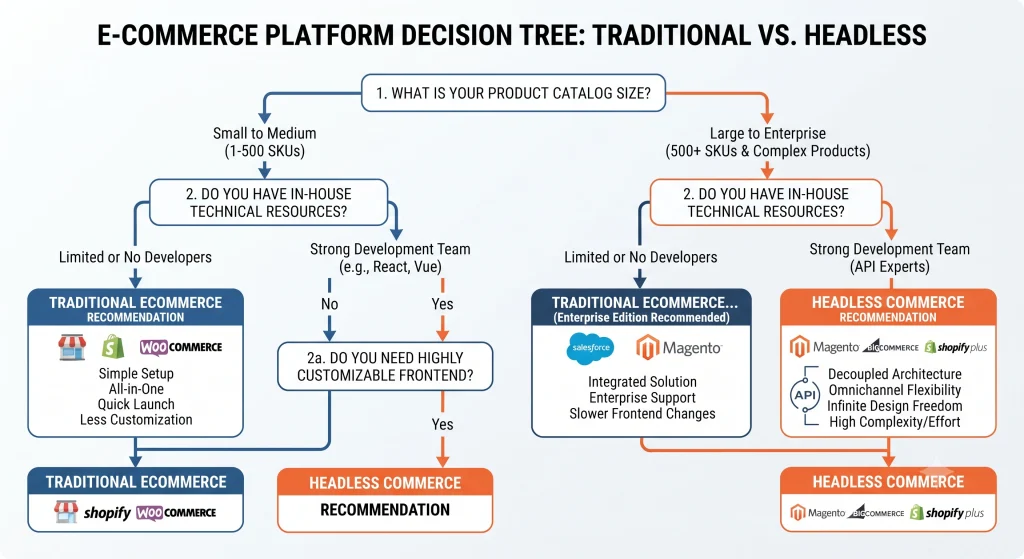
The decision generally comes down to catalog size, channel count, technical resources, and growth timeline. A boutique store launching its first website typically finds traditional platforms faster and more budget-friendly. A multi-brand enterprise selling across regions, apps, and retail partners may benefit more from a decoupled architecture, even with a higher initial build cost. Mid-sized catalogs can also follow a hybrid path, starting with a traditional platform and moving toward a more flexible setup as channel complexity increases. A related comparison of Shopify vs WooCommerce can help narrow the traditional-platform decision before evaluating a migration to a decoupled architecture.
Migration Considerations
Moving to Headless Commerce From a Traditional Storefront Involves Several Practical Steps:
- Auditing existing product data, integrations, and customer accounts see the related guide on eCommerce data migration
- Selecting a commerce API Shopify Storefront API, BigCommerce Open API, Adobe Commerce with PWA Studio, or a composable platform such as commercetools
- Building and testing a new front-end separately from the live store, referencing the front-end framework comparison guide
- Migrating SEO elements URLs, structured data, and redirects carefully to protect rankings, following Google’s site-move documentation
- Running both systems in parallel briefly before a full cutover, with support from the store launch checklist
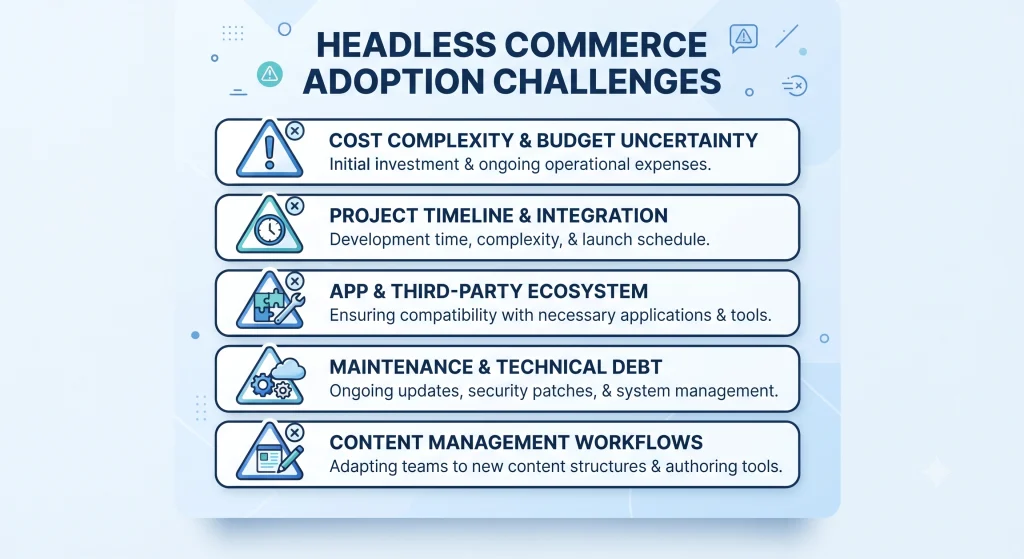
Common Challenges When Adopting Headless Commerce
Moving to a decoupled architecture can solve several limitations of a traditional setup, but it also introduces additional considerations that deserve attention before committing to a migration.
- Higher upfront investment: Custom front-end development costs more initially than installing a pre-built theme, and budgets should account for ongoing API maintenance, not just the initial build.
- Longer implementation timeline: A headless commerce launch typically takes longer than a traditional platform setup, since design, API integration, and testing all happen independently before going live.
- Loss of plug-and-play apps: Traditional platforms benefit from large app marketplaces; headless commerce often requires custom-built equivalents for features that a plugin would otherwise handle instantly.
- Ongoing technical maintenance: API connections, front-end frameworks, and third-party integrations all need continued upkeep, making a dedicated development resource close to a requirement rather than an option.
- Content management complexity: Marketing teams accustomed to a built-in page builder may need training on a separate CMS, since headless commerce frequently pairs the storefront with a standalone content system such as Contentful or Sanity.
Weighing these trade-offs against the scalability and speed benefits of headless commerce helps set realistic expectations before a migration begins.
Frequently Asked Questions About Headless Commerce
Is headless commerce more expensive than traditional eCommerce?
Initial development costs are usually higher for headless commerce, since a custom front-end must be built rather than relying on pre-made themes. Long-term costs can balance out for large catalogs that need multi-channel scalability.
Can Shopify or WooCommerce be used in a headless commerce setup?
Yes. Shopify offers the Storefront API and Hydrogen framework for headless commerce, while WooCommerce supports similar builds through its REST API paired with frameworks like Next.js.
Does headless commerce improve SEO?
Faster load times and cleaner code both achievable through headless commerce support stronger SEO performance, though results still depend on proper implementation and content strategy on any platform, per Google’s Core Web Vitals documentation.
Is Magento the same as Adobe Commerce?
Magento Open Source is the free, self-hosted version, while Adobe Commerce is the paid, enterprise edition offering added cloud hosting, support, and headless commerce tools through PWA Studio.
Which model suits a small business just starting out?
Traditional platforms such as Shopify, WooCommerce, or BigCommerce typically suit small businesses better due to lower cost and faster setup, with headless commerce becoming more relevant as channel complexity grows.
Conclusion
Choosing between traditional and headless eCommerce ultimately depends on catalog complexity, channel strategy, and available development resources. Traditional platforms such as Shopify, WooCommerce, Magento, and BigCommerce remain strong choices for straightforward, single-channel stores.
A decoupled architecture becomes more attractive when multi-channel scale, speed, and highly customized front-end design are priorities. Shopify Hydrogen, Adobe Commerce with PWA Studio, BigCommerce’s Open API, and composable platforms such as commerce tools provide different paths toward this model.
Reviewing your current catalog size, team capacity, sales channels, and long-term growth plans is the clearest way to select an architecture that fits your business without adding unnecessary technical complexity.