
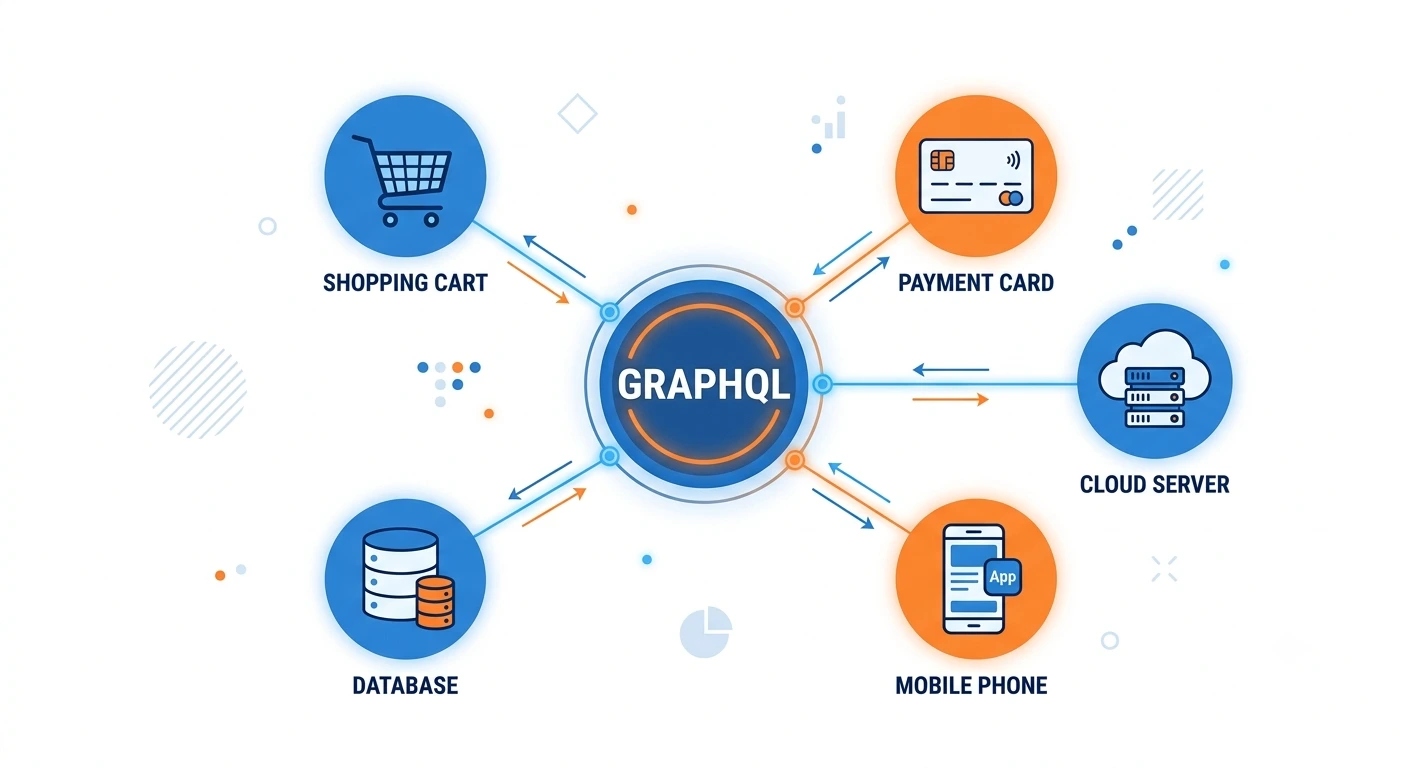
Modern online retail runs on data pulled from many directions at once product catalogs, pricing engines, inventory systems, payment gateways, loyalty platforms, and content repositories. GraphQL for eCommerce has become a practical answer to that complexity, giving storefronts a single, flexible way to request exactly the data needed for a page without over-fetching or under-fetching information. As catalogs grow and backend systems multiply, a related question keeps surfacing among architects and merchants alike: when does Adobe API Mesh actually earn a place in the stack, rather than simply adding another layer of tooling?
The following guide walks through that question in detail, covering the technical fundamentals, platform-specific considerations across Magento, Adobe Commerce, Shopify, WooCommerce, BigCommerce, and headless setups, along with practical guidance for teams deciding whether adoption makes sense. For background on core concepts before proceeding, a beginner’s guide to APIs in eCommerce is a useful starting point.
Understanding GraphQL in Modern eCommerce Architecture
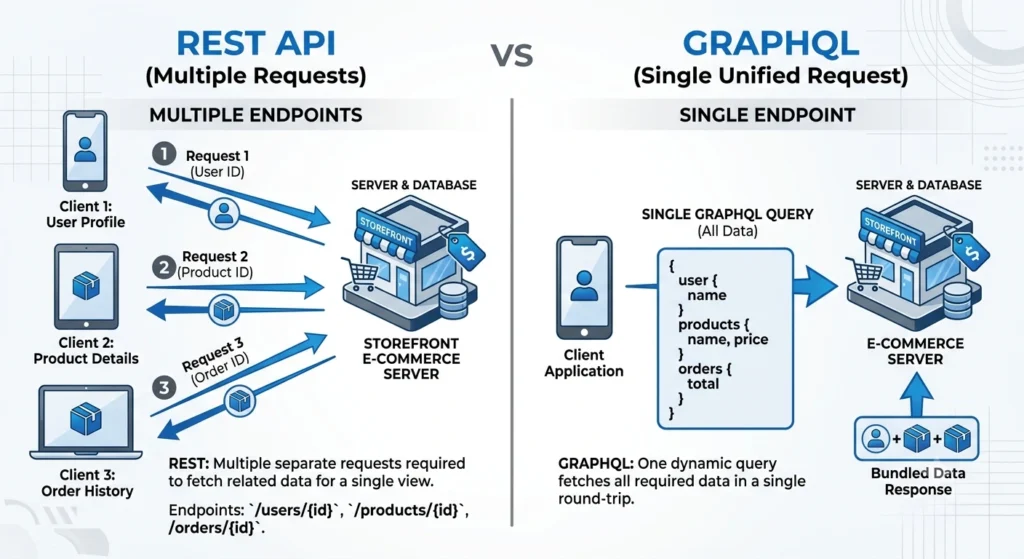
Traditional REST APIs typically require multiple round trips to assemble a single storefront page one call for product details, another for pricing, another for inventory status, and yet another for related recommendations. GraphQL collapses that pattern into a single request, letting front-end teams specify precisely which fields are required and receive a matching response.
For commerce specifically, that precision translates into measurable performance gains. Product listing pages load faster because unnecessary fields never travel across the network. Mobile applications benefit from smaller payloads. Search and filtering experiences become more responsive because a single query can express complex, nested requirements that would otherwise demand several REST endpoints stitched together on the client side.
GraphQL for eCommerce is not merely a technical preference it directly shapes conversion rates, since page speed and responsiveness remain closely tied to bounce rates and completed purchases. The official GraphQL specification documents the query language fundamentals referenced throughout the following sections.
GraphQL for eCommerce: What Is Adobe API Mesh?
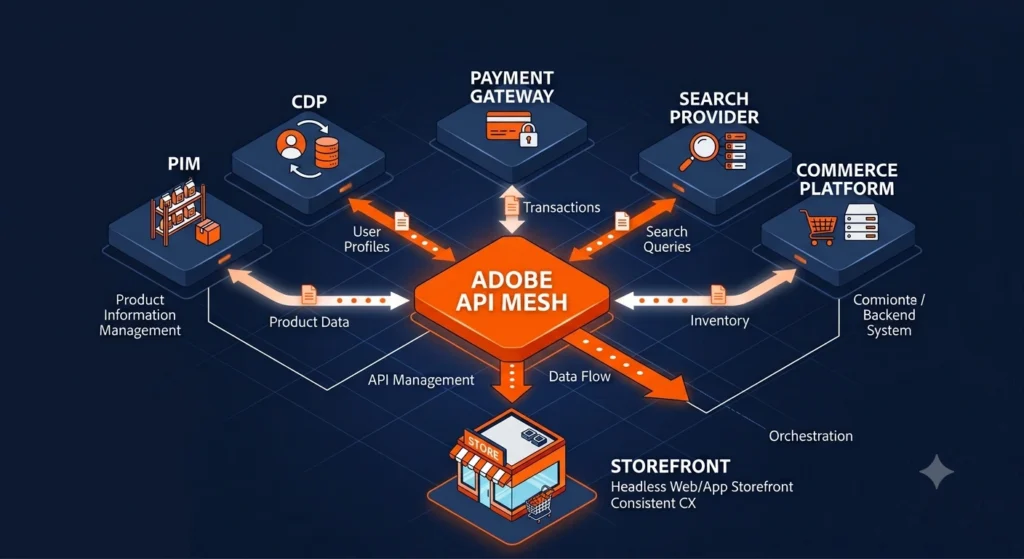
Adobe API Mesh is a managed GraphQL gateway that sits in front of multiple backend services REST APIs, GraphQL endpoints, third-party SaaS platforms, and legacy systems and unifies them into a single GraphQL schema. Rather than forcing front-end developers to negotiate separately with each backend, a single mesh endpoint handles the orchestration, merging, and transformation behind the scenes.
Built on API Mesh for Adobe Developer App Builder, the service allows organizations to combine Adobe Commerce data with external systems such as a Product Information Management (PIM) tool, a Customer Data Platform (CDP), a search provider, or a payment processor, all resolved through one query.
That consolidation matters most in composable and headless commerce environments, where a storefront frequently depends on five, ten, or more independent services working together in real time.
Core Benefits of GraphQL for eCommerce Platforms
Faster Data Fetching
Storefronts querying only the fields required for a specific view avoid the payload bloat common with REST responses. Category pages, product detail pages, and cart summaries each request a tailored dataset, reducing latency across devices.
Reduced Over-Fetching and Under-Fetching
REST endpoints often return more data than a page needs or require additional calls to fill gaps. GraphQL resolves both problems through precise, declarative queries, which becomes especially valuable on bandwidth-constrained mobile connections.
GraphQL for eCommerce: A Unified Data Layer
Rather than maintaining separate integration logic for every backend, front-end teams work against one schema. That consistency simplifies development, testing, and long-term maintenance, particularly as a commerce stack expands to include new microservices. A deeper technical breakdown appears in a related guide to headless commerce architecture.
When Adobe API Mesh Becomes Worth Adopting
Adoption decisions should rest on architectural complexity rather than trend-following. Several scenarios consistently justify bringing API Mesh into a project.
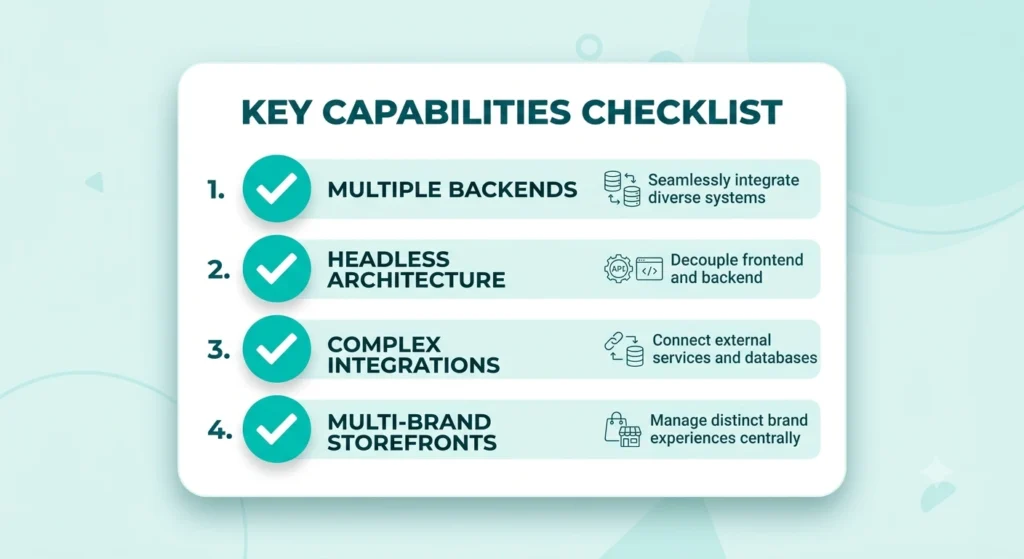
Multiple Backend Systems Feeding One Storefront
Once a storefront depends on more than two or three distinct data sources commerce platform, PIM, CMS, loyalty engine, recommendation service manually coordinating separate API calls on the front end becomes error-prone and slow to maintain. API Mesh consolidates that orchestration into a governed, centrally managed layer.
Headless and Composable Commerce Architectures
Headless setups decouple the storefront from the commerce backend entirely, often assembling functionality from several best-of-breed vendors. Adobe API Mesh fits naturally into that model, acting as the connective tissue between Adobe Commerce (or another commerce engine), third-party services, and the presentation layer, whether built on React, Vue, Next.js, or another framework.
GraphQL for eCommerce: Complex Third-Party Integrations
Enterprise storefronts frequently integrate ERP systems, tax calculation services, shipping rate engines, and marketing automation tools. Exposing each of those individually to the front end creates security risk and unnecessary coupling. A mesh layer can apply authentication, caching, rate limiting, and field-level transformations centrally, shielding the client from backend complexity.
GraphQL for eCommerce: Multi-Brand or Multi-Region Commerce
Retailers operating several storefronts across regions or brands, each with slightly different data requirements, benefit from a mesh that can merge and customize schemas per storefront without duplicating backend logic.
Smaller catalogs with a single backend and modest integration needs, on the other hand, may not see enough benefit to justify the additional operational layer. A straightforward Adobe Commerce GraphQL endpoint, without a mesh, often suffices for leaner implementations.
GraphQL and Adobe API Mesh Across Popular Commerce Platforms
Magento and Adobe Commerce
Adobe Commerce (built on Magento’s core) ships with native GraphQL support covering catalog browsing, cart management, checkout, and customer account operations. Merchants running Adobe Commerce gain the most direct path to API Mesh, since both technologies come from the same vendor and integrate with minimal friction. Businesses who use Adobe Commerce in conjunction with third-party PIM applications, Adobe Experience Manager, or Adobe Target typically experience the biggest benefits from using a mesh layer.
Shopify
Shopify offers a robust Storefront GraphQL API of its own. For merchants combining Shopify with external systems a separate ERP, a custom loyalty program, or a headless front end API Mesh can unify Shopify’s GraphQL schema with those additional services into one coherent endpoint, reducing front-end complexity in composable Shopify Plus builds.
WooCommerce
Although GraphQL support is possible with plugins like WPGraphQL and WooGraphQL extensions, WooCommerce, which is based on WordPress, has historically relied on REST APIs. Merchants running WooCommerce alongside multiple external services can use API Mesh to bring that WordPress-based GraphQL layer together with other backend systems under one schema, which is particularly useful for agencies building custom storefronts on top of WooCommerce.
BigCommerce
BigCommerce provides a native GraphQL Storefront API designed for headless implementations. Combining that endpoint with API Mesh allows merchants to merge BigCommerce catalog and checkout data with external CMS platforms, search providers, or marketing tools, without exposing separate credentials and endpoints to the front end.
Headless Commerce Setups
Regardless of the underlying commerce engine, headless architectures share a common trait: the presentation layer sits at a distance from backend logic. That separation is precisely where a GraphQL mesh delivers the most value, since front-end teams can query a single, well-documented schema instead of learning the quirks of every connected system individually.
Implementation Considerations
Rolling out Adobe API Mesh involves more than connecting endpoints. Schema design deserves careful planning so that naming conventions remain consistent across merged sources. Caching strategy matters as well mesh configurations can define per-field or per-query caching rules to reduce load on downstream systems. Authentication and authorization also need clear handling, since a mesh often aggregates data protected by different security models across separate backends.
Monitoring and observability round out a solid rollout. Because a mesh sits between the front end and several backends, tracing slow queries back to their originating service becomes essential for maintaining performance as traffic scales.
Common Challenges and Solutions
Schema conflicts occasionally arise when merged backends use overlapping field names for different data. Careful namespace planning and schema transformation rules within the mesh configuration typically resolve that issue early in development.
Latency can increase if a mesh queries multiple slow backends synchronously. Batching, caching, and selective resolver optimization help keep response times competitive.
Operational overhead is another consideration teams unfamiliar with GraphQL gateway concepts face a learning curve. Adobe’s documentation and App Builder tooling reduce that curve considerably compared with building a custom gateway from scratch.
Best Practices for Adopting Adobe API Mesh
- Start with a clear map of every backend system feeding the storefront before designing the merged schema.
- Apply caching selectively, prioritizing data that changes infrequently, such as category structures or static content.
- Keep resolver logic lightweight; heavy business logic belongs in backend services, not in mesh configuration.
- Version schemas carefully to avoid breaking existing front-end queries during updates.
- Monitor query performance continuously, especially after adding new backend sources.
- Pilot the mesh on a single storefront section, such as product listings, before expanding to checkout and account flows.
Frequently Asked Questions About GraphQL for eCommerce
Is Adobe API Mesh only useful for Adobe Commerce merchants?
No. While built by Adobe and integrating tightly with Adobe Commerce, API Mesh can connect to Shopify, BigCommerce, WooCommerce, custom REST services, and virtually any GraphQL or REST-based backend, making it relevant across commerce platforms.
Does adopting GraphQL require abandoning REST entirely?
Not necessarily. Many commerce architectures run GraphQL and REST side by side, with a mesh layer able to wrap existing REST endpoints into a unified GraphQL schema rather than requiring a full rewrite.
What size of business benefits most from Adobe API Mesh?
Mid-market and enterprise retailers running multiple backend systems, multi-brand storefronts, or headless architectures tend to see the strongest return. Smaller stores with a single backend often manage well without an added mesh layer.
How does API Mesh affect page speed?
By consolidating multiple backend calls into one client-facing query and enabling field-level caching, a well-configured mesh generally improves front-end performance compared with separate, uncoordinated API calls.
Can API Mesh work with a headless storefront built in Next.js or React?
Yes. Headless front ends built on modern JavaScript frameworks are among the most common use cases, since those frameworks pair naturally with a single GraphQL endpoint for data fetching.
Is coding experience required to configure Adobe API Mesh?
Basic familiarity with GraphQL schemas and JSON configuration files is needed, though Adobe’s App Builder tooling and documentation are designed to make setup accessible without deep backend engineering expertise.
Conclusion
GraphQL has reshaped how commerce data moves between backend systems and storefronts, cutting down on wasted network calls and giving development teams far more control over what gets fetched and when. Adobe API Mesh extends that advantage by unifying multiple backends whether Adobe Commerce, Shopify, BigCommerce, WooCommerce, or custom services into a single, governed schema.
Adoption makes the strongest case when a storefront depends on several backend systems, operates in a headless or composable architecture, or manages complex third-party integrations that would otherwise require fragile, hand-built connections. For simpler catalogs running on one backend, a lighter GraphQL setup without a mesh may remain the more practical choice. Evaluating actual architectural complexity, rather than following trends, remains the most reliable way to decide whether Adobe API Mesh belongs in a given commerce stack. Related reading: a comparison of headless vs traditional commerce platforms.