
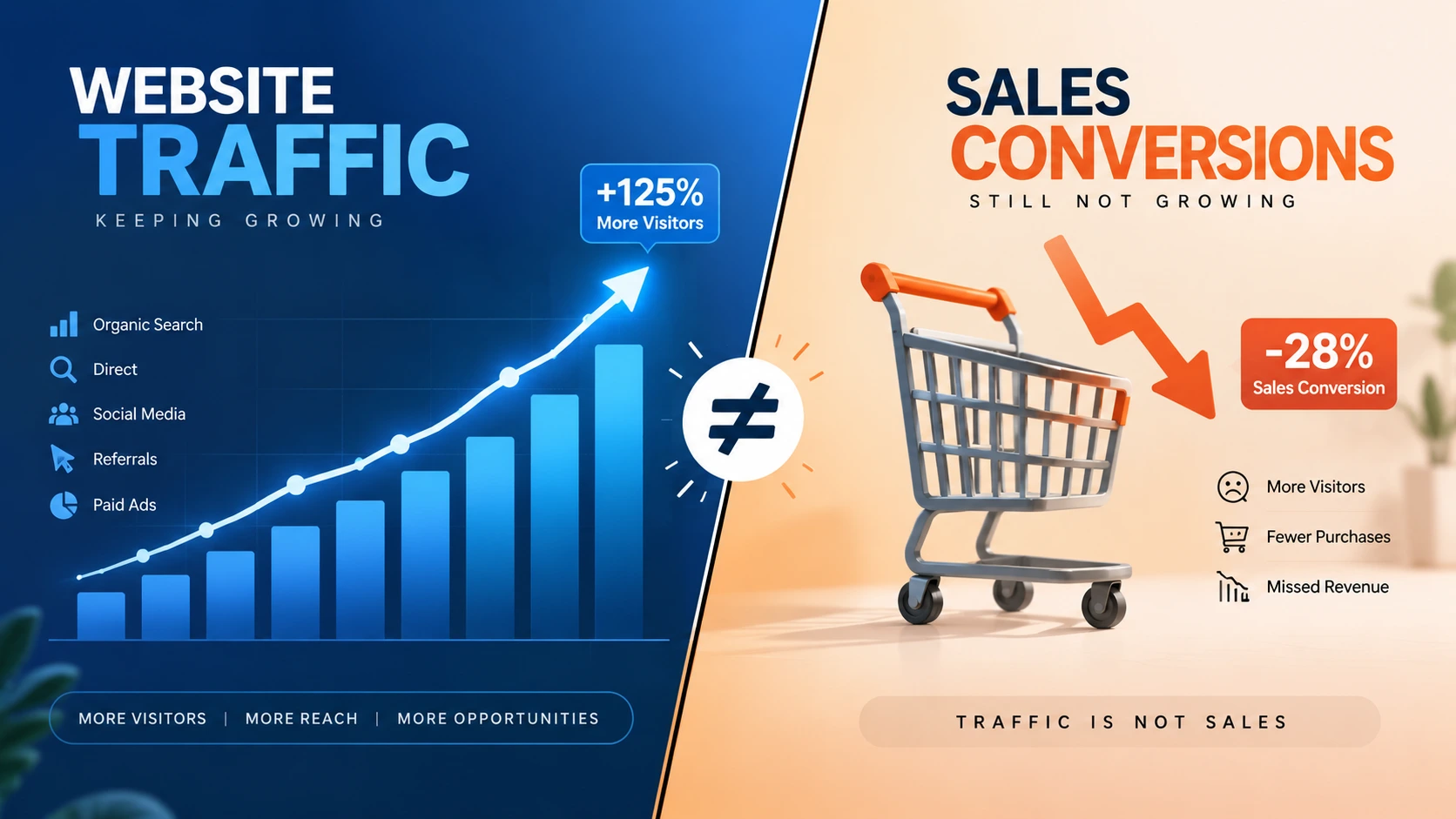
A retailer can rank on page one, run paid campaigns, and pull in thousands of monthly visitors. Yet the revenue report still stays flat. That disconnect is exactly why eCommerce sales conversion stays low despite strong traffic. The marketing engine is working. Something inside the storefront is stopping the purchase. This pattern shows up across every major platform, including Shopify, WooCommerce, Magento, BigCommerce, Adobe Commerce, and headless commerce builds.
So why does this happen? When eCommerce sales conversion stays low despite strong traffic, the cause is rarely the traffic source itself. Instead, the cause usually sits inside one of five areas:
- Page speed
- Product presentation
- Pricing clarity
- Checkout design
- Missing trust signals
The sections below break down exactly where shoppers disengage, and what typically fixes each stage of the funnel.
Traffic Is Not the Same as Revenue
A visitor from a search result or an ad click is not a guaranteed buyer. That person could be comparing prices, researching options, or simply browsing. Conversion is the moment a visitor becomes a paying customer. It depends on a completely different set of factors than the ones that drove the click.
Marketing brings people to the door. The storefront decides whether anyone walks in and pays.
Consider a retailer spending heavily on paid search or social ads while converting under one percent of visitors. That is a textbook case of poor eCommerce sales conversion. For comparison, healthy stores typically convert two to three percent of visitors, based on industry benchmark data tracked by Statista’s e-commerce research hub.
Common Reasons eCommerce Sales Conversion Stays Low
Slow Loading Speed
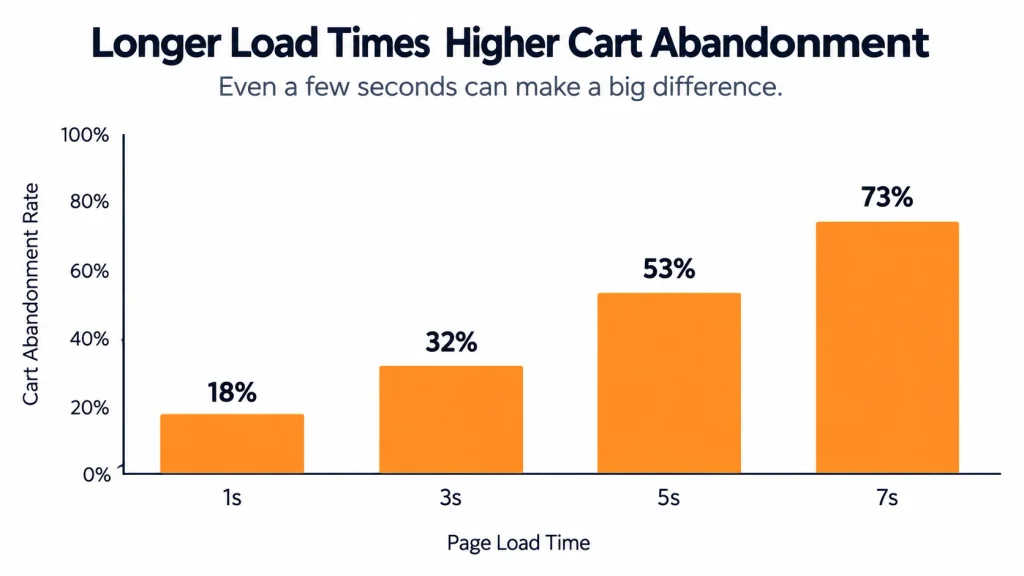
Every additional second a product page takes to load pushes abandonment higher, especially on mobile. A fast way to check this is testing load time with Google PageSpeed Insights. If the score is low, speed is likely a real factor behind weak eCommerce sales conversion. Magento and Adobe Commerce builds without proper caching often suffer more here than lighter Shopify themes.
Confusing Navigation and Site Search
Shoppers who cannot find a product within a few clicks tend to leave rather than dig further. A few common culprits stand out: category structures that go too deep, broken filters, and an internal search bar that returns irrelevant results. Each one sends potential buyers straight to a competitor instead.
Weak Product Descriptions and Photography
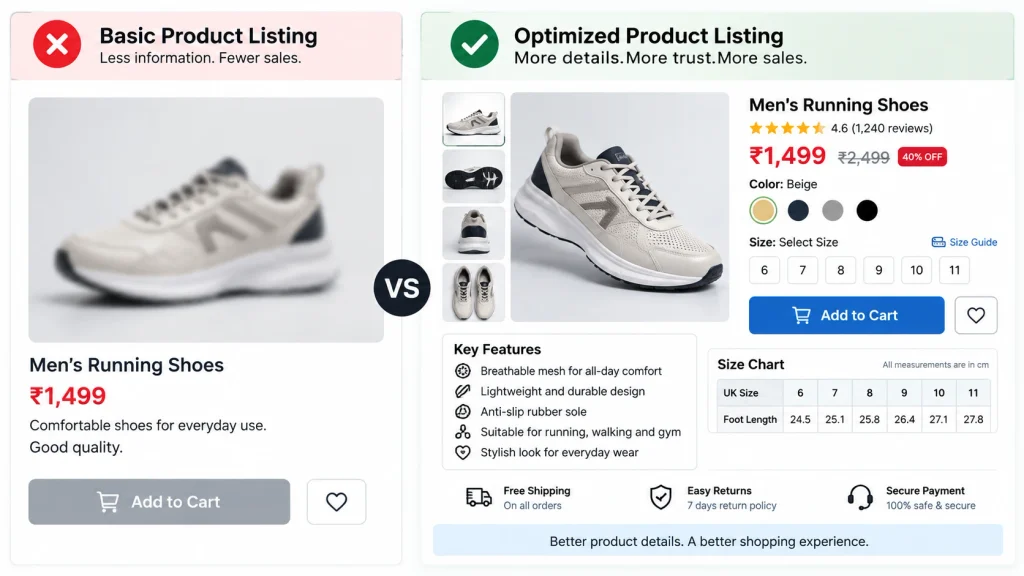
Generic manufacturer copy rarely answers the real buyer questions: sizing, material, use case, or how the product compares to similar items. Low-resolution photos make things worse. A single product angle leaves shoppers uncertain, and uncertainty rarely converts.
Missing Trust Signals
New or unfamiliar stores face a credibility hurdle. Without visible reviews, secure-checkout badges, a clear returns policy, or recognizable payment logos, hesitant shoppers tend to abandon the purchase. Nobody wants to risk a card number on an unfamiliar site. Research from the Nielsen Norman Group on usability consistently links visible trust indicators to higher checkout completion.
Checkout Friction
Checkout is where most lost sales actually happen, even after everything else works correctly. Baymard Institute’s cart abandonment research lists these as the most common friction points behind weak eCommerce sales conversion:
- Forced account creation before checkout
- Too many form fields
- The final phase is when shipping prices are disclosed.
- Limited payment options
- A checkout process that isn’t mobile-friendly
BigCommerce and Shopify both offer streamlined native checkout. WooCommerce and Magento, on the other hand, often need extra configuration to reach the same simplicity. A headless commerce setup gives full control over checkout design, but it requires solid development work to actually improve conversion rather than harm it.
Pricing and Shipping Surprises in eCommerce Sales Conversion
Unexpected costs at checkout rank among the leading causes of cart abandonment across nearly every industry, according to Think with Google consumer behavior studies. The fix is simple: show transparent pricing earlier in the shopping journey. Doing so keeps shoppers moving toward purchase instead of backing out at the last step.
Poor Mobile Experience
A desktop-optimized store that has not been properly adapted for smaller screens loses a large share of mobile shoppers before they even reach a product page. Small buttons, difficult forms, and poorly resized images all play a part. Together, these small frustrations quietly drag down eCommerce sales conversion on mobile devices specifically.
Platform-Specific Reasons Behind Weak Ecommerce Sales Conversion
Shopify
Shopify handles hosting, security, and most performance concerns automatically. So what is left for a retailer to manage? Mostly theme customization, app overload, and product page design.
WooCommerce
Running on WordPress, WooCommerce offers strong flexibility and content-marketing integration. Performance, however, depends heavily on hosting quality and plugin management. A bloated plugin stack is a frequent cause of slow WooCommerce stores.
Magento and Adobe Commerce
Both open-source Magento and enterprise-grade Adobe Commerce offer deep customization and scalability. That power comes at a cost, though: ongoing technical maintenance, caching configuration, and server tuning are all needed to protect eCommerce sales conversion.
BigCommerce
BigCommerce provides strong built-in features for scaling without heavy reliance on third-party apps. This reduces some of the performance risk seen on other platforms.
Headless Commerce
A headless setup separates the front-end presentation layer from the back-end commerce engine. This allows for highly customized, fast front-end experiences across web, mobile apps, and other channels. There is a catch, though: a poorly built front end can undo the performance benefits headless architecture is supposed to deliver.

Analyzing Traffic Sources Before Blaming the Storefront
Not all traffic behaves the same way. Before assuming the storefront is entirely at fault, it helps to check where visitors are actually coming from. Here is why: a campaign pulling in low-quality or mismatched traffic can look identical to a broken checkout on a basic analytics dashboard. Both show visitors without sales.
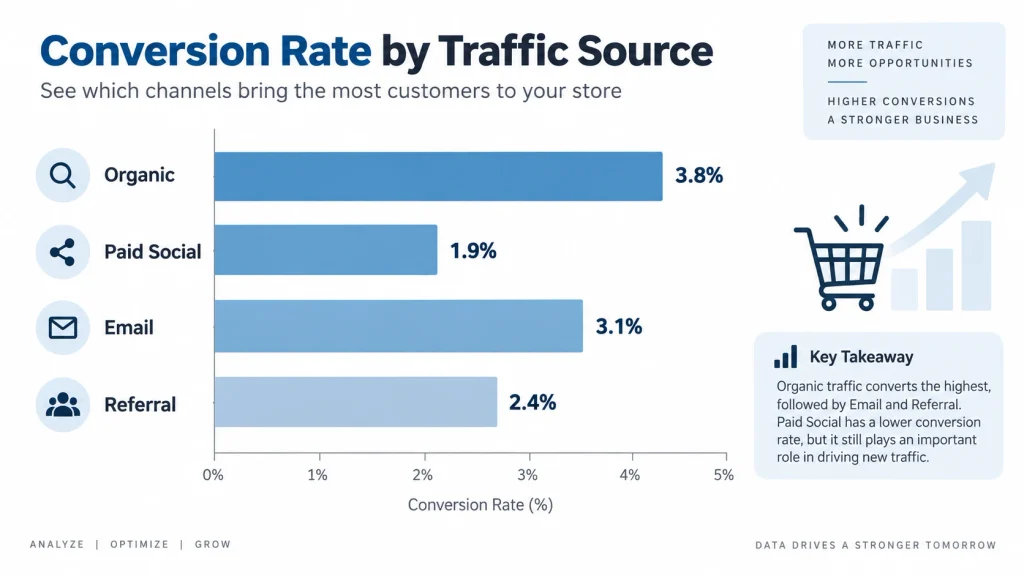
A quick source-by-source breakdown usually clears this up:
- Organic search traffic tends to convert best when landing pages match search intent closely.
- Paid social traffic often has lower purchase intent and needs stronger on-page persuasion.
- Email traffic usually converts highest, since it comes from an already-warm audience.
- Referral traffic varies widely depending on the credibility of the referring site.
If one channel converts far below the others, the issue may sit in targeting or ad creative rather than the store itself. But if every channel converts poorly at roughly the same low rate, that is a stronger signal: eCommerce sales conversion is being held back by the storefront experience, not the marketing.
Understanding Customer Intent Before the Purchase
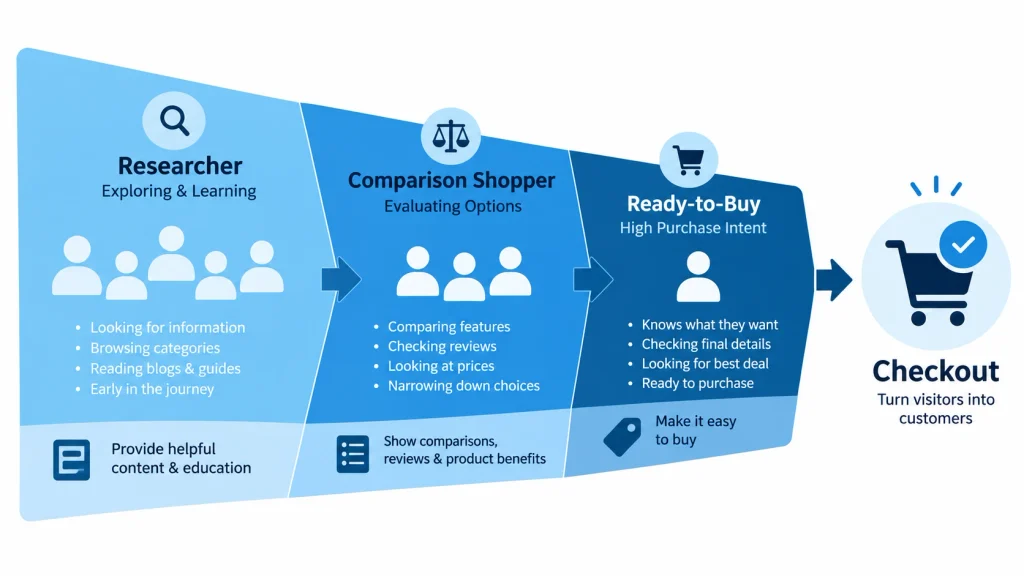
Not every visitor arrives ready to buy. Search traffic includes early-stage researchers, comparison shoppers, and ready-to-purchase buyers, all mixed together. Treating every visitor identically is a hidden reason eCommerce sales conversion stays low. High-intent buyers need fast paths to checkout. Research-stage visitors, on the other hand, need comparison content, reviews, and clear specifications before committing.
So how can a store tell the difference? Segmenting landing pages by intent, using on-site search data, and reviewing heatmap tools such as those referenced by Search Engine Journal can reveal exactly which visitor segment is dropping off and why.
Post-Purchase Experience and Repeat Sales
Fixing the moment of first purchase solves only part of the problem. A store that converts once but fails to bring customers back is still leaving revenue on the table. Several factors influence whether a one-time buyer becomes a repeat customer:
- Order confirmation clarity
- Shipping transparency
- Easy returns
- Follow-up email sequences
According to guidance published by WPBeginner and Moz, post-purchase communication and site trust signals both feed directly into search visibility and repeat traffic quality over time. As a result, strong post-purchase experience further protects eCommerce sales conversion in future cycles.
A/B Testing Ideas to Improve eCommerce Sales Conversion
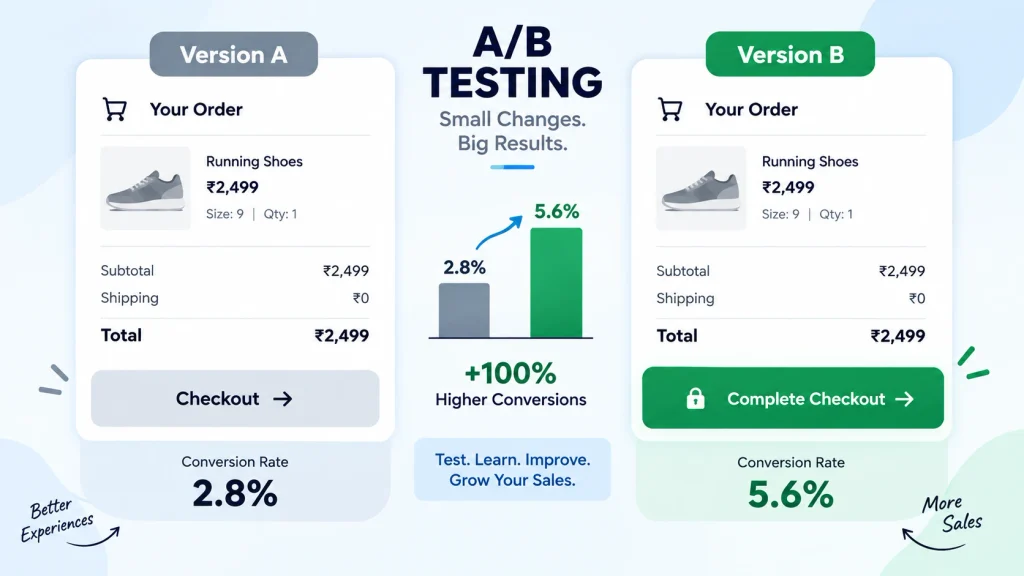
Guesswork rarely fixes conversion problems on its own. Structured testing removes the guesswork by comparing two versions of a page and measuring which one actually performs better. A few high-impact tests are worth running first:
- Checkout button copy: testing “Buy Now” against “Add to Cart” or “Checkout Securely” to see which drives more completions.
- Shipping cost placement: showing an estimated shipping cost on the product page versus revealing it only at checkout.
- Product image count: three images versus six images per listing.
- Trust badge placement: near the price versus near the add-to-cart button.
- Guest checkout visibility: a prominent guest option versus a buried one.
Each test should run long enough to reach a statistically meaningful sample size before drawing conclusions. Running several tests at once on the same page makes it hard to know which change actually caused a lift. Isolating one variable per test is worth the extra time it is the only way to know for certain what moved eCommerce sales conversion.
Fixing the Traffic-to-Sales Gap: Practical eCommerce Sales Conversion Steps
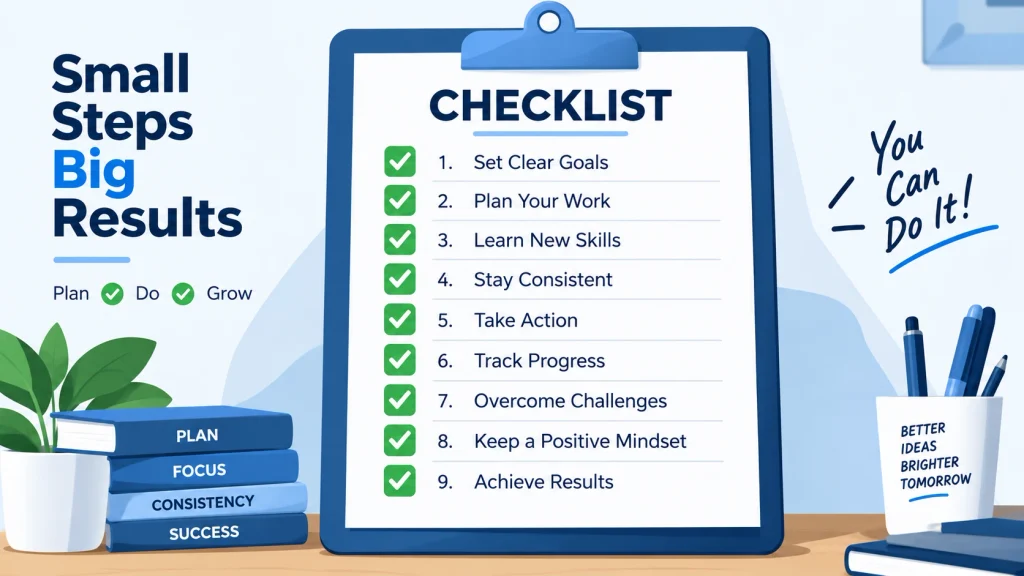
- Audit page speed across desktop and mobile, addressing unoptimized images and excessive scripts first.
- Simplify navigation by reducing category depth and testing internal search with real product queries.
- Rewrite product descriptions to answer specific buyer questions, with multiple high-quality images per listing.
- Add visible trust signals reviews, secure-checkout icons, clear policies near the add-to-cart button.
- Reduce checkout steps and allow guest checkout as the default option.
- Display full pricing early, including estimated shipping, before the final checkout step.
- Test the mobile experience end-to-end on an actual device, not just a resized browser window.
- Segment content by buyer intent so research-stage visitors and ready-to-buy visitors see different paths.
- Strengthen post-purchase follow-up to convert one-time buyers into repeat customers.
Measuring eCommerce Sales Conversion Progress After Changes
Once adjustments are made, a few metrics matter more than total traffic volume: conversion rate, cart abandonment rate, average page load time, and bounce rate on product pages. A store that sees conversion rate climb even slightly after fixing checkout friction or page speed has found the correct root cause. Testing changes one at a time, rather than all at once, makes it possible to know exactly which fix moved the needle for eCommerce sales conversion.

Frequently Asked Questions About eCommerce Sales Conversion
Why does an eCommerce store get traffic but not enough sales?
Traffic reflects marketing reach, while purchases depend on the shopping experience itself page speed, product presentation, pricing clarity, and checkout ease all play a direct role in conversion.
What is a normal conversion rate for an online store?
Most healthy eCommerce stores convert between two and three percent of visitors into buyers, though the figure varies by industry, price point, and traffic source quality.
Does platform choice Shopify, WooCommerce, Magento, BigCommerce, Adobe Commerce, or headless commerce affect sales directly?
Platform choice affects the technical ceiling for speed, checkout flexibility, and scalability, but conversion still depends heavily on configuration, design, and maintenance layered on top of that platform.
What is the single biggest cause of lost sales at checkout?
Unexpected costs revealed only at the final step, along with checkout flows requiring too many fields or forced account creation, rank among the most common reasons for abandonment.
How long does it take to see results after fixing conversion issues?
Measurable movement in conversion rate is often visible within a few weeks of implementing changes, particularly for page speed and checkout simplification fixes, though full results depend on traffic volume and testing pace.
How can a store tell whether traffic quality or the storefront is causing low sales?
Comparing conversion rate across individual traffic sources organic, paid social, email, and referral usually reveals the answer. Uneven performance across channels points to a traffic-quality issue, while consistently low conversion across every channel points to a storefront issue.
Conclusion
eCommerce sales conversion stays weak whenever the storefront experience fails to match the quality of the marketing driving visitors to it. Page speed, product presentation, pricing transparency, checkout simplicity, and trust signals all sit between a click and a completed order. Platform choice whether Shopify, WooCommerce, Magento, Adobe Commerce, BigCommerce, or a headless commerce build sets the technical ceiling. Configuration and ongoing optimization determine whether that ceiling is ever reached.
Traffic source quality, customer intent, and post-purchase experience all play supporting roles too. Addressing these points one at a time, testing changes deliberately, and measuring conversion rate rather than traffic alone is the most reliable way to close the gap between visitors arriving and orders being placed.