

A slow-loading online store quietly drains revenue every single day. Cart abandonment climbs, search rankings slip, and customers move to a competitor’s site within seconds. A manual ecommerce performance audit remains the most reliable way to uncover the real reasons behind sluggish load times, poor conversion rates, and inconsistent checkout behavior issues that automated scanners often miss or oversimplify.
This guide walks through a complete, hands-on ecommerce performance audit process across major platforms, including Shopify, WooCommerce, Magento, BigCommerce, Adobe Commerce, and headless commerce setups.
Why a Manual Audit Matters More Than Automated Reports
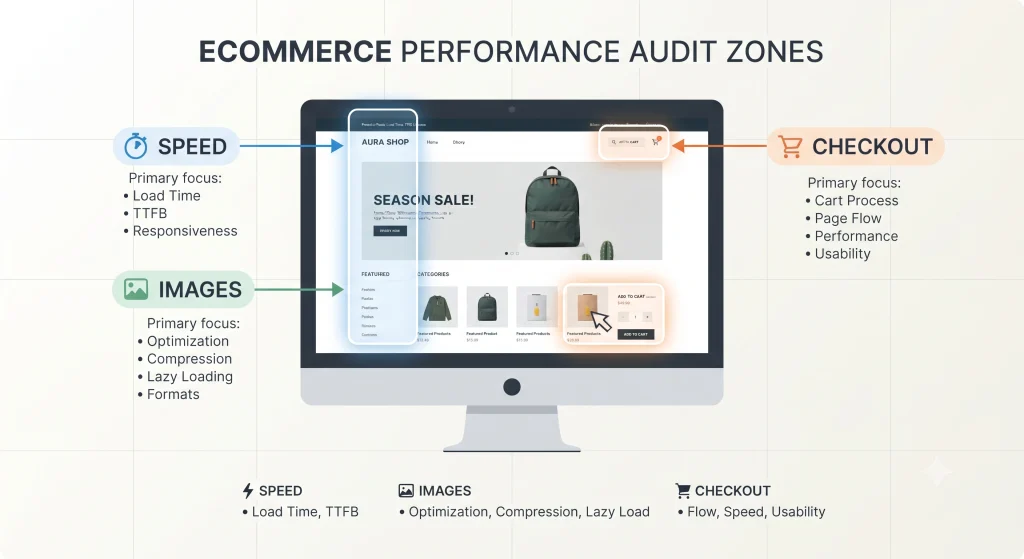
Automated tools generate scores, but scores alone rarely explain why a storefront underperforms. A manual review digs into server response behavior, third-party script bloat, image delivery, checkout flow friction, and mobile rendering the details that a single Lighthouse number cannot capture. A complete ecommerce performance audit connects technical findings directly to business impact: lost sales, lower rankings, and higher bounce rates.
Search engines increasingly reward stores with strong Core Web Vitals, and shoppers abandon carts within seconds of delay, making a regular ecommerce performance audit essential rather than optional.
Getting Ready for the E-Commerce Performance Assessment
Before diving into technical checks, a few essentials need to be in place:
- Access credentials for the store’s admin dashboard, hosting panel, and CDN (if applicable)
- Analytics access (Google Analytics 4, Search Console) to correlate performance with user behavior
- Testing tools: Google PageSpeed Insights, GTmetrix, WebPageTest, and Chrome DevTools
- A staging environment, where possible, to test changes without affecting the live store
Step-by-Step Ecommerce Performance Audit Process
1. Analyze Core Web Vitals Manually
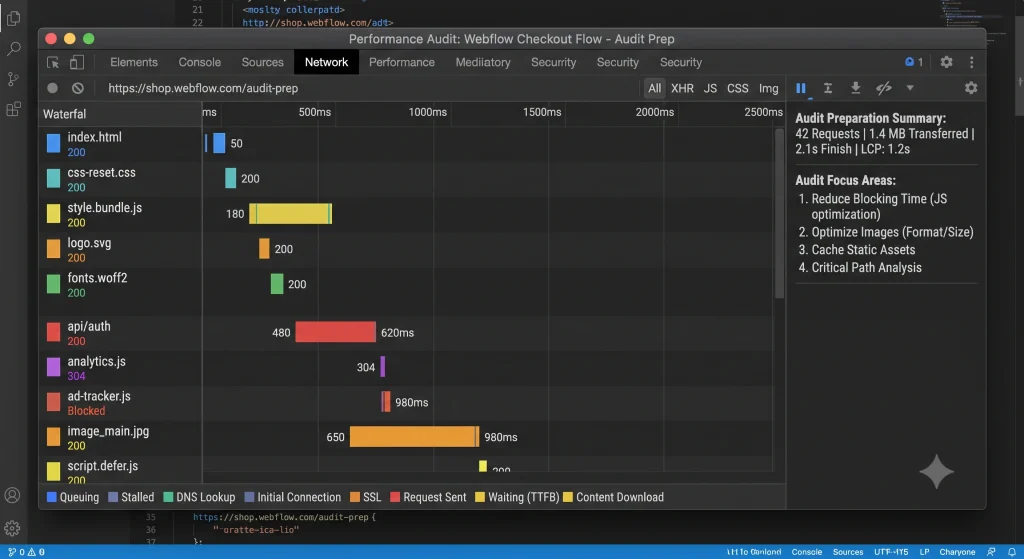
Rather than relying solely on an automated summary, each metric deserves individual attention during the ecommerce performance audit:
- Largest Contentful Paint (LCP): identifies the slowest-loading visible element, often a hero banner or product image
- Cumulative Layout Shift (CLS): flags elements that shift position during load, frequently caused by unsized images or late-loading ads
- Interaction to Next Paint (INP): measures responsiveness when a shopper clicks “Add to Cart” or opens a menu
Running the homepage, a category page, a product page, and the checkout page individually rather than testing only the homepage reveals inconsistencies that a single scan would hide.
2. Inspect Server Response and Hosting Configuration in an Ecommerce Performance Audit
Time to First Byte (TTFB) often points to hosting or backend inefficiencies. A manual check involves reviewing:
- Server location relative to the primary customer base
- Caching layers (full-page cache, object cache, opcode cache)
- Database query performance, particularly on stores with large product catalogs
Stores hosted on shared or under-resourced servers frequently show TTFB above 600ms, a strong signal that infrastructure upgrades are overdue.
3. Review Theme and Template Bloat
Many storefronts carry unused CSS, redundant JavaScript, and legacy theme code accumulated over years of updates. A manual code review inspecting the rendered page source and comparing it against actual on-page functionality often uncovers scripts loading for features that no longer exist on the site.
4. Audit Image Delivery in an Ecommerce Performance Audit
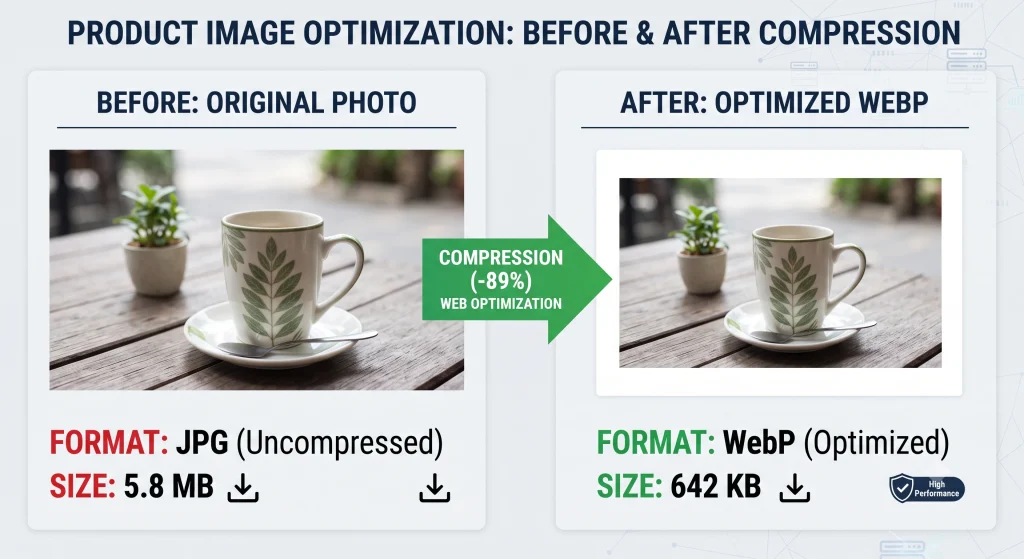
Product photography is frequently the single largest contributor to page weight. This part of the ecommerce performance audit should check:
- The availability of photographs in contemporary formats (WebP, AVIF)
- Whether responsive image sizing (srcset) is implemented
- Whether lazy loading is applied to below-the-fold images
- Whether a CDN is actively serving media assets
5. Examine Third-Party Scripts and Apps
Chat widgets, review plugins, marketing pixels, and upsell apps each add their own JavaScript payload. This step of the audit lists every third-party script currently loading, measures its individual impact using the DevTools coverage tab, and flags anything running on pages where it provides no functional value.
6. Test Mobile Performance Separately in an Ecommerce Performance Audit
Mobile shoppers make up the majority of ecommerce traffic on most platforms, yet mobile testing sometimes gets treated as an afterthought. Running the full ecommerce performance audit again under simulated mobile network conditions (Slow 4G) exposes gaps that desktop testing alone will not reveal.
7. Evaluate Checkout Flow Performance
A fast homepage means little if checkout stalls. This step involves manually stepping through the entire purchase journey cart, shipping selection, payment gateway integration, and order confirmation while monitoring network requests and script execution at each stage.
Platform-Specific Ecommerce Performance Audit Considerations
Shopify
Shopify–hosted stores benefit from a managed CDN and server infrastructure, so audits typically focus on theme code efficiency, app overload, and Liquid template inefficiencies. Reviewing installed apps individually and removing unused ones often produces measurable gains.
WooCommerce
Because WooCommerce runs on WordPress, audits extend into plugin conflicts, database table bloat (particularly the wp_postmeta table on large catalogs), and hosting-level PHP configuration. Caching plugin setup and database optimization tools play a central role here.
Magento (Adobe Commerce Open Source)
Magento stores require close inspection of full-page cache configuration, Elasticsearch/OpenSearch indexing status, and JavaScript/CSS bundling settings. Poorly configured indexing is a frequent, easily overlooked culprit behind slow category and search pages.
Adobe Commerce (Magento Enterprise)
Building on the same foundation as open-source Magento, Adobe Commerce audits additionally examine Fastly CDN configuration, B2B feature overhead where enabled, and Page Builder content blocks, which can introduce unexpected script weight if not managed carefully.
BigCommerce
BigCommerce‘s hosted architecture shifts audit focus toward Stencil theme customizations, custom script injections through the storefront API, and third-party app performance, since core infrastructure is managed by the platform itself.
Headless Commerce
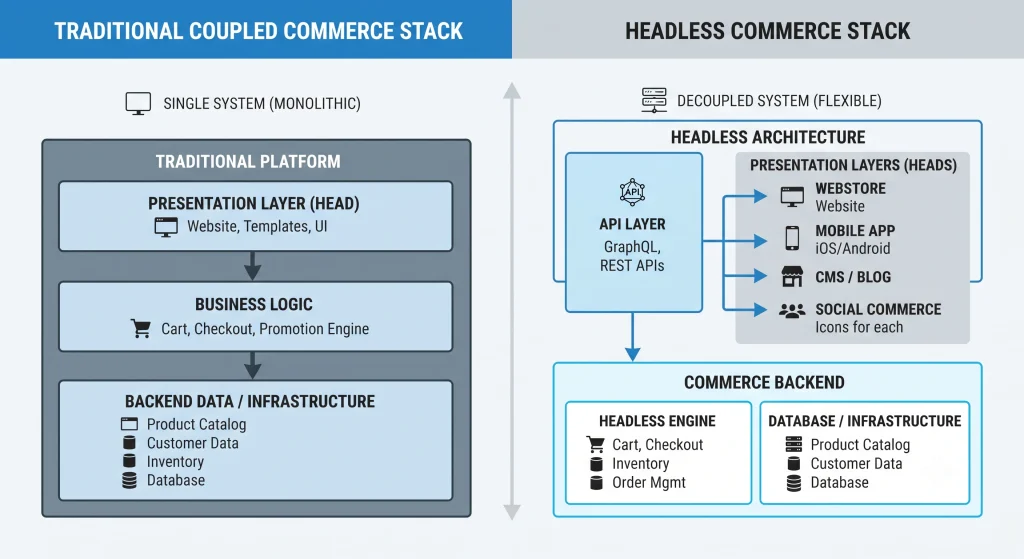
Headless setups (decoupled frontends built with frameworks like Next.js or Nuxt connected to a commerce backend via API) require a different lens entirely: API response times, caching strategy at the edge, hydration performance, and Time to Interactive become the primary focus, since traditional theme-level bottlenecks do not apply in the same way.
Common Issues Uncovered During an Ecommerce Performance Audit
- Render-blocking JavaScript loading above the fold
- Unoptimized, oversized product images
- Excessive third-party tracking scripts
- Missing browser and server-side caching
- Unindexed or poorly configured search/catalog databases
- Layout shift caused by dynamically injected banners or pop-ups
Turning Audit Findings Into Fixes
Documenting each issue with a severity rating (critical, moderate, minor) alongside its estimated impact on load time helps prioritize development effort. Critical fixes such as removing render-blocking scripts or compressing hero images typically deliver the fastest, most noticeable improvement, while structural changes like database optimization or CDN migration may require longer implementation timelines.
Frequently Asked Questions About Ecommerce Performance Audits
How frequently should an audit of e-commerce performance be carried out?
A full manual audit every quarter is generally sufficient for most stores, with lighter checks recommended after major theme updates, app installations, or traffic spikes.
Does a manual audit replace automated tools like PageSpeed Insights?
Automated tools remain useful for quick scoring and historical tracking, but a manual ecommerce performance audit adds the context and root-cause analysis that automated reports typically lack.
Which platform is easiest to audit by hand?
Hosted platforms such as Shopify and BigCommerce tend to involve fewer infrastructure variables, making the audit process somewhat more contained compared to self-hosted platforms like Magento or WooCommerce.
Can an ecommerce performance audit improve search rankings?
Yes, since Core Web Vitals form part of ranking signals, fixing the issues uncovered during an audit can contribute to improved visibility over time, alongside other SEO factors.
Is coding expertise necessary for this audit?
Basic familiarity with HTML, CSS, and browser developer tools helps significantly, though many findings (unused apps, oversized images, missing caching) can be identified and addressed without deep programming expertise.
Conclusion
Performance issues on an online store rarely stem from a single cause. A complete ecommerce performance audit covering Core Web Vitals, server response, image delivery, third-party scripts, and checkout flow uncovers the layered technical debt that automated scores alone cannot explain. Applied consistently across Shopify, WooCommerce, Magento, Adobe Commerce, BigCommerce, or headless architectures, this process forms the foundation for a faster, more reliable, and more profitable storefront. Running an ecommerce performance audit on a recurring schedule keeps a store aligned with evolving speed standards and shopper expectations.