

Global brands expanding across regions, currencies, and languages often face fragmented catalogs, inconsistent pricing, and disconnected checkout experiences. Adobe multi architecture solves this problem by allowing a single platform instance to power multiple storefronts, each tailored to a specific market, brand, or customer segment, without duplicating backend infrastructure.
Enterprises running international operations rely on a structured Adobe multi architecture setup to maintain centralized control while delivering localized shopping experiences. The sections below explain how the system works, how it compares with other commerce platforms, and what practices help organizations scale eCommerce operations worldwide.
What Is Adobe Multi Architecture
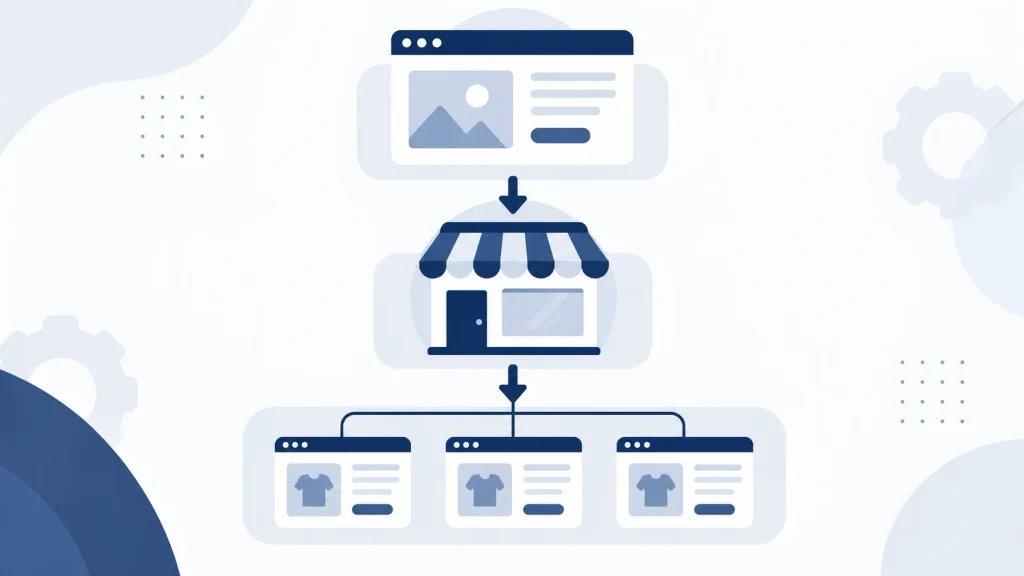
Adobe Commerce organizes storefronts through a hierarchical structure consisting of websites, stores, and store views. This layered Adobe multi architecture allows enterprises to manage multiple brands, regions, or customer segments from a single admin panel.
The structure reduces operational overhead while preserving flexibility for localized branding, pricing, and content. Large retailers, wholesalers, and manufacturers commonly adopt Adobe multi architecture because it removes the need for separate platform installations per region.
Shared resources such as product catalogs, customer data, and order management systems operate from one codebase. This cuts maintenance costs and simplifies updates across every connected storefront.
Why Global Brands Need Adobe Multi Architecture
International expansion introduces challenges a single storefront cannot handle efficiently. Currency conversion, tax compliance, language localization, and region-specific promotions all require dedicated configurations.
Without Adobe multi architecture, businesses end up managing multiple disconnected systems. This often leads to inconsistent branding and inflated IT costs. Research from McKinsey on global e-commerce growth shows cross-border digital retail continues expanding as brands seek scalable regional infrastructure.
This setup centralizes backend operations while decentralizing the customer-facing experience. Marketing teams gain the ability to run region-specific campaigns. Merchandising teams can adjust product assortments per market without duplicating infrastructure.

Core Components of Adobe Multi Architecture
Websites, Store Views, and Stores Hierarchy
At the top level sits the website, representing a distinct domain or business unit. It is often tied to a unique customer base and checkout configuration.
Beneath each website exist stores, which typically correspond to different product lines or brand divisions. Each store then contains store views, which handle language and regional presentation differences.
This tiered structure allows enterprises running dozens of storefronts to maintain granular control over pricing, catalog visibility, and design themes from one unified backend.
Shared Catalog and Inventory Management
Product catalogs can be shared across multiple websites or customized per store, depending on business requirements. Enterprises selling identical products across regions benefit from shared catalogs, since this reduces data entry duplication.
Inventory management tools track stock levels across warehouses. This ensures accurate availability data regardless of which storefront a customer visits.
Multi-Currency and Multi-Language Configuration
Currency and language settings operate at the store view level, enabling localized pricing and translated content without creating separate product records.
Exchange rate updates, tax rules, and locale-specific formatting apply automatically based on the store view a shopper accesses. This streamlines global order processing considerably. Localization guidance from the W3C Internationalization standards helps teams format content correctly for global audiences.

Comparing Adobe Multi Architecture With Other Platforms
Magento and Adobe Commerce
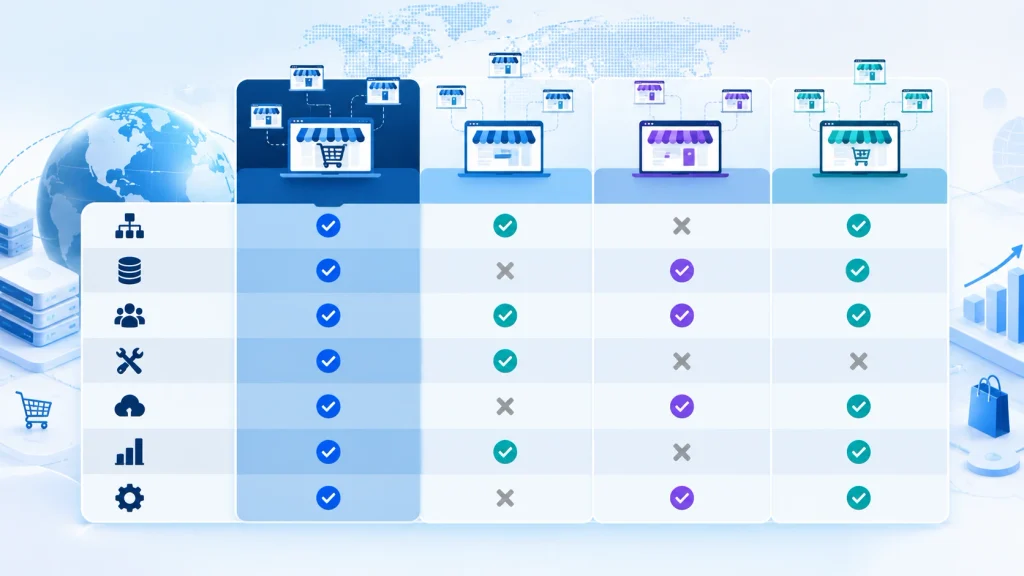
Magento Open Source and Adobe Commerce share the same foundational Adobe multi architecture hierarchy. Adobe Commerce adds enterprise-grade features like B2B functionality, advanced page builder tools, and cloud infrastructure optimized for high-traffic, multi-region deployments.
Shopify Plus Multi-Store Capabilities
Shopify Plus offers multi-store functionality through its Organization feature, allowing management of multiple Shopify stores under one account. Catalog and inventory sharing across stores generally requires third-party apps or custom integrations.
WooCommerce Multisite Configuration
WooCommerce, built on WordPress, achieves multi-store setups through WordPress Multisite functionality. Such configurations work well for smaller catalogs but often require additional plugins for centralized inventory synchronization.
BigCommerce multi-storefront
BigCommerce Enterprise supports multi-storefront capabilities natively, enabling brands to launch region-specific or brand-specific storefronts from a single backend. Catalog sharing and centralized order management come built into the platform, similar in concept to Adobe multi architecture.
Headless Commerce for Global Operations
Headless commerce architecture decouples the frontend presentation layer from backend commerce logic, using APIs to connect storefronts to a centralized commerce engine. Enterprises pursuing global operations increasingly pair headless approaches with Adobe multi architecture for custom frontend experiences per region.
Best Practices for Adobe Multi Architecture Operations
Structuring Adobe multi architecture effectively requires attention to several operational areas:
- Centralized product information management (PIM) ensures catalog consistency across regions while allowing localized descriptions and imagery.
- Automated currency and tax engines reduce manual errors in cross-border transactions.
- Content delivery networks (CDNs) improve page load speeds for international customers, a factor Google identifies as central to Core Web Vitals performance.
- Role-based admin access prevents unauthorized changes across different store views, protecting brand consistency.
- Scalable cloud hosting accommodates traffic spikes during regional sales events without affecting performance across other storefronts.
Retailers managing dozens of storefronts often implement dedicated regional teams while maintaining centralized governance, supported by Adobe Commerce Cloud infrastructure.

Security and Compliance in Adobe Multi Architecture
Enterprises operating storefronts across multiple countries must account for regional data protection laws, payment security standards, and consumer privacy regulations. Compliance frameworks such as the PCI Security Standards Council guidelines govern how payment data gets processed and stored across every store view within Adobe multi architecture.
Regions governed by data protection laws like GDPR require store-level consent management and localized privacy policies. Reference material published by the European Commission on data protection rules outlines obligations that apply to storefronts serving European customers.
Security patches and access controls get applied centrally within this architecture. This reduces the risk of inconsistent protection across regional storefronts while still allowing individual store views to meet local regulatory requirements.

Performance Optimization for Multi-Store Deployments
High-traffic, multi-region storefronts require deliberate performance planning to avoid slowdowns during peak shopping periods. Caching strategies, image optimization, and database indexing all influence how fast pages load across different store views within a multi-store environment.
Enterprises frequently rely on full-page caching and Varnish configurations documented in the Adobe Commerce Cloud performance guidelines to reduce server response times. Combining CDN distribution with database query optimization helps maintain consistent load times even when hundreds of store views operate from the same backend.
Monitoring tools tracking Google PageSpeed Insights metrics help regional teams identify bottlenecks specific to their storefront configuration.

Scaling Adobe Multi Architecture for Enterprise Growth
Enterprises expanding into new markets often begin with a single storefront before scaling into a full multi-store network. Planning ahead for this growth prevents costly re-architecture later.
Cloud-based deployment models support horizontal scaling, allowing additional store views to be added without downtime for existing storefronts. Integration with enterprise resource planning (ERP) and customer relationship management (CRM) systems becomes increasingly important as the number of storefronts grows within a multi-store setup.
Organizations preparing for long-term scaling typically establish governance documentation covering naming conventions, catalog structure rules, and access permissions. This groundwork keeps the setup organized even as storefronts expand into dozens or hundreds of store views.

Integration With Third-Party Systems
Multi-store deployments rarely operate in isolation. Payment gateways, shipping carriers, tax calculation engines, and marketing automation platforms all need to connect reliably across every storefront within a multi-store environment.
Application programming interfaces (APIs) allow the architecture to exchange data with external systems in near real time. Order data, inventory counts, and customer records sync automatically, reducing manual data entry across regional teams.
Enterprises operating in regulated industries often integrate compliance and fraud-detection tools directly into the checkout flow for each store view. This ensures consistent risk management standards apply across every regional storefront.

Common Challenges in Adobe Multi Architecture
Managing multiple storefronts introduces complexity around catalog synchronization, checkout localization, and performance optimization. Delayed inventory updates across regions can lead to overselling. Inconsistent tax configurations risk compliance issues in different jurisdictions.
Implementing automated synchronization tools, regular audits of store view configurations, and dedicated DevOps support for multi-region deployments helps mitigate such risks. Enterprises adopting Adobe Commerce Cloud infrastructure gain built-in scalability tools designed for handling traffic across multiple global storefronts simultaneously.

Frequently Asked Questions
What is Adobe multi architecture?
Adobe multi architecture is a hierarchical system of websites, stores, and store views that allows a single platform instance to power multiple storefronts, each with distinct branding, pricing, language, and currency settings.
How does Adobe multi architecture differ from multi-site setups?
Adobe multi architecture operates from a single codebase and database, sharing backend resources across storefronts. Multi-site setups often involve separate installations, requiring independent maintenance and updates for each site.
Can Adobe multi architecture handle multiple currencies across regions?
Yes. Currency configuration occurs at the store view level, enabling automatic exchange rate application and localized pricing without duplicating product data.
Is headless commerce compatible with Adobe multi architecture?
Yes. Headless commerce works alongside Adobe multi architecture, allowing custom frontend experiences connected through APIs while backend operations remain centralized within the multi-store hierarchy.
Which platform offers the strongest native multi-store support?
Adobe multi architecture and BigCommerce Enterprise provide the most robust native multi-store capabilities, particularly for catalog sharing and centralized inventory management. Shopify Plus and WooCommerce often require third-party tools for comparable functionality at scale.
What industries benefit most from Adobe multi architecture?
Retail chains, wholesale distributors, manufacturers with multiple brands, and enterprises operating across several countries benefit significantly, since operational costs decrease while regional customization remains achievable.
How does Adobe multi architecture handle security compliance across regions?
Security patches, access controls, and PCI compliance measures get applied centrally across the platform, while individual store views can still meet region-specific data protection requirements such as GDPR.
Does Adobe multi architecture require separate hosting for each storefront?
No. All storefronts within the architecture typically run from shared cloud infrastructure, which reduces hosting costs compared to maintaining separate servers for each regional site.
Conclusion
Adobe multi architecture provides a scalable foundation for enterprises managing global eCommerce operations across multiple brands, regions, and languages. Centralized catalogs, flexible currency handling, a structured store hierarchy, layered security compliance, third-party integrations, and deliberate performance optimization together reduce operational complexity.
Comparing this approach against Shopify Plus, WooCommerce, BigCommerce, and headless commerce frameworks highlights why enterprises with complex, Multi-region requirements continue to favor a well-planned enterprise architecture setup for long-term growth and operational efficiency.